April is National Poetry Month in the U.S. and to celebrate, we would like to spread the joys of poetry throughVoki! Beginning April 1st (no joke!), we will post your Voki poets every Friday until the end of April. Do you have your own poem or a favorite poem that you would like to share with others? If so, send us the embed code of your Voki poet and we will include it in our weekly poetry post throughout the month of April. Please send the title, text, and author of the poem as well.
Draw a crazy picture, Write a nutty poem, Sing a mumble-gumble song, Whistle through your comb. Do a loony-goony dance ‘Cross the kitchen floor, Put something silly in the world That ain’t been there before.
― Shel Silverstein
To submit your Voki Poet, email us the entire embed code to feedback@voki.com.
Check our blog each Friday to see your Voki give its poetry reading!
Check our blog every Friday to see one of your Vokis give a poetry reading!
There are lots of fun ways to participate in National Poetry Month. Take a stroll through Poets.org, brought to you by the Academy of American Poets, for 30 ideas on how to celebrate. Also, be sure to check back here for poetry lesson plans and to see if your Voki poet has been published on our blog!
As always, if you have any great lesson plans or ideas you would like to share, please feel free to email us at feedback@voki.com.
You know those days. You’ve spent the whole night grading and preparing for class, then wake up late only to find you’ve run out of coffee.Now a classroom full of bright eyed children are waiting for your performance…
This is the perfect morning to have a Voki introduce the day’s lesson and assignment.
Check out these examples and create your own savior Voki today!
Last week,when we came across a video of students using Vokito edit their writing, we had to find out who was behind the great production, interesting lesson, and big smiles found on every student’s face. The search led us to Chase Young, a second grade teacher, and Lynda Swanner, the language arts coordinator for McKinney ISD. Chase and Lynda are from McKinney, Texas and have worked together to create interactive and informative environments for students to develop as confident writers. We got in touch with Chase to find out more about how he uses Voki to motivate and improve literacy and he was more than happy to share his and Lynda’s tricks of the trade. Check out the great ideas below!
Conferring with an Avatar
Teachers can use this 21st century method for proofreading when students do not read over, or are unaware of revision or editing needed in their stories. Lynda Swanner and I devised this strategy to motivate students to actively revise and edit their own writing. This strategy helps students discover what they need to revise and edit and also empowers student as writers. They become aware of their own problems in writing, and they can self-regulate the writing process. Students use this self-discovery strategy of revising and editing to privately critique their work before conferring with the teacher. Here are a few brief steps to get you started using this strategy.
1. Students create an avatar using Voki.com. We suggest limiting the time because students and teachers could spend all day creating the perfect avatar.
2. Students type a sentence, paragraph, or section of their stories into the Voki text box.
3. Students listen to the speech and read along several times.
4. Students make corrections.
Consider the following example. The student noted a lack of punctuation after conferring with an avatar.
Mr. Young: What changes are you going to make?
Student: I need more periods.
Mr. Young: How do you know that?
Student: …It wasn’t very good, because it went in one fast glob.
This next example shows how a student caught a spelling error from listening to the avatar.
Mr. Young: What changes did you make?
Student: I needed to fix some spelling errors. I needed to spell “grabbed” correctly.
Mr. Young: How did you know it was spelled wrong?
Student: It sounded wrong.
Mr. Young: Do you remember how the avatar said it?
Student: “grabed” (Student uses a long a sound.)
Mr. Young: We know that you have to do WHAT to the consonant?
Student: Double it!
Based upon the avatar’s rendering, students were able to reflect and make changes to their work without teacher direction.
*The full chapter is currently being published by Corwin Press and will available soon in Writing Strategies for All Students in Grades 4-6: Scaffolding Independent Writing Through Differentiated Mini-Lessons.
Chase Young is a second grade teacher in McKinney, TX. He holds a MS Ed with a specialization in literacy. He is a Doctoral Candidate at the University of North Texas. He has written for the Reading Teacher and Education Review, published a book entitled Teaching Texas History through Readers Theatre, and contributed several chapters to educational books. When he is not teaching, studying, or writing, he is wondering where his free time goes. He enjoys playing the guitar, paintball, racquetball, grilling, concerts, billiards, pools, and golf carts (not to be confused with golfing).
Lynda Swanner has been a teacher, library media specialist, and literacy staff developer. She is currently the English Language Arts and Reading Coordinator in McKinney Independent School District in McKinney, Texas. She coordinates the curriculum, instruction, and assessments for all elementary teachers in the district. She is also a literacy consultant for many Texas school districts. Over the years, she has presented many workshops that integrate technology and literacy for the International Society for Technology in Education.
If you would like to share your tips and tricks on our blog, please email us at submit@voki.com. We always love to hear how Voki is being used to enhance students’ experiences in the classroom!
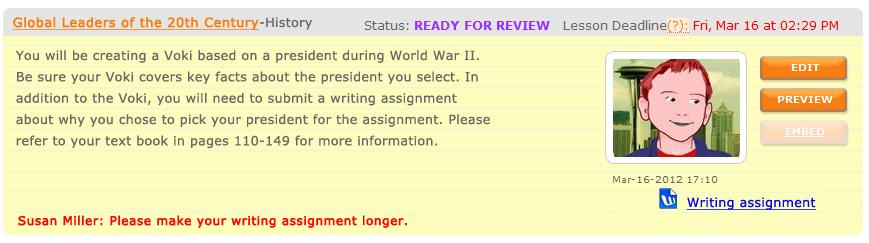
Voki Classroom is constantly improving thanks to your feedback! In this update, we would like to introduce the newest Voki Classroom features. Starting this week, teachers will be able to add a writing assignment to their Voki assignments, set Assignment deadlines, show/hide student names in the Assignment Pages, and give students feedback. Status types have also been updated in both the teacher and student accounts. Read below for more information!
Writing Assignment – Many of the Voki Lesson Plans contain a written requirement. Now teachers will have the option to add a writing assignment to their Voki Classroom Assignments. By selecting this option, students will be able to submit a written portion of up to 500 characters with their Voki. Teachers will also have the ability to make the writing assignment visible on the Assignment Page.
Student View of New Voki Classroom Features
Assignment Deadline – Students usually have due dates for homework and classroom assignments so it only makes sense that teachers be able to set deadlines on Voki Classroom assignments! Now, teachers can assign the date and time the Voki assignment is due. If a student submits their work after the deadline, the teacher will see the date and time of assignment completion in red.
Show/Hide Student Names – We understand that privacy is an important factor when using online tools in the classroom. For this reason, teachers will have the option to replace the students’ full name with their initials in the Assignment Page.
Feedback – Have you ever wanted to leave feedback on your students’ Voki assignments? Now you can! We added a feedback tool which will allow for expanded dialogue between you and your students.
Teacher View of New Voki Classroom Features in the Review Tab
Statuses – Stay up-to-date with your students’ progress with our updated status types. The new categories are named and color coded as follows:
Get Started
Ready for Review
Try Again
Approved
We hope you continue to enjoy Voki Classroom and that your experience is enhanced by these improvements.. As always, we want Voki Classroom to be a tool that is useful for teachers and engaging for students.
If you have any suggestions, please feel free to click the FEEDBACK tab in Voki Classroom, or email us at feedback@voki.com. Your opinions and suggestions go a long way!
Embedding Voki with the publishing presets is easy! Showcase your Voki on Facebook, Friendster, Twitter and more with just a few clicks.
Step One: After you have created your Voki, added text or voice, and have it ready to go, click Publish Your Voki.
Step Two: Select the size in which you would like to display your Voki. We recommend choosing large for the full Voki effect!
Step Three: Choose the platform where you would like to post your Voki. If you do not see a quick option for a particular site or blog, grab the embed code below. Once you click the code, it is automatically copied and ready to paste on your website.
Some sites, such as WordPress, require a bit of massaging to embed your Voki on the page. For WordPress instructions, please check out our past Voki Tip of the Week, How to Embed Voki on WordPress.
We hope you have fun creating your Vokis and sharing them with your students, teachers, and friends! If you have any questions or issues with embedding, please let us know in the comments section or by sending us an e-mail to feedback@voki.com.
Every month, we like to get a teacher’s perspective of Voki and learn more about how he or she uses Voki in the classroom. Usually, the teachers we interview have been Voki fans for quite a while. This month, we got the chance to talk to Vivienne Roberts, a Curriculum Leader and Assistant Vice Principal at All Saints Academy Dunstable in England and a Voki newbie!
Check out Vivienne’s interview below which offers a fresh perspective on Voki, especially when it comes to her ideas for Modern Language classes.
Tell us a little about yourself.
I am Curriculum Leader for Communications and Assistant Vice Principal at All Saints Academy Dunstable in England, which caters for students aged 13 to 19. While I am responsible for English and Literacy, my subject specialism is Modern Langauges. I discovered Voki only very recently and noticed immediately how useful a tool it could be for my students.
How do you use Voki?
I’ve begun by using Voki with my 14-16 year old students as part of the preparation for speaking assessments. I’ve set up a classroom for them and have created a number of lessons, using the types of questions I plan to ask in the test. In the instructions for each lesson, I include some hints as to the language structures I would like them to use. The students then create a Voki for each one and type in their responses to the questions. By changing the language and the voice, they can hear accurate pronunciation and intonation. By listening to their Vokis, they can learn their material for the test more thoroughly and they really enjoy creating the characters and playing around with the different voices, accents and special effects.
What are your 3 favorite things about Voki?
I love the fact that Vokis give my students greater independence in their learning. There is only one of me to go round a whole class but the foreign language voices in Voki allow them to listen and learn at their own pace. They forget that they’re learning because they have so much fun making weird creatures and trying out the different voices. Without being aware of it, they listen to their work several times over, thus consolidating the language content.
We can also create Vokis using sound files of the students speaking. Many students are reluctant to speak in another language in front of their peers but attaching the sound file to a Voki allows them to ‘hide’ behind the avatar and feel less self-conscious.
I can create my very own bespoke Vokis for my students as listening comprehension activities. The Voki will allow me to include exactly what I want, rather than relying on resources create by another person based upon what they think my students should learn. Vokis are very liberating!
What is one of your favorite lessons you have taught using Voki?
I’m still a Voki novice but using the Vokis for preparation for speaking tests has inspired my students. They want to add more to their Vokis – the Vokis are funny and the more they say, the funnier they become. Having a different Voki for each question really helps them. They can visualise the creature and this helps them to recall what it says i.e. their own answer to a question.
Do you have any Voki tricks up your sleeve?
As for tips, I’m sure I’ll acquire a few as I become a more competent user! At the moment, I’ve only really got the basics, but I know I’ll find a few tips and quick fixes as I get better at it. In the meantime, we’re having a lot of fun in Spanish and French lessons and that is priceless.
Want to be interviewed for this section? Send us a note and a link to your blog/ twitter: submit@voki.com!
Voki is a useful tool that makes lessons interactive, educational, and fun.We love seeing how teachers around the world incorporate Voki into their classroom activities. Voki isn’t only a great supplement to lessons, it can also serve as a cute message bearer that recognizes student achievements, good work, or birthdays! Just imagine a student’s delight upon receiving a Voki in their e-mail on their birthday that delivers a special and personalized message.
Below are a few examples of how Voki can help you give your students a virtual pat on the back.
If you are a Voki Classroom user, you have probably already noticed the changes we implemented to make student logins much easier. Along with a simpler default username, Voki Classroom now allows you to edit your students’ login information as you or your school district deem most appropriate.
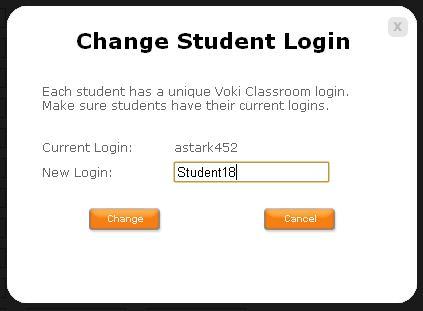
The new student logins are comprised of the student’s first name initial, last name, and 3 randomly generated numbers. If you do not want your students’ last names to appear or you would like to change any aspect of the username, go to your student roster and click the name in blue to edit.
Once you click the blue username, the ‘Change Student Login’ box will appear.
The rest is up to you! Once you enter the new login, click ‘Change’ and you are finished!
We hope you are pleased with this update. We are always eager to hear your your suggestions for Voki as we continue to improve your experience.
Should you have any questions, please leave a comment below and we will be happy to answer you, or email us at feedback@voki.com.



 The Voki Blog - Expanding Education