Guest Post: Creating Sight Word Games with Voki and Augmented Reality

Guest Post: Creating Sight Word Games with Voki and Augmented Reality

The Voki Team is so excited to introduce Ashleigh Catanzariti to the #VokiFam! Ashleigh has been doing some incredible work with her students in Sydney, Australia. We were extremely impressed with how she was able to use Voki in order to create an independent and autonomous learning experience for her students. Please read on to learn more about this brilliant activity and how to recreate it in your classroom:

Hello from down under! I am an educator from South Western Sydney, Australia, currently fortunate enough to be in a Digital Technologies/ STEM coaching role across two innovative primary schools. I have a strong passion for authentic integration of technology and believe it provides amazing opportunities to enhance learning and take it to a new level.

I have recently been using Voki to assist students in hearing sight words they are learning. While introducing BlueBots to a Kindergarten classroom, the teacher asked me to create a sight word game for their students to use during reading groups. I quickly discovered the game would become problematic for the students if they couldn’t remember the sight word correctly and a teacher wasn’t there to assist them. I decided a solution was needed so the students could independently play the game. To solve this dilemma, I use an Augmented Reality app (HP reveal) alongside Voki so the students could hear how to say the word correctly. When the students are unsure of a word, they use their iPad to scan over the unknown sight word and the Voki character reads it to them. Students are now able to complete this task independently and have the ability to hear the correct word if they haven’t learnt it yet.

I have created a handy “How To” below if you are interested in making a similar game for your students!

How to create your own sight word game using HP reveal and Voki.

These can be used under a BlueBot mat as part of a coding literacy activity or for any other sight word game!

Step 1: Create sight word cards including a different image per word (This will help with recognition when scanning into HP reveal).

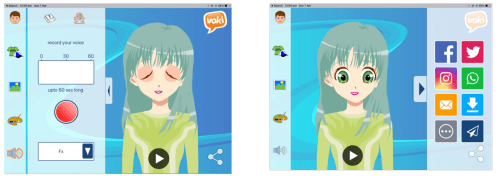
Step 2: Use Voki to create a character and record them saying the sight word. Save to your iPad.


Step 3: Using HP reveal scan the sight word card, upload the Voki from your photo album, name it and make it public for others to see.


After introducing this to the Kindergarten team, a colleague suggested using this same idea to read word problems for Kindergarten to solve. The possibilities are endless through the use of these tools and so many others that are now right at our fingertips.

Thanks so much, Ashleigh, for sharing your expertise with the #VokiFam! To see more amazing tech activities by Ashleigh Catanzariti, follow her here.

If you have an awesome way to use Voki and would like to write a guest blog post to share with the Voki Community, email The Voki Team at  feedback@voki.com. We look forward to seeing how you use Voki!

7 Ways Technology is Improving Education

7 Ways Technology is Improving Education

Over the years, technology has shown the potential to improve various sectors in society—and education is one of them. Teaching and learning are becoming a more interactive practice than what was the case a few decades ago. The need for tech literate individuals has also encouraged many schools to incorporate technology into their curricula. Various schools are converting their classrooms into tech hubs.

7wayspic1

However, unless we are ready to appreciate and make use of technology in the classroom, its potential cannot be fully realized. Prudent measures should be put in place to ensure that education is sufficiently promoted by using technology. This article discusses the top seven ways technology is improving education today.

1. Enhanced teaching

There are concepts in class that are well taught through illustration rather than mere theory. For instance, explaining the effect temperature has on molecules can be a little ambiguous, but thanks to digital simulators, such concepts are well understood by the student. Teaching using models is an effective way of illustrating significant changes in processes while ensuring that the students remember the idea for a long time.

Teaching is never complete without assessment. With the help of technology, testing the level of students’ understanding of a learned concept is done in real time. The teacher can use this information to help weaker students and move to the next topic after being satisfied that all the students are on the same page.

2. Improved communication

Education is founded on the effectiveness of communication among students and teachers. This way, flow of knowledge is enhanced at every level. The classroom has been made into a community where teachers quickly post assignments, and the students can ask questions for verifications. Moreover, they can communicate with peers on different relevant matters.

There are sites that allow a student to learn a particular language with native speakers. This is done through video conferencing. Other platforms that enable students from different countries to exchange notes and ideas are also available on the net.

3. Use of interactive textbooks

Gone are the days when a textbook was only using texts and images to present information. Technology has introduced the use of digital and interactive books with audio and video capabilities for enhanced reading. Using videos and animations while studying has been proven to be one of the best methods of grasping a new concept. Technology has allowed highlighting various ideas, setting reminders, and making improvements to the information in textbooks. This enables students to understand everything better.

Students no longer have to carry big textbooks around in their quest for learning. A student can now have multiple digital books on one device and compare the notes with a simple tap. Convenience in learning is taken to a completely new level.

4. Advanced Research

The use of the cloud to store information has allowed web-based research to become more efficient. Unlike before when one would have to sort through massive piles of books to find the desired pages, technology comes with efficient searching tools. You will agree that a lot of time is saved with technology that is used in internalizing the new information and ideas learned.

The ability to compare research results by researchers worldwide has made it possible for enhanced results and quicker acquisition of solutions. This is one of the most obvious advantages of technology in students’ life.

7wayspic2

5. Students can learn at their pace

It is true that different students have different abilities to grasp a concept. While others are quick learners, some are significantly slow learners. This has made it difficult for slow learners to cope with their peers in class. This is something that technology has come to change.

Such students can now go over learned concepts at their convenience and have time to consult their teachers privately for a deeper understanding.

6. Learning is more fun

The use of new technology has made students enjoy their studying more than ever. Keeping a student engaged in learning is also crucial in improving the retention rate of new concepts learned. Laptops and tablets used in class make a seemingly boring subject more enjoyable. Where a subject is not entirely understood, a student can find a live streaming video online for better understanding and a different approach to an idea.

7. Examination has gone online

Taking tests has never been more convenient. Many people are choosing to take online courses at their convenience and later sit online exams with accreditation. These examinations seem to be the main thing of the future. Everything is done in real time. For teachers, recording the scores of students and grading them is now done at great convenience. Furthermore, a teacher can identify students’ weak spots and make the necessary improvements for a better personal approach.

Ranking of different students from different schools is also made easy with technology. Additionally, taking international examinations online is becoming more and more common.

7wayspic3

It will be improper to end this article without mentioning what technology has done for students with special needs. On different devices, such as the iPad, students with special needs such as the autism spectrum have been given a chance to learn with convenience. Powerful studying tools enable them to study like other students and have the same opportunities in the job market. Students from less advanced countries who have access to technology are also given a platform to display their talents.

It is only fair to say that technology has a lot to offer when integrated in education. The advantages of new technology in classrooms cannot be overrated. One thing is certain, though; teachers will always have control over educational process even with the use of the best technology.

About the Author:

Crystal Roman is a blogger and freelance writer for Edubirdie. Her lifestyle credo is “Education is the most powerful weapon which you can use to change the world.”

Using Voki on the First Day of School, as a Reflection Tool, and to Introduce Personas

Using Voki on the First Day of School, as a Reflection Tool, and to Introduce Personas

friendship-day_10038964-031914

Although few people would have ever considered my 5th grade classroom “traditional,” I did avoid technology for the bulk of my first decade of teaching!  Nowadays, there are so many amazing tools out there that I wonder how anyone could avoid using technology with their students today.

Voki is one of those tools that I use in my classroom to increase motivation and encourage reflection with my students.  One such way I use Voki to increase motivation is on the first day of school.  Since it’s the first day, some of us don’t know everyone.  A mixer is a nice, old-fashioned way of getting to know each other and building community in the classroom.  Instead of the traditional walking around mixer, I decided to do a techie version that requires students to embed a URL on their blog & comment on each others’ posts.  (I bet these 5th graders never expected this on the first day!)

The mixer is called “Two Truths and a Lie.”  Students brainstormed two things that are true about themselves, but that might not be very believable to their peers, and one thing that is actually untrue that might be believable by their peers.  They mix them up & record them on a Voki.  After they are finished, they embed their Voki on their blog for others to listen to.  When people listen, they post a comment with their best guess as to which one might be the lie.  At the end of the period, the students post a comment on their blogs explaining which one was the lie for all to read.

I wanted to get technology into my students’ hands right away because we needed to establish some daily rituals, access some information online, and I needed my kiddos to pass on some details to their parents after school.  I also wanted my students to access their Google Mail accounts to accept invitations to our Weebly site, and learn how to create blog entries.

Here is a link to one of my students’ blog entries where some peers listened to their Voki and posted their guess as to which one of the three facts was actually a lie: http://psolarz.weebly.com/58/post/2012/08/two-truths-and-a-lie.html

Not only is Voki motivational to students, but it also makes an excellent reflection tool.  Rather than have my students complete written reflections after finishing an activity, I occasionally have them create a Voki explaining what they learned from the lesson.

For example, in our unit on the Oregon Trail, my students participate in a simulation where they each become individuals traveling westward in a wagon train.  At the end of each period, I have my students summarize their learning experiences in several different ways, and one of those ways is through a Voki.  The novelty and creative process engage them in the task and often improve their work far beyond traditional written answers.  In addition, students who struggle with writing are able to explain their learning without being encumbered by the written word.  Because they are able to record their voices, they often get into it much more so than when they are writing their reflections or typing them.  Here is our “Voki Journal” of our journey west: http://paulsolarz.weebly.com/voki-blog

Finally, we like to use Voki to introduce ourselves to the other members of the crew headed to colonize Mars.  This is another simulation that we do in our classroom where children learn about the U.S. Constitution and Government through the experience of settling the red planet.  Due to overcrowding in the year 2150, we are forced to try to create a colony on Mars so that the human race can continue!

We are each from a different country and all have different backgrounds and occupations.  I have my students create a Voki introducing themselves, telling us a little bit about where they are from and what their job will be on Mars.  We then embed those Vokis at the top of our ePortfolios so whenever anyone visits our page, they can learn a little bit about our persona in the simulation.  Here is an example (in the top, right-hand corner of the page): http://paulsolarz.weebly.com/6—kendall

Voki has provided my students with a tool that motivates them to try their hardest and have fun doing so!  But be warned, once you teach them how to use this tool, they’re going to ask for it ALL THE TIME!  🙂


paul_solarz

Paul Solarz is a 5th grade teacher in Arlington Heights, Illinois. He is a 2015 Global Teacher Prize Top 50 and author of Learn Like a Pirate.

GAMIFICATION: CAN IT HELP EDUCATION?

GAMIFICATION: CAN IT HELP EDUCATION?

gamification


By definition, the term gamification is the application of typical elements of game playing to other areas of activity to encourage engagement; “gamification is exciting because it promises to make the hard stuff in life fun.” (https://www.google.com/?gws_rd=ssl#q=gamification).

Okay, so what does that mean to education? I understand that gaming is quite popular among the children and adults of today’s society. I mean, I’ve heard of Pewdiepie,  you know…that person from Sweden who makes a lot of money simply by posting videos of himself playing video games. When I last checked he had over 40 million subscribers! Okay, enough about him. My point is this…if he can have that many followers, there must be something enticing about gaming. Right?

Naysayers  

The naysayers would argue that gamification is malarkey. The “older generation” learned just fine without technology and gaming. Technology is an extrinsic motivator and in order to be successful people need to be motivated intrinsically, or within themselves. If we want our students to think on a higher level, playing games would certainly not get them there. So, does this mean we are enforcing lower level thinking by having our students learn through gamification?

There is also the fact that when gaming, people tend to  concentrate so much on one thing that we miss a great deal of whatever goes on around us, as depicted in the famous awareness (selective attention) test from Daniel Simons.

Care to try it yourself? Click on the link below:

https://youtu.be/vJG698U2Mvo

People (myself included) seemingly concentrate so hard on counting the number of basketball passes (as stated in the instructions) that they missed seeing the gorilla walk right across the screen!

Some naysayers think gamification is just a trend or phase, and will soon be forgotten as we move on to something new in this ever-changing world.

Collaboration or Isolation?    

Clearly, we can agree that education is improved by constituents collaborating for the good of academic achievement. For example, teachers work in teams, they have their students working in groups, and colleagues work together to create innovative projects. Does gaming encourage collaboration or move us away from working together?

Are We Keeping Up With The Times?  

Yet, I believe we must keep up with the times. Our children are growing up surrounded by technology; so, it’s only fair to include these strategies in our classrooms. Think about it…. How long does an individual stay with a game simply to get from point A to point B? Answer:  a very long time!  … Or, at the very least, until he conquers it. Imagine what that would do for our student’s learning? Mastery!

Research Needed   

I would like to see more research or studies done on the advantages vs disadvantage of gaming and its impact (if any) on education. In our society, we only find things credible if proven. One way to prove something is to conduct a study or research. Even though gaming is not something new, research about its impact is sparse. Should we take gamification at face value? It is what it is?

It is obvious to me that gaming is extremely popular; so, I would like to know how we can utilize this popular phenomenon (gaming) to our advantage by helping us educate our students? Is it possible?  I believe it is.

What are your thoughts about gamification in our educational system? Should teachers design curriculum using game-based instruction or take it to the next level of helping students design their own games? Or, should educators simply go back to basics without including gamification in lesson/curriculum planning?

doreen

Doreen Plony has been in education for over thirty years in various roles: teacher, facilitator, and administrator. She is currently an adjunct professor both online and face-to-face at a local community college as well as a curriculum writer for Voki . Her credentials include PhD and CAS in Educational Leadership, MS in Reading, and BA in English. Doreen is passionate about the use of technology to engage student learning.


Voki: Changing The Way My Students Learn

Voki: Changing The Way My Students Learn

gurgastudentphotoHow is Voki revolutionizing the way students learn in the classroom? Find out in Gianna Gurga’s

(Our newest guest blogger’s) blog post!

https://fishphilosopher.wordpress.com/2015/03/10/voki-changing-the-way-my-students-learn/

gianna gurgaGianna Gurga is a Family and Consumer Sciences teacher at 2 PK-8 schools in Waterbury, CT. She has been teaching for 4 years and has developed a passion for increasing students’ learning abilities by incorporating technology into various lessons and activities. Currently, Gianna is 5 weeks away from completing her Master of Education program in Instructional Design and Technology at Post University in Waterbury, CT. In addition to being a full-time teacher and graduate student, she is a High School Girls Tennis Coach, a ZUMBA Fitness Instructor, and a Mary Kay Independent Beauty Consultant.

Voki Guest Blogger: Heather Loomis

Voki Guest Blogger: Heather Loomis

1Kindergarten has been using the library to research land forms.

Each class researched a different land form.  I love to use KWL Charts with young researchers.  We started with a group brainstorm session listing what we Knew about the land form.  Then we discussed what we Wanted to know.  The students came up with some great questions.

We then researched using websites, library books, and the Pebblego Database, which we found to be very helpful. We met back up for a group discussion about interesting facts we Learned during our research.  We kept track of all of our great facts using a flip chart on the Promethean board.

We used Voki to report on our findings.  After choosing a background and a character head relating to our land form, we had another class discussion about the most important research findings that the students wanted to share.

River Research

Lake Research

Ocean Research

We had fun with this activity, and I was very impressed with the curiosity and enthusiasm for research the Kindergarten students exhibited.  The also loved the Voki program.  It is always a hit!

_________________________________________________

Follow Heather on Twitter: @LoomisLibarian

Visit her blog: http://oldunionlibrary.blogspot.com/ 

Voki Guest Blogger: Kimberly Munoz

Voki Guest Blogger: Kimberly Munoz

As a Tech Apps teacher, I was always looking for relevant web tools that my students could use in my class and in others. Voki is a great educational technology tool because it teaches technology skills, and engages students in the content the teacher is presenting. If you’ve never used Voki before, it is simply a website that allows you to create a talking avatar! I’ve used Voki in my classroom for the past several years and my students loved it every time!


The most popular project I did with my students, using Voki, was the character analysis they were required to do over one person in the book, “The Giver.” It was a cross-curricular project between me and another English teacher. The students had to choose an avatar and edit their features to resemble the character as close as possible. Then, they were suppose to make the avatar explain who their character was in the book and what part they played in the story. Here is the link to their finished products. I love that you can publish their work just like I did here! http://greetingsbyvoki.wikispaces.com/


You can embed Voki’s on blogs and webpages. I’ve taught my students to create welcome messages to post on their blogs. It’s a great way to personalize content and show a bit of personality as well, which is why I think students love this tool so much! If you haven’t tried Voki yet, you are missing out!


Kimberly Munoz

Instructional Technologist

Franklin ISD


15 years teaching experience

@techmunoz


Guest Blogger: Using Voki to Support Learning by Craig Kemp

Guest Blogger: Using Voki to Support Learning by Craig Kemp

My name is Craig Kemp and I am Head of ICT & Learning Innovation at Avondale Grammar School in Singapore. I am an experienced New Zealand educator with a passion for Student Voice and Global ‘Connectedness’.

Being a globally connected educator means that you use tools to support the learning of your students on a global scale. In the 21st Century Learning Environments we work in, our job as educators is to support the learning journey of the digital natives in our care. Digital natives are engaged more actively now than ever before, through the use of technology on handheld and personal devices. This natural instinct to utilise technology on every occasion to support their learning makes it essential that educators are up to speed with how and why students use their devices.

Voki is a tool that I have used and still do use every week to support learning in my classroom and around my school. Voki is a free online tool that helps engage and connect learners anywhere and at anytime. I have seen it successfully used with new language learners and as an extension tool to support those students needing another vehicle to present their learning.

The good thing about Voki’s is that it is a flexible program and can be used across the curriculum and for many different purposes.

I have started to get hooked into creating a flipped classroom, as the current trends in education would suggest we should be. Voki is becoming a tool I am using to break up my lessons and add a bit of spice. It is exciting for the students to have variety.

Voki has become a tool in my school to encourage student voice. Often, in our classrooms, we have students that dominate conversation. It is hard to get true voice from shy students who are not strong at verbally express ing themselves. Voki has become a tool to share learning experiences or knowledge for those students so everyone is on a level playing field. I highly recommend giving this a go in your classroom.

In my classroom, students get the choice of how to present. Voki is one of many tools that students use on a regular basis to present their learning, either as a whole or as a part of their presentation.

I love Voki because it is easily embeddable into blogs or Wikispaces and is easy to use and very much student driven.

I highly recommend giving it a go today and sharing your learning amongst your teaching community.

______________________________________________________________________

If you missed his post on how to use Voki, check it out here.

Follow Craig on Twitter: @mrkempnz

Website: http://mrkempnz.com/

Guest Blogger: Jennifer Bouffard

Guest Blogger: Jennifer Bouffard

JB2Our school district decided to use Project Based Learning (PBL) as the main delivery system for gifted education this year. The gifted teachers, along with myself, worked on writing PBL units for 3rd, 4th, and 5th grade students.  The premise of PBL is that students are engaged through a driving question; an authentic problem or question that they need to answer through in-depth inquiry. Ultimately, the students present their final products and findings to an authentic audience. This is where Voki came in to play.

I was looking for a way to engage my students, and Voki became my ultimate tool as it provided a way to improve reading/writing skills, and it provided an authentic audience. My 3rd grade students were researching endangered Ohio animals. They had to find out about the physical appearance of their animal, its habitat, its diet, how it survives and thrives, and finally, what we can do to help protect these animals. The students chose the bobcat, the Little Brown Bat, the Peregrine Falcon, and Shovelnose Sturgeon, and the Eastern Massasauga rattlesnake. After researching and writing facts on notecards, I wanted the kids to write a speech that would teach others about their findings.

As most of us, most kids do not like to write, especially when it is a school assignment. They want to find other ways to present their information. Voki was the perfect way to motivate my students. I created a Voki speech that I showed the kids. It told them exactly what they needed to do for the project. Once I showed them my Voki and avatar, they were instantly sold. They created their Voki speeches first by writing them, doing a peer edit, and finally me editing them for a final revision. Once they were revised, I let them create their avatar, and type their speech into the Voki website.

JB1The kids really liked having their own login and password. Most of them memorized it instantly, but I still made sure they had it taped inside of their PBL folder. They could not wait to get started on their Voki speeches. It was interesting to watch them choose their avatars, colors, style of voice, backgrounds, etc. It gave them a voice and choice, another important part of PBL. I think the fact that they could make the speech their own, through Voki, really resonated with my students. I watched the students type their speech, listen to their speech, and rewrite their speech. The writing process naturally flowed, because the students really, really listened to what they wrote.

As a teacher, I was able to listen to my students’ speeches and provide feedback for them. I wish there was a way to see the text that the students had typed in while I was watching/listening to the speech. Sometimes, I could not tell what the student has written, and I wanted to provide better feedback for them.

Students need to be able to communicate their ideas and findings in order to be college and career ready.  For those students that are not totally comfortable speaking in front of a group, Voki was a great option. The students still stood up at the Smart Board while they were giving their Voki speech. They had to give their own introduction before the avatar spoke; however, it gave them peace of mind that they were not in the spotlight the entire time. One student even wrote on a reflection sheet, “Voki gave me a voice when I was afraid to use mine.” Pretty powerful.

JB3I used Voki with 3rd, 4th, and 5th grade students. I have to say that all the grade levels were totally engaged while using Voki. The 5th graders needed longer than the speech time allotted, so I added extra parts in for them. For example, they had Part I and Part II of their speeches so all of their information could fit. Ultimately, I liked that Voki provided an authentic audience, because the students’ work could be shared on various websites. The parents of my students enjoyed watching the Voki’s their child had created. They offered feedback to their children as well.

After having the students reflect on using Voki, the vast majority of them really enjoyed using the program. They offered these suggestions: More choices for avatars, especially animals and more choices for USA voices. Voice and choice is very important to them. Overall, it was a great experience for my students. I plan on using Voki again with my gifted PBL students next year.

________________________________________________________________________

Follow Jennifer on Twitter: @BellflowerBouf

Guest Blogger: Nancy Hniedziejko

Guest Blogger: Nancy Hniedziejko

Nancy Hniedziejko, M.Ed.

Library Media Specialist

Myers Elementary School

School District of Cheltenham Township, PA

nancy.hniedziejko@gmail.com

@nancyteaches


After a six week course of study on Digital Citizenship, I was looking for a culminating activity for my third graders.  Quite accidentally, I found Voki.  I’m a teacher/librarian who relies upon my PLN (Personal Learning Network) on Twitter, and I saw a few tweets about Voki and I began to explore. I was quickly intrigued.

While I had seen a number of ways to create avatars, I had never seen one that included not only a voice feature, but an abundance of creative choices.  I knew I had to find a way to include this in my library.  I began by setting up a free account.  Then, I tried to make a Voki that looked like me.  I was thrilled by the feature that used my cell phone so I could record my own voice.  Each step of the way was so user friendly.  My Voki told the students about the genre of the month after I easily copied the embedded code onto my library website.

When my third graders arrived for their weekly library lesson, I showed them the Voki on our library website.  They loved it.  When I told them they would be creating their own Vokis… well, let’s just say the enthusiasm included applause and high-fives.  In our district, the students all have a standard user name and password.  Prior to each class arriving, I had created Voki accounts for each student using the Voki Classroom feature.  This was a huge time saver.  It didn’t take too long and it insured that each student had an account with their correct user name and password.

Once I showed them how to navigate to Voki using our library Symbaloo (an exceptional time saver), I created another Voki. I showed them how to choose a character style, and the multitude of customization features as well as the background and player features.  (The bling was a huge hit!) One of the areas I didn’t stress strongly enough with the first group of third graders was the importance of saving their creations.  Luckily, as a librarian I get to try each lesson three times.  With each subsequent group, I modeled this vital step.

During this first introductory lesson, my goals for the students were to log on, create a Voki, enter text to make it talk, and save it.  When the students returned the next week and logged on, they found the assignment I created.  Not only does Voki have a place for teachers to share lessons, but you can create assignments for your students.  Each third grader was required to describe what being a good digital citizen meant.  Since we are always running short on time, creating the Voki the first week and focusing on the content the second week, made it much easier for the students.

Another great feature in the Voki Classroom is that the teacher can approve, disapprove and leave comments for the students.  Once I approved their Vokis, my next step was sharing. While each lesson automatically creates its own Web page, where you can showcase your students’ work, I wanted all of the students in the school to be able to view the Vokis through my library website.  When I clicked on the publish feature, I discovered that Voki had a feature for sharing the link on Symbaloo.  As mentioned earlier, Symbaloo is a great time saver if you are looking to save all of your links in one place.  I created a Symbaloo webmix that shared all of the third grade Vokis.  Now, everyone (including parents) could view the Vokis.  It didn’t take too long to copy/paste the Symbaloo Voki link for each link.  It was worth the time and effort.

As a library media specialist, I’m always looking for ways to excite my students about technology in a meaningful way.  Using the Voki as a culminating activity for our unit on Digital Citizenship was not only exciting and fun, it was meaningful.  It meshed different apps, typing skills, writing skills, summarizing skills and creativity.  An added bonus was when the teachers found out what the students were creating, they wanted to set up accounts and use Vokis in their classrooms.