Talking Technology Presentation at GaETC: Voki

Talking Technology Presentation at GaETC: Voki

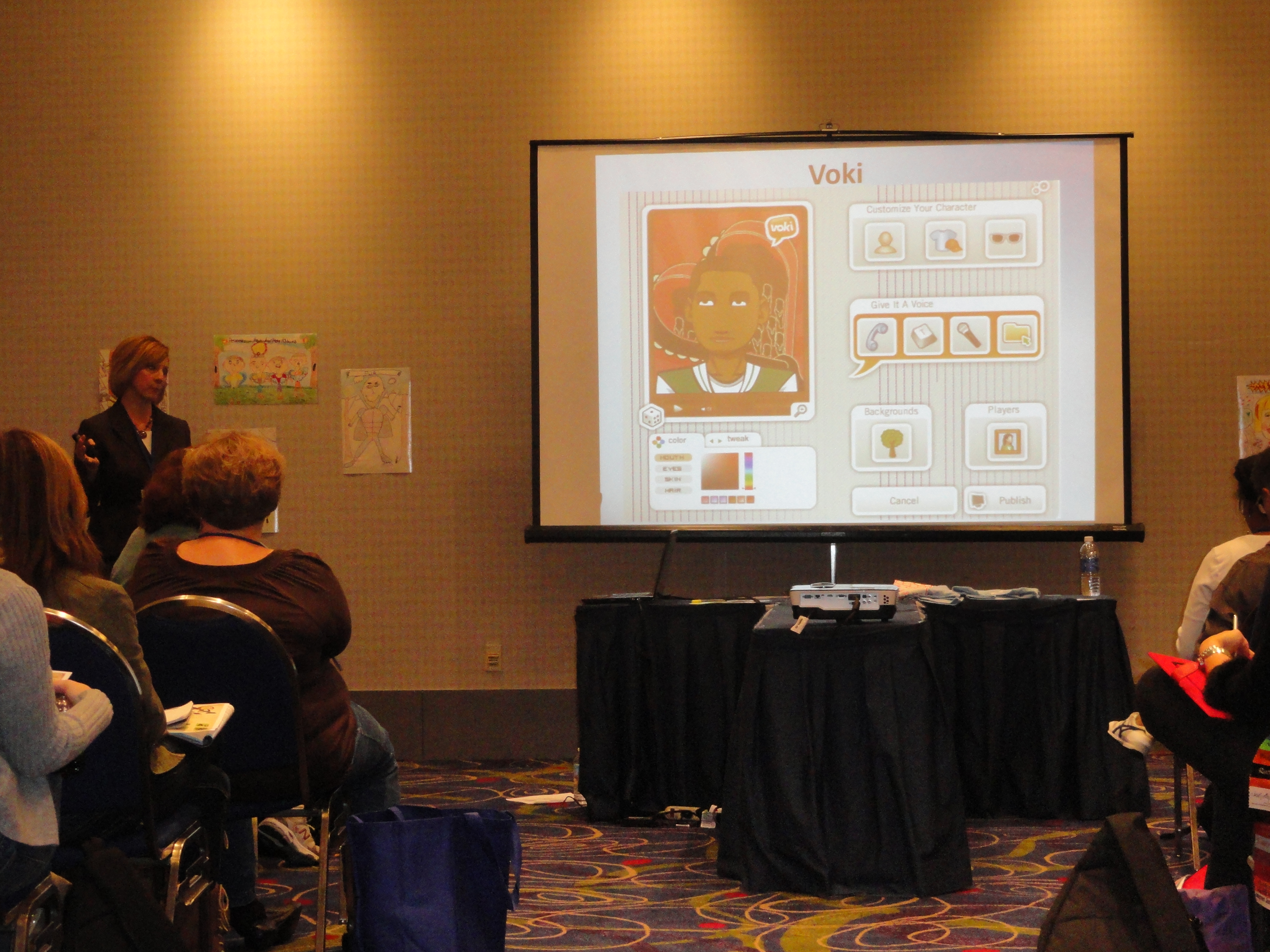
It was a huge success for the Talking Technology session lead by Lisa Collins at the Georgia Educational Technology Conference last week. The session took place on November 8, 2012 in Atlanta, Georgia. The GaETC is an annual event dedicated to helping educators understand the role of technology in classrooms.

Lisa Collins and her partner, Heidi Johnson, presented Voki to a crowd of teachers that day. They have some great giveaways that day.  Some cool Voki t-shirts were given away and two participants received Voki Classroom subscriptions!

Just take a look at how much fun they had:

If you are presenting Voki at a conference, make sure to use our Voki PowerPoint and Brochure! Remember us any pictures of the conference to feedback@voki.com!

Until next time,

The Voki Team

Hurricane Sandy Update

Hurricane Sandy Update

Hi Voki Fans,

Our office located in Midtown Manhattan lost power last Sunday due to Hurricane Sandy. With power now restored, we will be sure to follow up with any and all emails from the Voki Community ASAP. You may reach us at feedback@voki.com.

Thank you for your patience and a big thank you to those who have been working around the clock to get the region up and running!

Voki Character Ideas

Voki Character Ideas

We love getting feedback and comments from our Voki users. So let’s keep that feedback coming!

To celebrate the start of a new school year, Voki is planning to add some new characters to the Voki editor. And we would love it if you share actual Voki ideas with us!

If you think you have great character ideas, accessories design, or even a theme you want to see on Voki, share it with us! Send us your ideas at feedback@voki.com or share it with us on our Facebook and Twitter (@officialvoki)!

Until next time,

The Voki Team

Safari Users: Microphone Issue

Safari Users: Microphone Issue

Hey Voki users! Recently, some Safari users/Mac users were experiencing some difficulties when it came to recording with a microphone. This is because your JavaScript is not updated.

So here’s what you should do:

Solution:

  1. Go to  http://www.java.com/en/download/faq/java_mac.xml.
  2. When the page loads, you will see an option to Update plug-in.

We apologize for any inconvenience that you are having. This problem should be solved by next week! Just follow us on Facebook and Twitter for any updates on this issue!

If you are having difficulties with Voki, please send us an email at feedback@voki.com!

Voki Refer a Friend

Voki Refer a Friend

With summer vacation over and the weather starting to cool off, it’s the start of a new school year for many students and teachers. Whether you are still in school, still on vacation, or just started the new school year, there’s always a reason to celebrate!

To kick start this celebration, we are starting Voki Refer a Friend! For every friend you refer, you get 2 months of Voki Classroom! Let’s see the details below!

How this works:

  1. As an existing Voki Classroom subscriber, you can refer a friend to sign up for the 15-Day Free Trial of Voki Classroom.
  2. If the person you referred decides to keep using Voki Classroom after their 15 Day Free Trial, you should email feedback@voki.com with your Voki Classroom email and the email of the person who you referred! We will then add 2 BONUS months of Voki Classroom to your account to say “Thanks”!

Let’s take advantage of this! Voki Refer a Friend ends on Halloween (October 31, 2012)!

Good luck to everyone and here’s to a great start to the new school year!

Until next time,

The Voki Team

Voki Classroom Special: July Edition

Voki Classroom Special: July Edition

You’ve got one more month to take advantage of Voki’s Summer Special! July is your last chance to receive a FREE month with your 1 or 2 year Voki Classroom subscription. Since your time is running out, we are going to keep this post short and give you 3 good reasons of why you should check out Voki Classroom in July.

          1. You get one month FREE to explore the different Voki Classroom functions before school starts.

          2. Voki Classroom has everything you asked for in Voki to ensure student privacy and make publishing easier.

          3. Our Voki Classroom July Special goes well with hot dogs and lemonade.

To receive your free month with your Voki Classroom subscription, all you need to do is sign up! We will take care of the rest.

Enjoy your vacation and we hope to see you soon in Voki Classroom!

Until Next Time,

The Voki Team

Voki Classroom Update: 15 Day FREE Trial

Voki Classroom Update: 15 Day FREE Trial

It has been almost a year since we first introduced the revolutionary educational tool, Voki Classroom. We have worked hard to constantly make improvements based on the valuable feedback from the Voki Community. This summer, we are super excited to introduce one of the most commonly requested features: the Voki Classroom FREE Trial!

Q: How does the FREE Trial work?

A: To get started with your 15 Day FREE Trial, all you need to do is sign up for 1 or 2 year Voki Classroom subscription. Click the Get Voki Classroom button and you’re on your way!

Q: What kinds of features can I get in Voki Classroom that I can’t get with basic Voki?

A: Tons! Voki Classroom offers unlimited access to all Voki avatars, including 3D PhotoFace characters and Politicians. Teachers are given the ability to manage Classes and Assignments, control student privacy, set Assignment deadlines, leave feedback, and assign writing tasks! With Voki Classroom, teachers have unlimited email support and access to Voki Classroom Tutorials. Check out our products page to learn more.

So what are you waiting for? Take advantage of the new 15 Day FREE Trial and spread the word!

Happy Summer!

The Voki Team

Voki Classroom Special: June Edition

Voki Classroom Special: June Edition

Voki Classroom in the summertime is hot with savings! For the entire month of June, we are offering a FREE 2 month upgrade with your purchase of a 1 or 2 year Voki Classroom subscription. That means you can spend some time in the summer getting to know Voki Classroom so that when the school year comes around, using Voki Classroom with your students will be as nice and easy as a summer breeze!

          * June Special – 2 extra months


          July Special – 1 extra month


There is nothing special you need to do to receive these benefits. All you need to do is sign up for Voki Classroom and your extra months will be added onto your subscription automatically. We will be here for any questions you may have when you first get started. As a Voki Classroom subscriber, you are always entitled to unlimited e-mail support!

We hope to see you soon on Voki Classroom! We’ll save you a space on the beach blanket.

Until Next Time,

The Voki Team


Voki Classroom Summer Specials

Voki Classroom Summer Specials

Summertime is just around the corner and we’ve got an exciting Voki Classroom Summer Special to share with you! Starting in May through the end of July, you will receive FREE extra months when you buy a 1 or 2 year Voki Classroom subscription. This special is also great for teachers who are new to Voki Classroom and need some time to “play around.” With these summer savings, you can have your Voki Classroom ready for August through the entire school year.

Check out the schedule below!

          * May Special – 3 extra months

          * June Special – 2 extra months

          * July Special – 1 extra month

With all of these free months, you can enjoy a relaxing summer and feel confident with your new Voki Classroom subscription before the school year kicks in!

To take advantage of the Voki Classroom Summer Special, please visit the Voki Classroom website. Have a great vacation and we hope to see you in Voki Classroom soon!

Until Next Time,

The Voki Team

Voki Classroom Updates: Ready to Review Notifications, Multi-Delete Function and Privacy Features

Voki Classroom Updates: Ready to Review Notifications, Multi-Delete Function and Privacy Features

We’ve got more Voki Classroom updates rolling in and we think you are going to like these! As of this week, improvements have been made for reviewing Vokis as well as the multi-delete function for students. We’ve also implemented additional  student privacy settings to Voki Classroom.

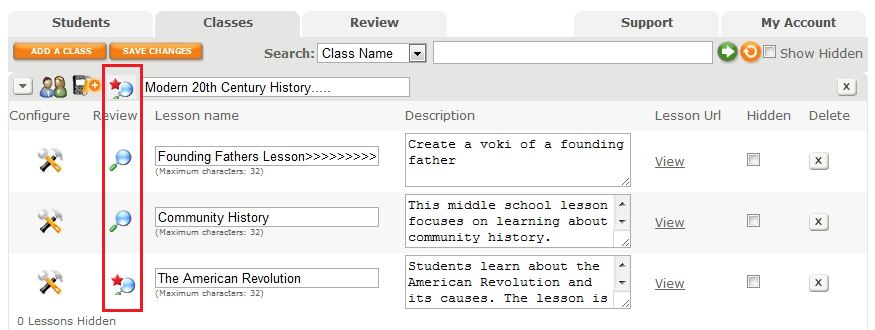
To improve your organization in Voki Classroom, we have introduced a visual that indicates that a Voki is Ready to Review. After you click the Classes Tab, you will see a list of your Classes and Assignments with the magnifying glass review icon. If there are new Vokis to review in a Class or Assignment, a red star will appear on the magnifying glass as a notification. By clicking on the notification icon, you will be taken to the Vokis that need to be reviewed.
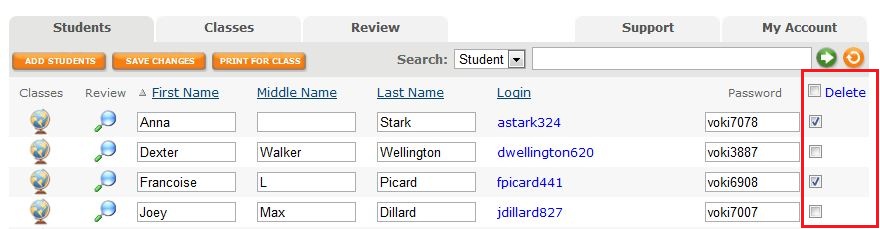
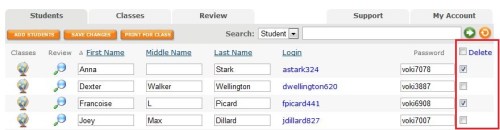
It’s now possible to delete more than one student at a time  with the new multi-delete function. Select the students you would like to delete then click on the delete button at the top of the column. Click the check box at the top of the column to select all students. You may deselect students by clicking on the check box.
Ensuring your students’ information and Vokis are private is now easier to manage with our streamlined Assignment Configuration tool. When it comes time to set up an Assignment Page, the module that pops up allows you to set your Assignment Page Security to public or private and include a password for access. You also have the option to show your students’ names or their initials only. It’s all up to you!
We hope you are enjoying Voki Classroom and always look forward to hearing your feedback! Your opinions matter. If you think of something we could do to make  your experience better, drop us a line at feedback@voki.com.

Until Next Time,

The Voki Team