New Lesson Plans for the New School Year

New Lesson Plans for the New School Year

School has already begun and we are sure you have a lot on your to-do list. Here at Voki, we are working hard to help you prepare for the new school year on the technology front! We have added many new lesson plans that do not take long to complete, and don’t require much prep time. These are great for re-introducing your students to Voki and to your subject (in case they forgot anything over the summer…it happens).

The new lesson plans cover a variety of topics and span from kindergarten to 12th grade. Below are several examples of new lesson plans, now available in Voki’s Lesson Plan Database:

  • Discovering Your Intelligence: Students create a Voki to elaborate and speak about their favorite hobby.
  • Classroom Topic of the Week: Students follow a current event and create a Voki presentation. Perfect for Social Studies!
  • The Meaning of a Poem: Students analyze a poem by using their intuition and personal opinions. This allows them to feel more engaged with poetry and more confident with literary analysis.
  • Guess Who with Voki: A fun game of guess who? with historical figures will keep students entertained and informed.
  • Elicited Opinions of History: Students form concise arguments based off of their opinions of the current topic or debate in class.

Each lesson contains the intended grade level and subject(s), the time recommended for completion, resources needed, as well as a list of objectives and activities. Each lesson is easy to follow and can be adapted according to your own personal teaching style.

Remember, Voki lesson plans are completely free – and are our way of thanking you for using Voki for education.

As always, we are interested in hearing about the Voki lessons you have used in class. If you have a lesson plan that uses Voki and you would like to share, please email us at lessonplans@voki.com.

Happy teaching!

The Voki Team

The Voki Back-to-the-Classroom Giveaway

The Voki Back-to-the-Classroom Giveaway

It’s a fact: summer is almost behind us, and a new school-year is starting. There’s no use denying it, so you might as well celebrate it! We’d like to help. In fact, we have a few things to celebrate.

To help celebrate the new school-year, the launch of Voki Classroom, and because we love teachers, we’ve decided to give away a whole bunch of Official Voki T-Shirts! These things are amazing! (You can see them modeled below)

Anyone can win a Voki t-shirt, and we are giving away plenty. You can wear them when teaching with Voki, or give yours away to a lucky student (or save yours in the hopes of one day auctioning it to the highest bidder…)!

How to win an Official Voki T-Shirt:

Here’s how to enter yourself in the daily drawing –
(Check out “How it Works” below, before entering.)

  1. Like Voki’s Facebook Page (if you don’t already)
  2. Follow @OfficialVoki on Twitter (if you don’t already)
  3. Tweet about why you love Voki, or how you use Voki in the classroom (add #VokiTee4Me).

Important: Make sure to include #VokiTee4Me at the end of your tweet so we can find it!

Tip: Getting your followers to re-tweet you increases your chance of winning…

Which Official Voki T-Shirt will you choose?

We have 4 types (as modeled by our very own Ashley):

How it works:

After every weekday (M-F), from Monday, September 5th to Friday, September 16th, 2011, we will randomly draw three (3) winners who have completed the 3 steps above during that day. If you are selected (and if you have completed the 3 steps), you win!

More Tips: Every day is a new day, meaning you can send out a different tweet each day and you’ll be in the running for that day’s selection. You can also send out more than one tweet per day, as long as each tweet is different. To be fair, each person can win only one (1) Voki T-Shirt.

If and when your name is selected, we will contact you via Twitter (via @ mention or DM). We’ll ask you to email us your info and we’ll send you an Official Voki T-Shirt! We’ll even pay the shipping!

Good luck to everyone and here’s to a great start to the new school-year!

The Voki Team

Introducing Voki Classroom – Part 3

Introducing Voki Classroom – Part 3

We hope that you’re having a great summer, and you’re probably starting to think about the start of the upcoming school year ? Below is the final, and most informative post of our 3-part announcement about Voki Classroom.

In Part 1 of the Voki Classroom announcement, we introduced you to Voki’s new classroom management system. In Part 2, we told you more about some of the features you’ll have access to with Voki Classroom. In this final post, Part 3, we’re going to discuss some additional features included in Voki Classroom, as well as the pricing and schedule.

Last time, we discussed:

This time, we’ll talk about:
  • Student View
  • Assignment Showcase
  • Voki Classroom Support
  • Voki Classroom Pricing
Student view. After logging in to Voki Classroom, students can easily view all of their Vokis by Assignments, and by complete or incomplete Assignments. Under each Assignments, they will see the instructions that the teacher has provided. Clicking the Edit button will open the Voki editor (the same editor you’ve always used in Voki.com/Create) and let them create (or edit) their Vokis. With Voki Classroom, students will create their Vokis in a secure and ad-free environment.

Bonus: As an added feature, when students create their Vokis in Voki Classroom, they will be able to create audio messages that are 50% longer than the current limit! The longer 90-second audio limit will enable students to prepare more detailed Voki messages.

Assignment Showcase. Each of your Assignment automatically generates its own Web page (an Assignment Page), where you can showcase your students’ work. You can easily configure each Assignment Page – select a layout and font. You can also set the Assignment to Private and add password protection to the Assignment Page. TIP: you can also set the Assignment Page as “hidden” so it not viewable while students are working on their Vokis.

Unlimited Support. Voki Classroom also includes unlimited email support from our dedicated support team. While logged in, simply click on Contact Support, choose your topic, and send us a note! Our support team is here to help you with any questions you might have.

Voki Classroom Pricing. We know all too well that teachers don’t usually have much of a budget to work with for technology. With that in mind, we’ve made every effort to reduce the price of Voki Classroom down to a very manageable amount. Below is the pricing of Voki Classroom. Here are a couple of things to keep in mind:

  • Currently, the pricing is based on an annual or bi-annual plan. The 1-year and 2-year plans help reduce the monthly cost.
  • We’re very confident that educators who use Voki will Love Voki Classroom, and we’re backing it up with a full 30-day money-back guarantee. Here’s what that means: If you’re not satisfied for any reason within, 30 days of purchasing Voki Classroom, simply contact support and ask for a refund. You’ll receive a Full (100%) refund of your purchase price.

Without further ado, here is the pricing for Voki Classroom:

  • 1 Year Subscription: $29.95/year ($2.50/month)
  • 2 Year Subscription: $44.95/2 years ($22.48/year, or $1.87/month) – a 25% discount
Additional Discounts. In addition to the 2-Year discount of 25%, schools can get an further discounts when they purchase multiple accounts (Multiple-Account Discounts):
  • 10% Discount when purchasing 5 to 9 accounts
  • 15% Discount when purchasing 10 or more accounts
Note: The 2-Year account discount and multiple-account discounts are separate from each other. You don’t need one to get the other, but you can get both!
.
So, when is this happening?
All this talk about Voki Classroom – but we haven’t told you when Voki Classroom will be Live! Well, we can now tell you that Voki Classroom will be ready and live around Mid August, just in time for the upcoming school year.
.
That’s it, you’re officially schooled on Voki Classroom. Don’t worry, since school is out, there won’t be a quiz.
.
Let us know what you think in the comments area below. We’d love to hear your thoughts/ questions/ concerns about Voki Classroom.
.
Until next time,
The Voki Team
Introducing Voki Classroom – Part 2

Introducing Voki Classroom – Part 2

In Part 1 of the Voki Classroom announcement, we introduced you to Voki’s classroom management system. We received some great feedback and we’d like to share more about Voki Classroom. In Part 2, we’re going to tell you more about some of the additional features you’ll have access to with Voki Classroom.

Last time, we discussed:

This time, we’ll discuss:
  • Managing Classes and Assignments
  • Reviewing Student Work
Just a quick note – we wanted to let you know that we’re very close to the launch of Voki Classroom – it’s only a matter of weeks now. We want to make sure that we polish every edge, and end up with a product that is completely intuitive, easy to use, and foolproof for even the least tech-savvy user! In short, using Voki Classroom will be even easier than using Voki itself. And now, more about Voki Classroom:

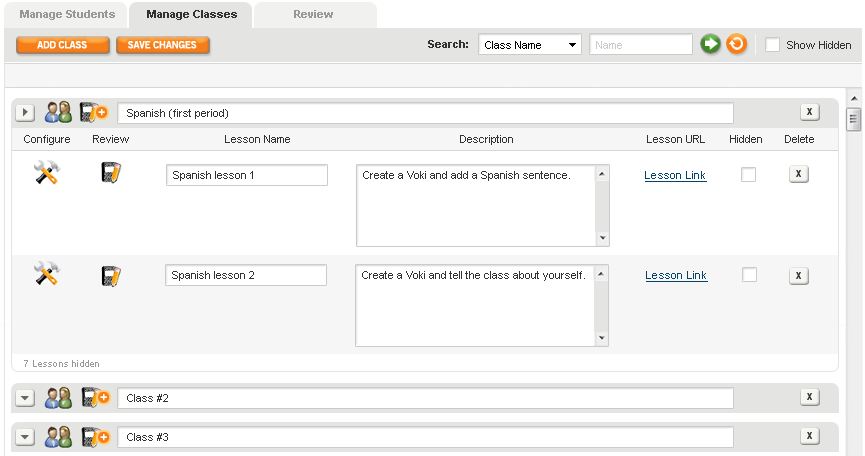
Manage Classes & Assignments. Voki Classroom lets you add and manage your Classes, as well as Aassignments within each class. When you add a new class, a new row will appear (see below). You can then name your Class – i.e. “Spanish (first period)” and add Assignments to it.
.
To add an Assignment, simply click on the Notepad+ icon next tot he class name. Then, give your Assignment a name, and add a description. You can also customize the layout and coloring of each Assignment by clicking on the Configure icon. Each Assignment comes with an Assignment Page – a Web page where you can feature all of the approved Vokis created for that Assignment. Or, if you prefer, you can set the Assignment Page to Private and require a password to view it. If you have your own class site, you can still easily embed each Voki using the embed code.
Voki Classroom - Manage Classes and Lessons
Review Student Work. Review and approve your students’ Vokis within your Voki Classroom account, all in one page. You can view all students Vokis for a given Assignment (view “By Assignment”), or look up and review all Vokis created by an individual student (view “By Student”). You can also choose to view only incomplete, completed or un-reviewed Vokis.
Clicking the Preview icon (the little person button) will open a new window with the Voki scene. If approved, just click the Approve icon (green check mark), and the Voki will appear on the Assignment Page. To get the code, click on the Code icom (<>).
Voki Classroom - Review by Lesson
That’s all for Part 2 of our introduction to Voki Classroom.
Next time, we’ll discuss
  • Student View
  • Assignment Showcase
  • Voki Classroom Support
  • Voki Classroom Pricing
As always, we’re eager to get your thoughts – comments or questions – about Voki Classroom. Feel free to leave a comment below!
Introducing Voki Classroom – Part 1

Introducing Voki Classroom – Part 1

For the last several months, we at Voki have been working on an exciting and **top-secret** project, which we can officially introduce today. Very soon, we will be launching a major addition to Voki, something that will vastly improve the way teachers utilize Voki in the classroom.

Introducing: Voki Classroom! 

Voki Classroom logo

Voki Classroom is a classroom management system for Voki. We created Voki Classroom in response to numerous requests from teachers. Voki Classroom is designed to enhance the way you manage your students’ Voki assignments. In short, Voki Classroom helps students and teachers get more from Voki.

Without further ado, here are the main features of the new Voki Classroom. We’ve also included screen shots to help you visualize the new site:

Class Accounts. They are finally here! No longer will your students need to register with Voki to create their own accounts, using their own email addresses. Now you, the teacher, will be the one to assign each student’s Voki login information (created automatically). Since there is no need for students to register, you can spend more time on the lesson, and less time on creating accounts and helping students log in.

Added benefit: This feature will enable students of any age to use Voki without sharing contact information. If they can use a computer, they can use Voki.

Manage students. You can add and manage all of your students (up to 100) in Voki Classroom. Easily assign students to one or more classes, or review all of the Vokis created by a student. You can either add each student or upload a list of students.

Voki CLassroom - Manage Students

Tip: In this view, you can also print login instructions for the entire class, or separately for each student.

Voki Classroom - Print Class Login Information

Full disclosure: Voki Classroom is a paid service, and we know that teachers don’t have an unlimited budget. So, we are working hard to ensure that Voki Classroom will be very affordable. We can’t yet say exactly what the cost will be, but you shouldn’t have to sacrifice more than one Small Skinny Macchiato, per month. In addition to low cost, we’re introducing a couple of extra discounts, such as:

  • Long-term discounts: choosing the longer term option (2 years vs. 1 year) will save teachers 25%.
  • Multiple Accounts: to make Voki Classroom even more affordable, we’re enabling a multiple account discount for schools wishing to use 5 or more accounts. This discount will range from 10% (5 to 9 accounts) to 15% (10 or more accounts). This is in addition to the 2-year discount.

Wait – what about Voki?
We are very excited about the launch of Voki Classroom and all of the benefits it offers teachers. At the same time, we’d like to reassure you that Voki, and all of its great features, will remain Free to use. We will not be removing or decreasing any Voki features that are currently available for Free. 🙂

In Part 2, we’ll discuss:

  • Manage Classes and Assignments
  • Review Student Work

So, what do you think? We’d love to hear your thoughts about Voki Classroom, the features we mentioned, and the features you’d like to see.

Disappearing Voki scenes

Disappearing Voki scenes

Several Voki educators have reported “disappearing Voki scenes” recently. The scenario goes something like this:

You planned a great lesson using Voki in your classroom. Come class time, you have all of your students log on and create their Voki scenes, and then save them. Or, perhaps you had your students log on from home and create a Voki as part of a homework assignment.

You’re excited to see what they came up with. So, you log in to check their Vokis, and nothing! All (or most) of the Voki scenes that should be in your account, aren’t! What happened??

What happened
Well, we found out that this was due to special characters being used in the Voki titles. The less-than and greater-than characters (<, >) were actually causing all (or most) of the saved Voki scenes to disappear! (Note: although you could not see them, your saved Vokis are always saved in your account…)

What we’re doing about it
We’re happy to say that this issue has been resolved. When you log in to your account, you should see all of your scenes (if you don’t make sure to clear your browser’s cache and then refresh). Any new Voki scenes that are created can have the less-than and greater-than characters in the title. For the existing Voki scenes, we have replaced those characters with a space. So, a scene named “I just ❤ this” is now named “I just  3 this” – you can go back and rename these scenes however you lik
e.

If you have any questions or concerns, please leave a comment or drop us a line in the Teacher’s Corner.

What’s with Ads on Voki?

What’s with Ads on Voki?

So you logged on to your favorite site this morning (no, not Facebook) only to notice an ad where there was none before. “What’s with the ad?” you exclaimed. We’d like to take a minute to explain exactly why the new ad is there.

Then. As many of our “old school” Voki users will remember, we made the decision to stop showing those small ads within Voki scenes sometime in 2010. This decision was based 100% on the requests we received from our users. Many educators and parents didn’t want their students/ kids exposed to ads while viewing a Voki scene.

Since then, we have not shown any ads within Voki scenes, and our users have responded very positively! In fact, we have never seen as many Voki signups as we’ve seen lately. We’ve received a lot of positive feedback and “Voki love.” Yet, while we love the love, and we’re proud to offer Voki as a free and useful service, “love don’t pay the bills.”

Now. If you’ve visited http://www.voki.com recently, you may have noticed something new. Instead of just the normal SitePal “tower” ad on the right (which links to our sister site, www.sitepal.com), you’ll now see a second ad (or ads) on the left side of the page. These ads are being served by Google.

Why the ads? Our primary goal is to keep Voki as a free service for all education and non-profit individuals and groups. To do this, we need to begin to cover the costs of development, maintenance, and hosting. Hence, the ads are there to help keep Voki free for all. More importantly for many of our users, this is a way to keep the ads out of the Voki scenes.

Can I help? Sure, just keep on using Voki like you always have, and spread the word! If you see an ad that interests you, feel free to click on it (note – you can right click and select “open in new window/ tab” if you’d like to keep your Voki window intact).

A note on ad content: We have attempted to block certain types of ads from showing – anything that we believe is inappropriate for kids, really. If you come across an ad that you believe is unsuitable for youngsters, feel free to email us (feedback@voki.com) the website’s name and we’ll consider blocking the site.

We Couldn’t Have Done it without You!

We Couldn’t Have Done it without You!

We have finally launched Voki for Education and could not have been more pleased with the results! We’d like to thank you for “hanging in there” and for taking the time to share with us how you would like to see Voki improve.

Thanks to you, Voki is now simpler to use, includes more features, encourages community engagement, and is more reliable and classroom-friendly than ever! We hope you enjoy Voki for Education as much as we do. Here are some highlights:

  • You can now post your Voki to Facebook! You asked for it and we delivered. You can now share your Voki with all of your Facebook friends by easily posting it to your wall.
  • We’ve made posting to your blog or site as easy as clicking on an icon. Just click on the icon, log in, and your Voki is posted automatically!
  • Don’t have a blog or site? No problem. We now offer a Voki link! Copy your Voki link (URL) and paste it into your browser … or email it to a friend … or paste it into your PowerPoint … or … well, you get the idea. There’s never been an easier way to share Voki!
  • Got a question or want to share a tip? Join the Teacher’s Corner community, where you can engage with other educators, ask questions about Voki.com, and share your Voki tips and tricks.
  • To further the use of technology in the classroom, we now offer a Lesson Plan Database where educators can browse and use new Voki lesson plans. And we’re always looking for more great Voki lesson plans from great educators!

Again, thank you for sticking with Voki and for helping us spread the word about our free online educational tool!

The Voki Team

The “Missing” Voki Embed Code

The “Missing” Voki Embed Code

Quite a few Voki users have reported that they cannot see the Voki embed code, after clicking Publish. We have identified the issue and we would like to tell you about it here, as well as the solution we’ve implemented.

The New Voki for Ed uses a new type of publishing called Gigya. The Gigya publishing tool (or, panel) lets Voki users easily and automatically post their Voki to many, many types of blogs and websites. The Gigya panel also includes an embed code that you can copy and paste into your site, blog, or profile.

The Issue: As many of you have noticed, some schools have blocked Gigya. What this means, is that the school’s network settings prevents accessing (seeing and using) the Gigya panel, which includes the publishing options (icons) and the embed code. Keep in mind that you should still be able to access the Voki link. This was obviously a significant issue for many teachers! This is also why you can probably access everything just fine from home, but not from school (where you need it!).

The Solution: One solution would be for the school’s network administrator to allow use of Gigya in your school. If this is not possible, we’ve implemented another solution. When Voki senses that Gigya is blocked (i.e. when your system will not allow you to see the Gigya publishing options), you now automatically see the Voki embed code, which you can paste into your site, blog, or profile. This code also provides you with your Voki scene ID.

That’s it! Our embed code solution is now live and working. We hope it serves you well!

Sincerely,

The Voki Team