Voki Podcast on TeacherCast

Voki Podcast on TeacherCast

Hey Voki users! Recently, Voki did a podcast with Jeff Bradbury at TeacherCast.

TeacherCast was created by Jeff to help teachers use technology in their classrooms. Follow @JeffBradbury and @TeacherCast on Twitter to get great updates on cool technologies to use in class! If you have any cool apps or would love to share your ideas with Jeff, feel free to reach out to him!

If you missed it on TeacherCast, listen to it here!

If you want Voki to be a guest blogger on your site or record a podcast with you, just send us an email at feedback@voki.com!


Until next time,

The Voki Team

Tip of the Week: Embed Voki on Google Site

Tip of the Week: Embed Voki on Google Site

Are you looking for different ways to share your Voki? You can always embed your Voki collection to your Google Site! If you attempted to embed your Voki on your Google Site (and failed), continue reading to learn how!

Just follow these simple steps and you can show off your Voki collection to everyone!

  1. Go on www.voki.com
  2. Publish your Voki.
  3. Select your Voki size.
  4. Click to copy your Voki embed code.
  5. Paste your embed code onto Word.
  6. Find the hyperlink starting with src=”http://vhss-d.oddcast.com.
  7. Copy the hyperlink.Note: To make the Voki link work on Google Site, add “s” to http.
  8. Go to sites.google.com. If you do not have a Google site created, click the Create button.
  9. Name your site.
  10. Click Create again.
  11. Click on the Edit button. It looks like a pencil.
  12. Click Insert at the top of the page.
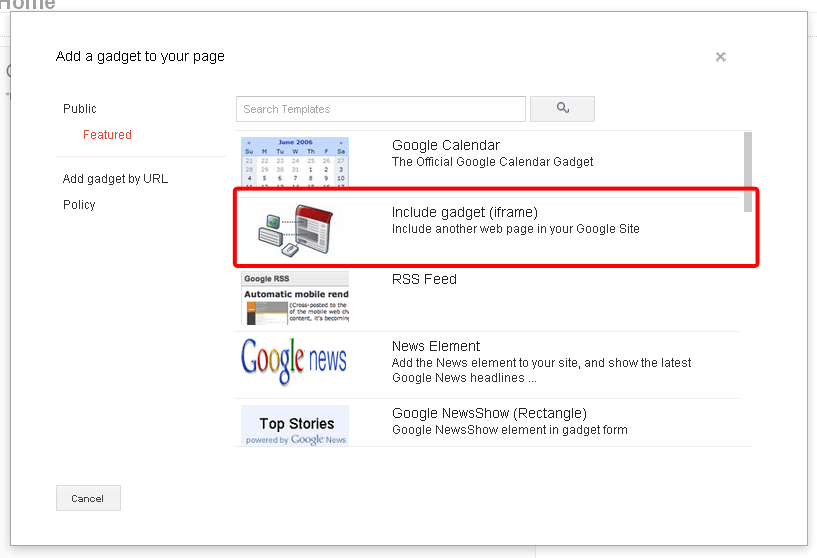
  13. Click on More Gadget.
  14. Click on Include Gadget. If you cannot find it, search Include Gadget.
  15. Click on Select.
  16.  Paste the Voki hyperlink into the box and click OK
  17.  Click Save.

Now your Voki is embedded on your Google Site!

If you have any questions, comments, or suggestions for Voki, shoot us an email at feedback@voki.com!

Happy embedding!

The Voki Team

Voki Character Ideas

Voki Character Ideas

We love getting feedback and comments from our Voki users. So let’s keep that feedback coming!

To celebrate the start of a new school year, Voki is planning to add some new characters to the Voki editor. And we would love it if you share actual Voki ideas with us!

If you think you have great character ideas, accessories design, or even a theme you want to see on Voki, share it with us! Send us your ideas at feedback@voki.com or share it with us on our Facebook and Twitter (@officialvoki)!

Until next time,

The Voki Team

Safari Users: Microphone Issue

Safari Users: Microphone Issue

Hey Voki users! Recently, some Safari users/Mac users were experiencing some difficulties when it came to recording with a microphone. This is because your JavaScript is not updated.

So here’s what you should do:

Solution:

  1. Go to  http://www.java.com/en/download/faq/java_mac.xml.
  2. When the page loads, you will see an option to Update plug-in.

We apologize for any inconvenience that you are having. This problem should be solved by next week! Just follow us on Facebook and Twitter for any updates on this issue!

If you are having difficulties with Voki, please send us an email at feedback@voki.com!

Voki Tip of the Week: Changing Your Voki Login Emails

Voki Tip of the Week: Changing Your Voki Login Emails

So you’re a long time Voki fan and want to have a new email address associated with your Voki account. This is the scoop on how this feature works in Vok and Voki Classroom.

For Basic Voki Users:

Basic Voki users’ emails cannot be changed, but you can easily create a new account with a different email! To copy your Voki to your new account, check our blog post on How to Copy a Voki. You can also log into your old account as much as you need.

For Voki Classroom Users:

Voki Classroom users can change their emails. Here’s what you can do:

  1. Log into your Voki Classroom account.
  2. Click on the My Account tab.
  3. Under Personal Settings, click the Edit option on the Email Address line.
  4. Type in your new email and click Save. You will receive a notification informing you that your email address has been updated.

Click here to learn more about other advanced features in Voki Classroom!

Until next time,

The Voki Team

Feature Update: Exclusive Voki Classroom Characters

Feature Update: Exclusive Voki Classroom Characters

We LOVE when Voki fans share their unique character creations with us. Monsters, talking dogs, hot pink hair – we’ve seen it all! To keep teachers’ and students’ creative juices flowing, we are introducing brand new characters to the line up!

These characters are exclusively available to Voki Classroom users, but they can be previewed in the basic Voki editor by anyone. So, how do you know which characters are available in Voki Classroom? Easy! We added a graduation cap icon for all Voki Classroom characters! Additionally, a banner notification is visible in the editing window when you are previewing a Voki Classrooom character.

To take advantage of these new characters, sign up for the Voki Classroom 15 day FREE Trial. You will have full access to 3D PhotoFace characters, 2D illustrated characters, beachgoers, and more! To see the full Voki Character Catalog, go to the Product page.

Until Next Time,
The Voki Team

Voki Classroom Update: 15 Day FREE Trial

Voki Classroom Update: 15 Day FREE Trial

It has been almost a year since we first introduced the revolutionary educational tool, Voki Classroom. We have worked hard to constantly make improvements based on the valuable feedback from the Voki Community. This summer, we are super excited to introduce one of the most commonly requested features: the Voki Classroom FREE Trial!

Q: How does the FREE Trial work?

A: To get started with your 15 Day FREE Trial, all you need to do is sign up for 1 or 2 year Voki Classroom subscription. Click the Get Voki Classroom button and you’re on your way!

Q: What kinds of features can I get in Voki Classroom that I can’t get with basic Voki?

A: Tons! Voki Classroom offers unlimited access to all Voki avatars, including 3D PhotoFace characters and Politicians. Teachers are given the ability to manage Classes and Assignments, control student privacy, set Assignment deadlines, leave feedback, and assign writing tasks! With Voki Classroom, teachers have unlimited email support and access to Voki Classroom Tutorials. Check out our products page to learn more.

So what are you waiting for? Take advantage of the new 15 Day FREE Trial and spread the word!

Happy Summer!

The Voki Team

New Voki Character Categories: Monsters and Smilies!

New Voki Character Categories: Monsters and Smilies!

We’ve added two new categories to Voki, and we know you will love it!

Let’s take a look at them right now.

Everyone, this is Baby Blue. Baby Blue is in our Monsters category. You can let Baby Blue wear hats or even change its hair!

But Baby Blue is not the only monster in the line! There are 15 types of scary monsters that you can customize, like the vampire and pirate. There’s even a zombie!

Baby Blue

Don’t let Baby Blue be the only little monster. Help Baby Blue make some scary friends!

This is Mr. Smiles. He is under our new category: Smilies. There are 6 different types of smilies for you to choose from.

Mr. Smiles

So, let’s make some friends for Mr. Smiles!

So what are you waiting for? Let’s go create some monsters and smilies!

Until next time,

The Voki Team

Voki Poet: A Poem by Emily Dickinson

Voki Poet: A Poem by Emily Dickinson

We hope you were able to spend some time this month enjoying poetry in and out of the classroom! Happy National Poetry Month!

Hope is the thing with feathers 
That perches in the soul 
And sings the tune without the words 
And never stops at all.

by Emily Dickinson

Voki Poet: Warm Summer Sun by Mark Twain

Voki Poet: Warm Summer Sun by Mark Twain

Warm Summer Sun

by Mark Twain

Warm summer sun,
Shine kindly here,
Warm southern wind,
Blow softly here.
Green sod above,
Lie light, lie light.
Good night, dear heart,
Good night, good night. 

Don’t forget to submit your favorite poem as told by Voki! Every Friday, we will post your submissions to our blog! To submit your Voki Poet, send the complete embed code along with the poem title and author’s name to feedback@voki.com.