Guest Blogger: Trine Mork

Guest Blogger: Trine Mork

I’ve been using Voki for a couple of years now in one of my EFL courses in one particular Japanese university class. This year I decided to procure some student feedback and reflect on how things were going with the platform. The main pedagogical impetus for taking on this application was threefold:

  1. to expose students to one of many fun tools available online through which they could practice their speaking in a safe and secure setting (privacy controlled).
  2. to expose students to computer applications in general, as computer competency tends to be low, and students need confidence to adapt to an ever increasingly digital world upon graduation.
  3. to provide a medium though which students could record and share some clips of their speaking for evaluation purposes.

Students in this particular full-year course used Voki twice in their first semester, and will do so once again at the end of the second semester. (Japanese universities generally start the academic year in April.) The time they will have spent with the platform is therefore minimal. For their first Voki assignment, they had to record a self-introduction and paste their Voki avatar onto their blogs. This first assignment was not only to help them get used to both Voki and the WordPress blogging platform (several students were not even aware of the concept of blogging), but also to get them used to having to deal with this technology in a foreign language. It was highly intimidating for some. The second VOKI recording also had to be posted to their blogs and was part of a larger semester review activity that was assessed and weighted at 30% of the semester grade, as will be the case for the 3rd assignment next term. I have always perceived formal speaking assessments as class time wasters and have preferred to assess student L2 (second language) speaking throughout the term through monitoring in-class activities such as task-based speaking activities and discussions. Tools like Voki have added another dimension in addressing teachers’ need to get feedback on student performance while at the same time maximizing the few contact hours they have with their students on campus.

From a teacher’s perspective, Voki indeed has a lot to offer, which is why I use it. There are issues I continue to have, however, but these actually have less to do with the Voki platform itself than other issues such as language ability. The first main problem I have is that despite having in-class screen demos on how to use the platform and embed Vokis onto their blogs, students still get stuck with the technology. Instead of taking the extra time (of which I have none, so I really don’t have a choice) to help individual students troubleshoot outside of class, I make it a point to challenge students to be autonomous learners and try to figure out how things work by trial and error; to have to the curiosity to click buttons to see what happens, and to take the initiative to collaborate with their peers if stuck. Sadly, this approach to learning does not come easily to Japanese learners, who by university age are used to a teacher-centered, top-down approach to acquiring any knowledge or skill.

A second issue I have is the existence on Voki of the option to type in desired speech. Despite what I hoped were clear instructions, and despite what I thought was an obvious goal that Voki was to be used as a speaking activity, almost 20% of my students in the 2013 spring term typed in their content and had the Voki speaking machine do its magic for them. Whether this was a result of foreign language misunderstanding, poor instruction on my part, or a simple lack of common sense from students is yet to be ascertained, but it is certainly not the fault of the Voki platform, and neither is the third problem I had: In any out-of-class speech recording, teachers cannot control how students record their voice. The goal is to have students prepare their opinions about certain issues before recording their voice, and to have those recordings be completely natural and unscripted. It is easy for teachers to know when second language learners are reading from a prepared script and when they are speaking off the top of their heads. Sadly, only about half of students were doing as I had reminded them several times to do: Don’t read from a script; speak naturally! At my university, privacy-related fears have prompted a ban on online video use, so teachers have unfortunately not been able to make use of tools such as Youtube for recording student work, despite the existence of privacy settings. However, even video to some extent would not eliminate the issue of script reading. Cues could be held off camera, after all. This is the main reason why I would use Voki or any similar tool as neither a major form, nor the only form, of speaking assessment.

As I was curious to know how students perceived the Voki platform, using Survey Monkey, I questioned my 31 students after having completed their second Voki assignment at the end of the 2013 spring term. 55% of students enjoyed using Voki, 18% enjoyed it sometimes, another 18% were neutral about it, and 9% did not enjoy their Voki experience. These are the optional comments I received regarding their enjoyment:

  • It is interesting to create my own character.
  • Making my Voki was fun!
  • To make my own picture was really fun!
  • It is good for practicing my pronunciation.
  • It was interesting because the picture spoke what I want to say. Also, I could listen to my own talking, so I can notice my bad point of speaking.
  • It was fun to listen other’s opinion by voice instead of just reading the text.
  • I enjoyed listening to some of my friends’ Vokis. I didn’t listen all of them because I wasn’t interested in other classmates’ Vokis.
  • I was too nervous while recording, so I wanted to enjoy more!
  • It was interesting that I can record my voice and publish on blog.  

When I surveyed students about Voki’s ease of use, none replied that it was extremely easy, but almost 37% responded that it was easy enough and they had no major difficulties. 18% said it was generally OK, another 18% said is was sometimes tricky, and unfortunately over 27% reported that it was challenging to use. These are the optional comments I received, from positive to more negative:

  • At first tiles, it is difficult to put voki on the blog, but once I understand how to do, it is not difficult to use voki.
  • I confused a little at the first time, but it’s ok now.
  • First , I had trouble, but easy to understand.
  • Hard to use it.
  • I didn’t like the homepage. Hard to understand.
  • I thought putting Voki on my blog was a little difficult.
  • I’m good at SNS tools, but it was difficult to find a microphone to record the voice. Our classroom is the only capable for record anyway…
  • I could’t record my voice at home, so I had to do it at university. Also, PC at university was limited to use, so I felt little confused to search the available PC room to use it every time.
  • At first, I was confused to upload Voki to the blog.
  • I think it should be easier to record and upload on blogs.
  • It was hard to record the voice. My Mac PC didn’t work. I could record but couldn’t save it… so I had to use school PC but the LLclass opening time was limited and also I had PTJ 6 days a week so it was really hard to make the pinpoint time for it ;( anyway, I enjoyed the system. so I wish it gonna be more smoother to save the voice.
  • It had some problems, for example, most of us couldn’t record with own PC at home, I mean we couldn’t do homework at home.

 The comments above indicate that students’ issues were more related to hardware access and blog embedding than using the Voki application itself. Inability to get the code to display correctly occurred often because students were pasting Voki embed code into the WYSIWYG editor as opposed to the html section of their WordPress blogs. Even though Voki has a short cut of getting them to login to their WordPress blogs directly from the platform, perhaps the additional method served to confuse students? Instruction on both methods was offered to students in class, so I can only assume that they failed to either pay attention, take good notes, or express any lack of understanding at the time. It could also be that the instruction session was either too difficult (it was indeed given in English), or given too far in advance of the homework assignments and students forgot. I imagine that most students did in fact have the necessary hardware (microphone, etc.) needed to record a Voki on their home computers, but did not make the effort to troubleshoot in English for reasons I have stated earlier.

Almost 64% of students indicated they would use Voki again on their own, and the rest said they would not. Again, here are their optional comments:

  • I think recording my voice and listening my speech will help improve my pronunciation skills.
  • I can record my voice and check my speaking skills.
  • I want to use Voki more to train my speaking!
  • It is the easy system to record my voice in English.
  • No, because I don’t have a private blog where I can put Voki.
  • No, because I don’t have any idea where to use.
  • I don’t have an opportunity to use it.
  • No, me and many people around me had trouble making a Voki.
  • I already used Facebook and Twitter. It’s enough.

 In my final survey question, I asked students to offer their general impressions about the Voki system in terms of how it related to their learning, and here are some examples of the feedback I received:

  • It is useful to take an oral test in English.
  • I think I study English while enjoying myself if I use voki
  • Useful: I could learn how I am speaking to people easily.
  • Not useful: hard to record!
  • Voki is so fun for me because I can record my own voice and check it after that. However, I don’t think Voki is not so useful for learning English.
  • It’s useful to know my speaking skill of English directly.
  • It was good to record my voice and listen to it because I can’t listen my English usually.
  • I could listening my own English speech and improve my English speech skill.
  • At the point of speaking in English, it is useful because they can record their talking and listen to them again and again. But I think it is more important that others listen to that and comment on that.
  • When I become a senior year, I didn’t have a enough opportunity to speak in English. However, Voki is a good chance to tell something another classmates. It is so nice that my friend replay me.
  • Useful. We could use Voki a few times for free. This was a good service for English learner.
  • I’m sorry to say but it was not useful for me.


In conclusion, overall Voki usage in my EFL class has been a positive experience. As a teacher, I perceive the platform to be extremely easy to use, but because students coming into the course in which I use it have had very limited online application experience, and because English is not their first language, there are obstacles for both teachers and students to overcome. With practice, teachers get better at explaining how to use Voki, and with practice, students will surely get over their anxiety in using the platform, and become more confident the next time they need to produce a Voki or dive into yet another English-only, online app.

Guest Blogger: Kyle Dunbar

Guest Blogger: Kyle Dunbar

me-smallI still remember the first time I was introduced to Voki, I was at a tech conference. The presenter was showing a number of different fun, new, tools, but Voki stole the day. Honestly, I can’t remember the next 20 minutes of the presentation because I was so busy having fun playing with Voki, recording myself, giving myself new outfits, sending emails back to my boss saying things like “Vokis are so much fun!” I was immersed in learning the new tool and practicing my digital literacy and fluency. It is the same for our students.

Voki opens up a world of hands-on creativity for your students.

Show any classroom of students Voki, and you will immediately see them trying it out in a myriad of ways. I had the pleasure of joining a student tech club after school one day and I did a quick demo of Voki. The teacher and I had a plan that they would use their Vokis to introduce themselves to me (a visitor for the day) and then we would share what each student did. It was a nice plan, and the students would have done it. But we quickly realized, we had set the bar way too low, these kids had more ideas about what they wanted to do!

Voki lets you have your Voki speak in several languages.

Some students immediately started playing with the language feature of Voki. While this tech club is in a richly diverse school, where many languages are heard every day, these students still had a great time listening to phrases spoken in languages they had never heard before.

Voki allows you to re-record until you like how it sounds.

Some students probably practiced what they wanted to say 5-7 times before they saved their Voki. This repeated practice is fantastic for English Language Learners and other students working on their oral language skills. Asking a student to re-read passages can be tiresome, but ask them to make a Voki and they will repeat the passage until they like how it sounds, over and over again.

Voki lets students play around with identity.

 Let’s face it, not all students are pleased with their self-image. I’ve seen students change their avatar dozens of times to find a “look” that they want to project. Don’t overlook the importance of this! As students travel the weary path of adolescence and pre-adolescence, they crave opportunities to try on different looks and personas. Using Voki to do this is a safe and fun way to change your hair color, add an earring or see how a British accent sounds. Letting students play with these avatars as they complete a content-based assignment is as developmentally appropriate as free play in Kindergarten.

Voki is a great way to discuss Digital Citizenship.

Our students might not need our guidance when it comes to figuring out how to make a Voki, but they do still need our guidance about what makes a good and appropriate Voki. Voki is a fun way to get students talking about what make a quality presentation. If the assignment is to have an Abraham Lincoln Voki talk about three of the most important parts of his presidency, showing him with sunglasses on isn’t the best way to convey your message. Likewise, students should never use Voki to share too much information about themselves or to embarrass others. It is imperative that we have these conversations with students and why not do it with a tool they love!

Voki can be used in any classroom:

Science: Make a Voki to explain the outcomes of a lab. (I’ve seen students do this for their Science Fair presentations!)

Social Studies: Choose a Voki of an historical figure and have them give three important facts about their lives.

English: Make a Voki that represents a character from a novel. Have them “saying” the theme of the novel.

Math: There is a lot of vocabulary in Math. Have a Voki provide definitions for key terms.

World Language: Provide a description of a person in the target language, see if the students can make a matching Voki.

Physical Education/Health: Let a Voki give facts about staying fit and healthy.

To get the most out of Vokis, make sure you give your students time to play when making their Vokis, you’ll be surprised with the results!

-Kyle Dunbar

________________________________________________________________________

For Kyle’s blog, go here: EdTechDunny

Follow Kyle on Twitter: @edtechdunny

Guest Blogger: Sonya terBorg

Guest Blogger: Sonya terBorg

In our previous unit under the theme How We Express Ourselves my students were asked to create a Voki avatar to persuade people to send their kids kids to our school – essentially answering the question “Why Riverstone?” from their perspective. We had used Voki in the past, and I wanted to revisit it in a more formal (rather than optional) way to really see if this was something worthwhile to do.

My class has Voki Classroom accounts. This is different to the regular, free version of Voki. What it does differently, is that it allows you access to your kids work prior to publishing. As the teacher, you set the assignment and send this to each child’s account. They log in (with usernames and passwords that you have access to) and click on the appropriate task, read the instructions and carry out the assignment. When they are finished, they submit it to you for review. You can ‘approve’ it or send it back to them to work on it some more.
Here are what I consider the key strengths of Voki:

  • you get an oral presentation without the pressure of performing live in front of an audience. Yes, I know performing live is valuable, but so is hearing people applaud your clear, confident, expressive speech that normally may have been muffled and quiet and spoken into your armpit.
  • some kids will knock your socks off! I was crazy impressed with the majority of the Voki’s that were produced for this assignment and some kids really stood out from the rest – and not necessarily the kids you would expect either. I love that.
  • it is really intuitive. We had used it before but even then, all it took was one class lesson on the Smartboard and they were off. There were a few glitches along the way but that was my doing – not Voki’s or my kids!

Which leads me to my recommendations:

  • make sure you set the assignment up first! I know, this seems simple, but in all the organizing, actually sending out the last assignment to their accounts was missed off my to-do list. Major bummer.
  • keep a printed list of usernames and passwords – they are easy to remember but we use a lot of sites and so having them handy is a must so those who forget can quickly access them
  • start with some fun, non-assessed assignments – let them play with Voki! I started with a book review from a character’s perspective and each child introducing themselves.

Prior to beginning the assignment, I shared the following with my class. Click on the image to enlarge. Click to download a PDF version.

screen-shot-2013-02-24-at-1-59-36-pmscreen-shot-2013-02-24-at-1-59-23-pm

After you have approved their work, it is very easy to embed the finished Voki in your blog. I have found in the past that there are many embedding codes that don’t work with WordPress (the blogging platform we use at school) but Voki is not one of them. At the conclusion of the assignment I was able to easily export the Voki’s to our class website to share with the students and their families. Here are a couple of examples of our Voki’s:


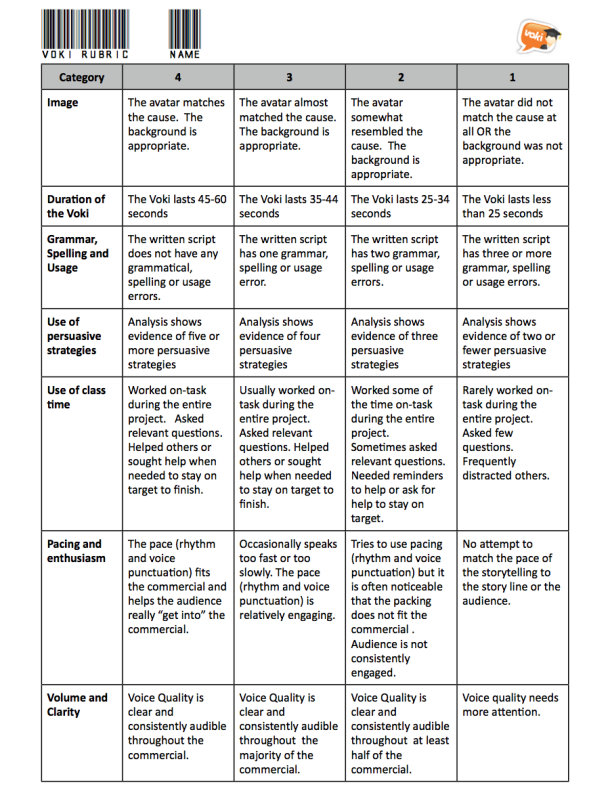
When they were uploaded, each student was tasked with drawing five names from a hat, finding that Voki online, and reviewing their work using the following form. The grid of persuasive strategies is from the awesome website, ReadWriteThink.

screen-shot-2013-02-24-at-2-03-09-pm

In addition to this personalized, specific feedback, we watched all the Voki’s as a class and rated them ‘live’ using the online student response tool: Socrative. If you have not used Socrative before, please check it out! It is really cool – and as the byline says, “as easy as raising your hand”. Once you set up a teacher account, students log on with any device and plug in your ‘room number’. You control the pace of the questions or allow them to go at their own pace. As they answer your questions, their responses show up live on screen. We watched each Voki together and then rated them on persuasive effectiveness on a scale of 1-5. Check this video out for further information:


Socrative introduction video (new) from Socrative Inc. on Vimeo.

In Summary:

I would highly recommend the use of Voki in your classroom. I like the education version, Voki Classroom, mostly because of it’s editing/reviewing options and because your recordings can be up to 90 seconds (as opposed to 60 seconds in the free version). It is easy to see where each student is at on the project and feedback can be delivered instantly to them from your account to theirs. I love that you can embed the finished Voki’s and the quality of both the avatar and the voice options are excellent. In addition to the stock backgrounds, you can also upload your own images = the first Voki featured in this post actually has a photo of the front of our school as the background. This feature allows you to incorporate aspects of visual language into your curriculum by challenging students to come up with the most appropriate look to their Voki that suits their message.

__________________________________________________________________________

For Sonya’s blog, go here.

Follow Sonya on Twitter: @terSonya

Guest Blogger: Carmen Brettel – How to Use Voki in the Classroom

Guest Blogger: Carmen Brettel – How to Use Voki in the Classroom

Voki speaking avatars are great tools for the classroom. Teachers and students alike can create avatars and use them in a number of ways to make learning fun and more accessible. Not sure how Voki can help you or your students? Here are a few fun ideas for how you can incorporate Voki speaking avatars in your classroom and lesson plans:

Use Your Avatar as a “Substitute”

Students can start to zone out in the middle of lectures, and the teacher’s voice can start to sound like the “mwah mwah mwah” in a Charlie Brown cartoon. Introducing an avatar for some lessons can get students’ attention and make it a little more fun.

Choose a quirky and interesting avatar — not just one that looks like you. Use it for particularly dry discussions and incorporate it into an interactive presentation. Students will feel like they’re watching a show — and they’ll be learning at the same time.

Get Students to Create Interactive Avatars

Every teacher knows that encouraging student participation can be a bit like pulling teeth at times. Encouraging students to create their own interactive avatars may help them to participate more, both by offering them a fun outlet for it, and by offering shy students a way to participate that doesn’t require being so “exposed.”

You can create a virtual interactive classroom if you have access to a computer lab, or you can use the avatars in online discussions through a classroom blog or website. Explore which options work best for you based on your resources.

Assign a Virtual Presentation

Old-fashioned book reports and project presentations can be dull for both the presenter and the audience. Students standing next to a tri-fold project board and reading off note cards are not likely to have a good time, and neither are their peers who have to listen to it.

You can make it a little more fun for all students by asking them to create virtual presentations that are created with a Voki speaking avatar and a powerpoint or other presentation. The avatar can guide the presentation, which students will have fun creating (with a little more creative latitude) and their peers will have fun listening to, helping both to learn more.

Create Avatars Based on Lessons

Help bring historical and literary figures to life by asking students to create a speaking avatar for them. Not only will students have to create an avatar in that person’s likeness — and may have to imagine it based on cues for literary figures — but they can also create dialogue for the characters for a presentation or report.

Such an assignment will help students better understand the figures they are studying in class, and it will help them to have more fun while they’re doing it.

There are many more ways you can use Voki speaking avatars in your classroom to help promote learning and greater interaction. You are only limited by your creativity.

How have you used Voki speaking avatars in your classroom? Share your tips in the comments!

Carmen Brettel is a writer and manager for Studentgrants.org. In her spare time, Carmen enjoys gardening and volunteering at animal shelters.

Guest Blogger: Give Kids a Voice with Voki by Susan Stephenson

Guest Blogger: Give Kids a Voice with Voki by Susan Stephenson

SusanI love what Voki offers kids! Often in the classroom or in home school we focus on the key skills of reading and writing to such an extent that we neglect other communication skills. Speaking confidently and competently is a skill that helps not just in school, but in real life. Give an employer a choice between someone who mumbles and rambles, and another person who speaks clearly and concisely. I think we can guess which candidate they will choose.

Voki gives children an engaging format for speaking. The range of cute avatars available is motivating for kids, allowing them to choose one to suit their purpose. Voki also gives kids a voice. Whether they are creating a short speech to introduce themselves on a class blog, or giving an opinion about their favourite video game, kids are involved in creative and critical thinking as they choose the best words and delivery style for their purpose.

We want older kids to develop real writing skills. Part of that with narrative writing is to develop strong characters for a story. The Voki avatars can suggest a character, and students can speak like that character, trying to think their way into the character and look at life from its perspective.

In a literature lesson, students can use Voki to give a book report, or brief opinion of a book they’ve read. By listening to others’ Vokis, kids are not only experiencing different ways of delivering a presentation, but also perhaps learning about new and exciting books to read.

For children in younger grades, Voki gives them a way to practise reading fluency and writing. By adopting “voices” for the different avatars, and reading aloud scripts they’ve written earlier, kids have a purpose for both reading and writing that is truly engaging.

There are many ways to create avatars. Voki offers more than the usual avatar because children can record themselves and speak through the character they choose. Adding the dimension of audio to an  avatar makes it a talking character, opening up lots of learning possibilities for children at home and at school. Voki really does give children a voice!

Find many more ideas from teachers currently using Voki on the Voki blog.

BIO: Susan Stephenson is an Australian writer, teacher and book reviewer. She blogs at The Book Chook (www.thebookchook.com). Teachers and parents from all over the world visit The Book Chook to find tips on encouraging kids to read, write and communicate, and ideas for incorporating children’s literature and learning into everyday life. Susan also offers free PDF booklets of learning activities at her personal website, www.susanstephenson.com.au

Guest Blogger: Shana Ellason

Guest Blogger: Shana Ellason

Our students are growing up in a digital age where they can show their creativity through oodles of different media opportunities. Educational technology is engaging and can hold their attention span without them even knowing they are learning in the process. However, many students are still held captive in the pencil-paper classroom. So, why not tap into that engagement by bringing technology into the classroom? That’s why I love and recommend Voki to all educators. Voki is a fun way of introducing technology into your lessons. Teachers love it because it motivates students to showcase their knowledge. Students love it because they can be creative in their work while designing their own avatar from a variety of character and setting choices. The coolest thing about Voki is it allows you to record your own audio for the avatar by phone, uploading an audio file, or the text-to-speech feature. Voki is appropriate for any age or grade level from early childhood to adults. Here are a few ideas on how to integrate Voki into your classroom.

  • Have students record themselves reading a poem or passage. It is a great way to practice fluency, expression, and intonation.
  • Students can summarize a story.
  • For students that are shy and timid, Voki is an ideal method to deliver speeches or presentations. They don’t have to feel embarrassed to get up in front of their peers; instead they can have their Voki do it for them!
  • English language learners can build confidence by practicing vocabulary skills.
  • Emergent readers and writers can demonstrate their knowledge of content orally by retelling.
  • Have students debate a topic with each other’s Voki.
  • Students can explain a math formula, science hypothesis, or theory.
  • They can recite fast facts about a topic.
  • It can be a great way to do an “About Me” at the beginning of the school year to learn about one another.
  • Teachers and students can make Who am I? or What am I? Voki’s.
  • Teachers can use it as an instructional tool for recording directions for centers or homework.
  • Teachers can record classroom sing-along songs.

The possibilities are endless!

Here is an example of a kindergarten student singing the Days of the Week song. We only did one take so you’ll notice she has a challenge saying Saturday, but what a way to practice the days!

Here is a Who am I? example.

Another wonderful feature of Voki, you can share all your awesome creations through email, website link, or embed it within your blog or website. So what are you waiting for? Have fun getting your Voki on!

__________________________________________________________________________

For Shana’s blog, go here: Enchanted with Technology

Follow Shana on Twitter: @sellason


Guest Blogger: Phil Timmons from Byte Me

Guest Blogger: Phil Timmons from Byte Me

I’m always looking for new ways to share and communicate in ways that will be engaging enough to keep the attention of my lively bunch of 7 & 8 year olds. We use our Learning Platform extensively for communication and sharing news and information and as it has grown it is getting more likely that areas will get missed or forgotten. I have also had a problem with allowing access to the Learning Platform to younger children where reading levels make it difficult for them to find and navigate to the correct areas.

Voki has been the answer to all the problems for me in one place. I created a character for our Learning Platform (we use frog primary) called Frogbot. He is a little robot Voki to act as a guide and a way to share news. The character appears around the Platform offering advice and direction to pupils and staff. The areas that were getting lost and forgotten are now being used again and children who find reading difficult now enjoy using the Learning Platform where they were somewhat reluctant before. The Internet can be a very ‘wordy’ place!

After embedding the Voki into our Learning Platform I started wondering how else I could use Voki. I happened to be doing speech and dialogue at the time and thought Voki would lend itself nicely to the topic. I created a new character called Doug who had a lot to say for himself. He was originally going to be used online until I stumbled upon a YouTube video. I use Smart Notebook and found out that there is a widget that you can download and embed your Voki straight into a Smart file. I used the Voki on my Smart page for the children to write the sentences using the correct punctuation. We used the idea then to do some further work about using alternatives for the word said and added them to the sentences we had written. Massive thank you goes to Doug for helping teach my class how to use speech marks and keep the engaged and excited at the same time.

I’m now looking at using Voki to make characters with the children to make conversations we can embed into Smart for the class to write up the next day.

_______________________________________________________________________________

Phil runs the site Byte Me with his partners to provide helpful advice and suggestions for teachers.

Follow Phil on Twitter: @Bytemeict

Guest Blogger: Joann Claspill

Guest Blogger: Joann Claspill

JCEvery once in a while, a new tech tool comes along that really makes an impact with me and my students. www.voki.com has been that website for me since last school year.

I discovered Voki when I was doing the novel study for “No Talking”, by Andrew Clements. I was online searching for activities to enrich and engage my students and saw that someone has made Vokis for the 2 main characters. I checked them out and was hooked! I used these to introduce the characters to my students, and then using Voki took off in my classroom.

We did another novel study on “Julie of the Wolves” later in the year. To work on summarizing text, I made a Julie voki (the main character) and had her summarize the chapter for the class. This was the “I do it” stage. Next, we developed a Julie voki together and posted it – the “We Do It” stage. Finally, it was my students’ turn.

Student One

Student Two

Student One chose to use his own voice for recording, student two used one of the many, many choices available on Voki as his characters’ voice. The abundance of choices is one of the reasons we love Voki. Students not only choose voice, they choose characters physical traits, backgrounds and more. There are even animal avatars to pick from!

Besides using Voki as a tool for reading instruction, I use it frequently to review or introduce History ideas. If we are learning about roles played in a war, I create Vokis to reinforce concepts to the students. Something as simple as hearing it from a Voki avatar makes it more interesting than just hearing it from me. I also review vocabulary terms using Voki.

SS Vocab

My students this school year are just getting into Voki and I can’t wait to see what develops. The site is user friendly, the students love creating these and I love the engaged learning that takes place when I use Voki in my classroom!

Joann Claspill
Langford Elementary
5th Grade

Guest Blogger: A Voki Spin on an Old Math Favorite – Jessica Johnston

Guest Blogger: A Voki Spin on an Old Math Favorite – Jessica Johnston

As an Instructional Technology Specialist, I love it when teachers find easy ways to incorporate technology into their everyday lessons.  Technology shouldn’t be separate from what you’re doing in the classroom – it should be woven into what you’re already doing in the classroom.  Voki is a tool that we use in just about every grade level and subject area in my district.  It’s versatile, easy to use, and the kids (and teachers!) love it!

It was no surprise when Staci Stephens, 6th grade math teacher at Brenham Middle School, emailed and asked if I could help her with a Voki lesson in her classroom.  Our school got a new Chromebook cart this year and we were brainstorming ways to use the cart in her math class.  Staci decided to let her kids draw a math problem from the “problem paper bag” – like they had done a dozen times before – but this time they would have to script how they solved the problem.  With a little help from Google Docs, the kids worked through their math problems and typed out every single step.

Normally students would groan about this kind of activity – math AND writing?!  However, when you hold a flashy tool like Voki in front of them, all of a sudden writing about math looks like fun instead of work!  Staci and I were amazed at the detail the students included in their writing and we marveled at the level of engagement and deep thinking that was going on in the classroom.  You could have heard a pin drop – until the avatars started speaking!

Watching the students light up as their writing came to life in the form of a Voki avatar was priceless.  In a single class period, the students had created virtual speaking tutors for dozens of fraction problems.  In the process, not only did they ask meaningful questions about math and writing, but also about technology.  Voki got the students to really THINK about how they solve a math problem, but in a fun and non-threatening way!  Even struggling learners can feel successful with an activity like this.  Here’s what some of the students had to say about this lesson and using Voki:

  • Katherine: I think it helped me because if you are visual learner or you need to hear it it helps you.  You can hear the problem and it helps you work it out.  The Voki was very helpful to all students whether they know it or not.
  •  Rylie: Voki really helped me in Math.  It brought the math problem to life.  I now understand math a lot easier.
  •  Estefania: Well Voki taught me how to cut short sentences for only the important things.  Voki also is very fun to create your own character, to express who you are on your Voki.
  • Jesse: I like Voki because it is fun to do.  It helps me learn because when I hear about stuff it gets stuck in my mind.  It is fun to do because you help other people learn.
  • Arreyus: It’s technology and technology is well known in our century.  It’s fun, but we still learn while having fun.  Voki is a wonderful way for kids in this century to learn things.

Staci published the completed avatars on her teacher website with images of the problems being solved.  Publishing completed work gives the students an audience which makes the learning real and more meaningful.  See the completed avatars here: http://goo.gl/kDjbU.  Here’s what Staci had to say about this lesson:

I like that Voki motivates students to communicate their thinking in a new and exciting way.  Instead of solving 20 addition and subtraction of fraction problems, I learn much more about their problem solving process by having them explain 1 problem step by step.  It is so difficult to hear the voices of each of my students on a daily basis, especially my shy students, but Voki enables each student to explain what they were thinking without the fear often involved with speaking up in class.  I’m a big believer that learning mathematics is more than just solving problems- it is a problem solving process, but often when I ask students to write about or explain the process my students are very hesitant.  Generally, they do not like writing, and do not feel they are good writers, but Voki gives them a way to communicate their thinking in a way they enjoy!
If you are looking for an easy (and FREE!) tool to use with any age students in any content area, I can highly recommend Voki and I know my staff and students would say the same.  Brenham ISD loves Voki and I am certain your organization will, as well!
__________________________________________________________________________

For Jessica’s blog, go here: EdTechChic

Follow Jessica on Twitter: @EdTechChic

Like Jessica’s Facebook page: EdTechChic Facebook


Interview with Educators | Stephanie Bullock

Interview with Educators | Stephanie Bullock

This week we have an interview with Mrs. Stephanie Bullock. Mrs. Bullock is an academic technology teacher from The Lovett School in Atlanta, GA. She a Voki user since 2009! It was great that we have a chance to talk to Mrs. Bullock.

Here’s what Mrs. Bullock likes about Voki:

  1. My students feel like they are creating something original and personal to share with a wider audience.
  2. I love that my students can create their own backgrounds to further personalize their Vokis.
  3. My most favorite thing is that Vokis are easily embeddable and they are there for me to share with the students’ family.

Mrs. Bullock created a Voki about how she used Voki in class. She and her third graders did a really great reading project by creating Voki characters to represents the characters from the books they read!

Q: What would you add to the Voki product?

A: I would add the ability to edit the student Vokis from the teacher account. My students were too young and my time with them was too limited to ask them to handle the audio conversions that were necessary, so I had to keep track of all their usernames and passwords in order to add the audio for them. It was time consuming.

Wider variety of acceptable voice and background formats. I’ve had to open students’ backgrounds using Preview and then export them as low-quality .jpgs in order for them to successfully be uploaded.

The ability to publish a Voki without having to add audio so that the students’ work during one computer class period will be saved for the next time they have class. I haven’t found a way to save their work before they are ready to add audio. (See my work-around below).

Q: Do you have any Voki tricks up your sleeve?

A: I use the application Audacity to convert audio files to the acceptable .mp3 format.  My students only have access to the application Audio Recorder on their computer, producing an .m4a file that isn’t an acceptable file type.

To circumvent the publishing issue that I have, I usually type in a filler word like “test” in the audio component to Voki so that I am able to save students’ work from class period to class period.

_______________________________________________________________________________

Mrs. Bullock runs a technology blog: http://techknowledgey.edublogs.org/

Follow Mrs. Bullock on Twitter: @srbullock

Want to be interviewed for the Voki blog? Send us an email at submit@voki.com!

Until next time,

The Voki Team