Guest Post: Creating Sight Word Games with Voki and Augmented Reality

Guest Post: Creating Sight Word Games with Voki and Augmented Reality

The Voki Team is so excited to introduce Ashleigh Catanzariti to the #VokiFam! Ashleigh has been doing some incredible work with her students in Sydney, Australia. We were extremely impressed with how she was able to use Voki in order to create an independent and autonomous learning experience for her students. Please read on to learn more about this brilliant activity and how to recreate it in your classroom:

Hello from down under! I am an educator from South Western Sydney, Australia, currently fortunate enough to be in a Digital Technologies/ STEM coaching role across two innovative primary schools. I have a strong passion for authentic integration of technology and believe it provides amazing opportunities to enhance learning and take it to a new level.

I have recently been using Voki to assist students in hearing sight words they are learning. While introducing BlueBots to a Kindergarten classroom, the teacher asked me to create a sight word game for their students to use during reading groups. I quickly discovered the game would become problematic for the students if they couldn’t remember the sight word correctly and a teacher wasn’t there to assist them. I decided a solution was needed so the students could independently play the game. To solve this dilemma, I use an Augmented Reality app (HP reveal) alongside Voki so the students could hear how to say the word correctly. When the students are unsure of a word, they use their iPad to scan over the unknown sight word and the Voki character reads it to them. Students are now able to complete this task independently and have the ability to hear the correct word if they haven’t learnt it yet.

I have created a handy “How To” below if you are interested in making a similar game for your students!

How to create your own sight word game using HP reveal and Voki.

These can be used under a BlueBot mat as part of a coding literacy activity or for any other sight word game!

Step 1: Create sight word cards including a different image per word (This will help with recognition when scanning into HP reveal).

Step 2: Use Voki to create a character and record them saying the sight word. Save to your iPad.
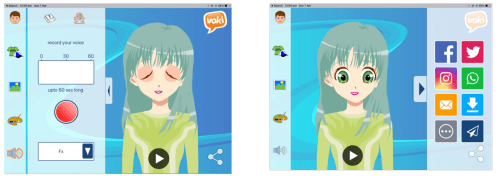
 

Step 3: Using HP reveal scan the sight word card, upload the Voki from your photo album, name it and make it public for others to see.


After introducing this to the Kindergarten team, a colleague suggested using this same idea to read word problems for Kindergarten to solve. The possibilities are endless through the use of these tools and so many others that are now right at our fingertips.

Thanks so much, Ashleigh, for sharing your expertise with the #VokiFam! To see more amazing tech activities by Ashleigh Catanzariti, follow her here.

If you have an awesome way to use Voki and would like to write a guest blog post to share with the Voki Community, email The Voki Team at  feedback@voki.com. We look forward to seeing how you use Voki!

Interview with Educators | Paul Solarz

Interview with Educators | Paul Solarz

Paul

This month, we have great interview with another tech-savvy educator! Paul Solarz is a 5th grade teacher who loves to use Voki! Check out Paul’s interview below!

1. Tell us a little about yourself:

  • Paul Solarz
  • 5th Grade Teacher
  • Westgate Elementary School
  • Arlington Heights, Illinois, USA
  • Voki user since 2012.

2. What are your goals using Voki?

  • Introspection
  • Reflection
  • Creative expression
  • Fun

3. How do you use Voki?

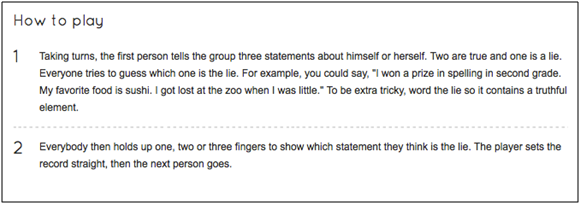
  • To start the year, I have my students play the game, “Two Truths and Lie” to introduce themselves to each other using Voki.  Here is how the game is traditionally played:

2Truth1Lie

  • Instead of telling people their three statements in person, they record them on a Voki.
  • They embed their Vokis on their ePortfolio.  Some add a poll to capture students’ votes, and everyone reflects on the experience.  When students have time, they listen to their friends’ Vokis and type their guess as to which one was the lie in the comments section of the ePortfolio.  Link to an example.
  • I also had my students create a Voki that introduced their Revolutionary War persona to the class.  We all transported back to 1763 and ended up in Boston.  Since we had no food, shelter, or clean clothes, we had to find apprenticeships and start working.  Each of us became a new person with the same first name, but our last name was now our profession.  I asked students to predict why they thought they were transported back in time, and what they hoped to learn while there.  All of this was done on a Voki.  Link to an example.

4. What are your 3 favorite things about Voki?

  • It’s free!
  • My students can all log into one account at the same time.
  • Embeddable on their ePortfolios.

5. What would you add to the Voki product?

  • An automatic saving feature so students don’t lose their work if they have to stop early or if we lose our wireless connection.
  • Improve (or clarify what we’re doing wrong) the voice recording feature – it only works for us some of the time.

6. Do you have any Voki tricks up your sleeve?

  • No.

Want to be interviewed for the Voki blog? Send us an email at submit@voki.com and we’ll get in touch!

Interview with Educators | Rebecca Lallier

Interview with Educators | Rebecca Lallier

screen-shot-2013-06-10-at-6-44-14-pmFor this month’s interview, we have Rebecca Lallier from Dothan Brook School in Vermont. Rebecca is the creator of created School Counseling by Heart to share ideas, lessons, insights, experiences, inspirations!  For her first Voki project, she had her students imagined  him/herself in a future career!  Check them out here!

1.Tell us a little about yourself:

I’m Rebecca Lallier, an elementary school counselor at the Dothan Brook School in White River Junction, Vermont, US. I started using Voki in the spring of 2013.

2.What are your goals using Voki?

  • To give students the opportunity to explore their experiences and possibilities by stepping outside of themselves.
  •  Creating a Voki allows them to speak as if they have already accomplished something – behavioral change, a personal challenge, a future career – so they can “try on” the feeling of success, even before they’ve made much progress.

Sometimes it’s really hard to get kids who are self-defeating or feeling hopeless to push through and keep trying at something that is hard. This is one way to hold out a beacon to them and to help them believe in themselves.

3. How do you use Voki?

  • In the classroom setting – all 44 of my fourth graders made avatars of themselves in a future career as their final project for our Career Smarts unit. I will definitely be using Vokis in more classroom projects in the future.
  • In individual and small group counseling sessions to help kids express themselves.
  • To give directions that kids can access online as needed.

4. What are your 3 favorite things about Voki?

  • That it’s so engaging and intuitive for kids
  • That it is a great tool through which they can show what they have learned (and I can assess that learning)
  • That I can manage the classroom accounts easily

5. What would you add to the Voki product?

More options for kid characters in the classic style and more racial/ethnic, and facial/body shape choices. The customization is great, but it’s hard for some kids to approximate how they look without some more basic characters.
6. Do you have any Voki tricks up your sleeve?

Some kids and I are already cooking up some advice-giving Vokis!

____________________________________________________________

Like Rebecca’s Facebook: School Counseling by Heart

Follow Rebecca on Twitter: @SchCslgByHeart

Want to be interviewed for the Voki blog? Send us an email at submit@voki.com!

Until next time,

The Voki Team


Interviews with Educators | Jennifer Matthews

Interviews with Educators | Jennifer Matthews

227920_10150181942052987_2072322_n

This month’s Interview with Educators features Jennifer Matthews. She is a tech-savvy teacher at Southampton Township School District in New Jersey. She works with students from kindergarten to fifth grade. Jennifer is a Voki user since 2012!

Check out Jennifer’s interview below and the Vokis her students created!

1.Tell us a little about yourself.

My name is Jennifer Matthews and I am the computer/technology and the Gifted and Talented teacher in the Southampton Township School District, which is in Southampton, New Jersey. I service students Kindergarten through 5th grade. I am also the schools webmaster, an adviser for the Media club and the Middle School cheer-leading coach. I have been a teacher for 15 years.

2. What are your goals using Voki?

I wanted a way for my S.T.E.P. (Southampton Township Enrichment Program) students to incorporate more technology into their units of study and to be able to share their thoughts, feelings and information publicly and creatively. Voki Classroom was perfect.

3. How do you use Voki?

My 3rd, 4th, and 5th grade S.T.E.P. students each create a Voki regularly to introduce an important person they are studying, explain a concept which they have learned and express their ideas in a fun and unique way.

4. What are your 3 favorite things about Voki?

There are many things I like about Voki and Voki classroom.

It is engaging to the students and lets them create an avatar that presents information to the world safely.

It is very easy to use and control. The students needed little instruction to use the tools to build their Voki avatar.  As the educator, I can easily add lessons and review what the students create before posting.

Affordability, Voki classroom is very affordable and easily adds technology to every unit of study.

5. What would you add to the Voki product?

Adding more design choices to the Voki’s look would be a wonderful addition as well as possibility having Voki’s interact with one another.
6. Do you have any Voki tricks up your sleeve?

I post my student’s Voki’s on my teacher’s website so all the students (and the world) can see what my students are learning and they can connect to a wide diverse audience.

Here is the link: http://school2.nj.sts.schoolinsites.com/?PageName=TeacherPage&Page=15&StaffID=188719

Want to be interviewed for the Voki blog?
Send us an email at submit@voki.com and we’ll get in touch!

Guest Blogger: Carmen Brettel – How to Use Voki in the Classroom

Guest Blogger: Carmen Brettel – How to Use Voki in the Classroom

Voki speaking avatars are great tools for the classroom. Teachers and students alike can create avatars and use them in a number of ways to make learning fun and more accessible. Not sure how Voki can help you or your students? Here are a few fun ideas for how you can incorporate Voki speaking avatars in your classroom and lesson plans:

Use Your Avatar as a “Substitute”

Students can start to zone out in the middle of lectures, and the teacher’s voice can start to sound like the “mwah mwah mwah” in a Charlie Brown cartoon. Introducing an avatar for some lessons can get students’ attention and make it a little more fun.

Choose a quirky and interesting avatar — not just one that looks like you. Use it for particularly dry discussions and incorporate it into an interactive presentation. Students will feel like they’re watching a show — and they’ll be learning at the same time.

Get Students to Create Interactive Avatars

Every teacher knows that encouraging student participation can be a bit like pulling teeth at times. Encouraging students to create their own interactive avatars may help them to participate more, both by offering them a fun outlet for it, and by offering shy students a way to participate that doesn’t require being so “exposed.”

You can create a virtual interactive classroom if you have access to a computer lab, or you can use the avatars in online discussions through a classroom blog or website. Explore which options work best for you based on your resources.

Assign a Virtual Presentation

Old-fashioned book reports and project presentations can be dull for both the presenter and the audience. Students standing next to a tri-fold project board and reading off note cards are not likely to have a good time, and neither are their peers who have to listen to it.

You can make it a little more fun for all students by asking them to create virtual presentations that are created with a Voki speaking avatar and a powerpoint or other presentation. The avatar can guide the presentation, which students will have fun creating (with a little more creative latitude) and their peers will have fun listening to, helping both to learn more.

Create Avatars Based on Lessons

Help bring historical and literary figures to life by asking students to create a speaking avatar for them. Not only will students have to create an avatar in that person’s likeness — and may have to imagine it based on cues for literary figures — but they can also create dialogue for the characters for a presentation or report.

Such an assignment will help students better understand the figures they are studying in class, and it will help them to have more fun while they’re doing it.

There are many more ways you can use Voki speaking avatars in your classroom to help promote learning and greater interaction. You are only limited by your creativity.

How have you used Voki speaking avatars in your classroom? Share your tips in the comments!

Carmen Brettel is a writer and manager for Studentgrants.org. In her spare time, Carmen enjoys gardening and volunteering at animal shelters.

Interviews with Educators | Christina Martidou

Interviews with Educators | Christina Martidou

Christina

Every month, we like to learn how teachers use Voki in the classroom. This month, we have another great interview with a tech-savvy educator! Christina Martidou is an English teacher who loves to use Voki to celebrate holidays!

Christina Martidou

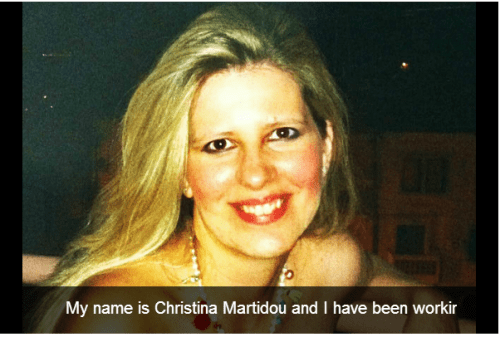
My name is Christina Martidou and I have been working as an English teacher for the past eleven years. I currently work freelance as a private tutor and part- time for the British Council in Thessaloniki, Greece. My students vary from young learners to teenagers. I mainly prepare learners for the Cambridge ESOL exams, develop my own technology-based materials and love writing on my new blog (http://christinamartidou.edublogs.org). I have been using Voki since 2011!

What are your goals using Voki?

To make my ELT lessons more fun and engaging! With Voki the use of technology becomes meaningful!

How do you use Voki?

I mainly use Voki with my younger students especially to celebrate holidays like Halloween and Christmas. I also love the idea of assigning homework via Voki or giving oral instructions in this alternative way.

What are your 3 favorite things about Voki?

  • The fact that you can record your own voice and add sound effects to it!
  • It’s easy-to-use and safe!
  • Avatars can then be e-mailed or embedded in any social media site, blog or website.

What would you add to the Voki product?

I would extend the time limit of the recordings, add more celebrities among the speaking avatars and make it available for iPads & iPhones!

Do you have any Voki tricks up your sleeve?

I use Voki to play riddle games or a celebrity ‘guess who’ game!


Christina made a PhotoPeach presentation. Click the picture below to see it!

Chris

Check out Christina’s blog:  http://christinamartidou.edublogs.org

Follow Christina at: https://twitter.com/CMartidougr

Want to be interviewed for the Voki blog?
Send us an email at submit@voki.com and we’ll get in touch!

Guest Blogger: Phil Timmons from Byte Me

Guest Blogger: Phil Timmons from Byte Me

I’m always looking for new ways to share and communicate in ways that will be engaging enough to keep the attention of my lively bunch of 7 & 8 year olds. We use our Learning Platform extensively for communication and sharing news and information and as it has grown it is getting more likely that areas will get missed or forgotten. I have also had a problem with allowing access to the Learning Platform to younger children where reading levels make it difficult for them to find and navigate to the correct areas.

Voki has been the answer to all the problems for me in one place. I created a character for our Learning Platform (we use frog primary) called Frogbot. He is a little robot Voki to act as a guide and a way to share news. The character appears around the Platform offering advice and direction to pupils and staff. The areas that were getting lost and forgotten are now being used again and children who find reading difficult now enjoy using the Learning Platform where they were somewhat reluctant before. The Internet can be a very ‘wordy’ place!

After embedding the Voki into our Learning Platform I started wondering how else I could use Voki. I happened to be doing speech and dialogue at the time and thought Voki would lend itself nicely to the topic. I created a new character called Doug who had a lot to say for himself. He was originally going to be used online until I stumbled upon a YouTube video. I use Smart Notebook and found out that there is a widget that you can download and embed your Voki straight into a Smart file. I used the Voki on my Smart page for the children to write the sentences using the correct punctuation. We used the idea then to do some further work about using alternatives for the word said and added them to the sentences we had written. Massive thank you goes to Doug for helping teach my class how to use speech marks and keep the engaged and excited at the same time.

I’m now looking at using Voki to make characters with the children to make conversations we can embed into Smart for the class to write up the next day.

_______________________________________________________________________________

Phil runs the site Byte Me with his partners to provide helpful advice and suggestions for teachers.

Follow Phil on Twitter: @Bytemeict

National Poetry Month Celebration

National Poetry Month Celebration

It’s time to celebrate National Poetry Month! Last year, we have Voki users shared some of their favorite poetry with us. Take a look at them below:

A Poem by Emily Dickinson

Oh, the Places You’ll Go! By Dr. Seuss

Warm Summer Sun by Mark Twain

We would love for you to send in more of your favorite poems. Just send us the embed code of your Voki poet to feedback@voki.com! Be sure to include the title, entire poem, and the poet’s name!

In addition to posting your favorite poems, we will be posting a fun Tip of the Week with a great poetry activity to do with your students! So be on the lookout for them!

Until next time,

The Voki Team

Voki Tip of the Week: Voki on Popplet

Voki Tip of the Week: Voki on Popplet

We know that some of our Voki teachers use Popplet in their class! What if you want to have your Voki character there? We have the solution here!

Direct Link

  1. Go to www.voki.com.
  2. Create and publish your Voki.
  3. Select your Voki size and copy your Voki link.1
  4. Go to www.popplet.com and sign in.2
  5. Click to Make new popplet and double click to create a popple.3
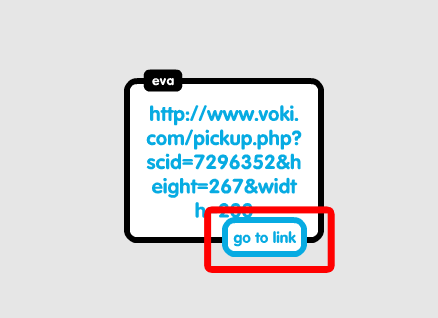
  6. Paste your Voki link into the popple.4
  7. Hover your mouse over the Voki link and click on Go to link.5

Now you go to your Voki from Popplet!

Note: If you want your Voki to appear in full screen, read this Tip of the week to learn how!

Voki Video

  1. To save your Voki as a video file, check out this Tip of the week.
  2. Upload it on YouTube.
  3. 6Go to www.popplet.com and sign in.2
  4. Click to Make new popplet and double click to create a popple.3
  5. Click on the upload icon.
  6. Click on the YouTube icon.7
  7. Search for your video.8
  8. Select your video and click Add to popple.9

Now you can view your Voki directly on Popplet!

If you have any feedback, comments, or suggestion for Voki, send us an email at feedback@voki.com!

Until next time,

The Voki Team

Guest Blogger: Joann Claspill

Guest Blogger: Joann Claspill

JCEvery once in a while, a new tech tool comes along that really makes an impact with me and my students. www.voki.com has been that website for me since last school year.

I discovered Voki when I was doing the novel study for “No Talking”, by Andrew Clements. I was online searching for activities to enrich and engage my students and saw that someone has made Vokis for the 2 main characters. I checked them out and was hooked! I used these to introduce the characters to my students, and then using Voki took off in my classroom.

We did another novel study on “Julie of the Wolves” later in the year. To work on summarizing text, I made a Julie voki (the main character) and had her summarize the chapter for the class. This was the “I do it” stage. Next, we developed a Julie voki together and posted it – the “We Do It” stage. Finally, it was my students’ turn.

Student One

Student Two

Student One chose to use his own voice for recording, student two used one of the many, many choices available on Voki as his characters’ voice. The abundance of choices is one of the reasons we love Voki. Students not only choose voice, they choose characters physical traits, backgrounds and more. There are even animal avatars to pick from!

Besides using Voki as a tool for reading instruction, I use it frequently to review or introduce History ideas. If we are learning about roles played in a war, I create Vokis to reinforce concepts to the students. Something as simple as hearing it from a Voki avatar makes it more interesting than just hearing it from me. I also review vocabulary terms using Voki.

SS Vocab

My students this school year are just getting into Voki and I can’t wait to see what develops. The site is user friendly, the students love creating these and I love the engaged learning that takes place when I use Voki in my classroom!

Joann Claspill
Langford Elementary
5th Grade