Voki Tip of the Week: Have a question? Contact us!

Voki Tip of the Week: Have a question? Contact us!

When you have a comment, recommendation or question to share with The Voki Team, we are here to listen! Getting in touch with us is easy. All you need to do is send us an email that clearly states your purpose for writing to feedback[at]voki.com. If you need help with a specific tool on Voki, it always helpful if you can send a screenshot of what you are experiencing.

We receive feedback daily and want to respond to everyone, therefore it may take us a couple days to get back to you. Our goal is to make you happy so please be patient and we will work with you!

So next time you need help or simply feel like sharing a good Voki idea, send us an email!

Until Next Time,

The Voki Team

Voki for Learner-Center Design

Voki for Learner-Center Design

Voki Interview with Educators

 Houston Community College, Teaching & Learning Resources

HCC Model Courses Use Voki for Learner-Centered Design

Article by Wendy Maboudian, Ed.D. Instructional Designer, TLR

Houston Community College, 4th largest in the community college nation, is a learner-centered institution. The HCC Teaching & Learning Excellence program systematically supports faculty teams in  building online model courses for all faculty to use. These model courses are learner-centered in many ways to engage learners, including the use of Voki avatars.

Our uses of Voki avatars are learner-centered because they guide students to become stronger learners (see Neal Tannihill’s use of Voki below), they create real-world scenarios, and they provide engaging learning moments. They’re fun! Here are samples of how Voki made a difference for some of our model courses.

(Quick note: Our courses are in Moodle 1.9; we’ve used Labels, Book, Quiz, and the Forum tools to deliver the Voki avatars. We include written script for ADA compliance. Because the courses are models that faculty may want to change, we used the automated voices [mostly Paul and Julie]. But the audio upload and the Voki recording capability are also awesome!)

See for yourself…

Teaching Assistant: In Government 2302, Dr. Neal Tannihill created Avi, the Teaching Assistant. Avi was developed to welcome, guide, encourage and give advice on study skills. The first time the students meet Avi, he doesn’t give a list of to-do’s, but instead inspires them to succeed. (Nationally, 50% of community college students drop out before their second year, so it’s important to engage and support student success. Instead of a list of links, they first hear Avi encourage them.)

Our learner-centered design keeps the student in mind. Assessing what the students most often ask in his classes, Dr. Neal Tannihill (Avi’s author) designed avatar students to prompt Avi’s advice. Avi is always polite, calls them by name, often generalizes to include all students, and gives great study tips.

Avi gives the student study tips and responds to concerns.

A student asks Avi an important question that many students wonder in classes, but may be afraid to ask. She asks if she has to read everything in the course.…***

Avi answers the student, explaining how the course works.…***

Avatar student, Chris may speak for other students. Chris bombed a test. Who knows if this scenario might change a student’s life decision to stay in school.

Avi keeps student, Chris, from dropping out… and gives a study tip. How effective is Avi? Very!

Avi guides students on what to do. Avi may get to answer student posts! Cool!

Guide for the course journey: Dr. Cammy Shay, well-grounded in engaging students, used a small-sized avatar, Sam, to guide to deliver an introductory lecturette in the model course topics throughout the students’ journey. Try this one out. Doesn’t it make you want to learn more? Dr. Shay selected blue jeans, shades, and the capitol background to set the tone.

Discussing norms for each stage of life, Dr. Jane Cirillo and Dr. Irv Lichtman add humor with an older Voki avatar couple, Norm and his doctor wife, Norma. Voki gives us neat options to age, add weight and height, and change clothes. Here is an example where Norm and Norma discuss aging.

Norm states his observation and opinion….

Norma answers with her logical fact-based explanation….

Create a scenario: Drs. Susan Grigsby and Mahtash Moussavi wanted real-world experiences in their online class. To design scenarios in the model course for nutrition, the students become intern nutritionists. In the clinic, avatar – Nurse Tara – guides them. The students ask the avatar patient questions using a script and then click the Voki to hear the answers. The student then filters out the conversational comments to fill in the clinical questionnaire. Below you can hear samples of Nurse Tara and two of patient answers. See how Nurse Tara takes the student through the assignment of a virtual intern. (Each rendition of Nurse Tara is in a different location in the scenario as the students work.)

Tara greets the students. She praises them for being on time.

Nurse Tara directs students to go see the patient….

Nurse Tara reminds the students that they are making a difference for the patient.

This patient is asked to describe what she eats. There’s humor in her answer.

This patient also describes her diet, which is different. She has diabetes and wants to control her blood glucose. The student-dietician will develop a diet recommendation for her.

You can even partner with an avatar team member instead of giving an assignment in which the learner is given links to write a short paper on child hunger. The assignment is set in the context of contributing to a special council and is assigned a partner to help. On the next page, the partner is an avatar whose share of the work is actually what the student would have been given anyway. The student learns about team roles and child hunger.

The avatars in our model courses engage and promote confidence and a perception of warmth in the course. They help students know what to do, encourage them to stay, help them practice in scenarios, advise them, and offer nuggets of info that are memorable. Does this support student success in our online model courses? (For more on Learner-Centered design, visit http://hccs.edu/tle)

***We’ve been working with around five Voki classic avatars to build our characters. Great news! Just went to the Voki site last night and saw that the wonderful follks who give educators Voki have supplied more classic Voki’s.

Voki Classroom Summer Specials

Voki Classroom Summer Specials

Summertime is just around the corner and we’ve got an exciting Voki Classroom Summer Special to share with you! Starting in May through the end of July, you will receive FREE extra months when you buy a 1 or 2 year Voki Classroom subscription. This special is also great for teachers who are new to Voki Classroom and need some time to “play around.” With these summer savings, you can have your Voki Classroom ready for August through the entire school year.

Check out the schedule below!

          * May Special – 3 extra months

          * June Special – 2 extra months

          * July Special – 1 extra month

With all of these free months, you can enjoy a relaxing summer and feel confident with your new Voki Classroom subscription before the school year kicks in!

To take advantage of the Voki Classroom Summer Special, please visit the Voki Classroom website. Have a great vacation and we hope to see you in Voki Classroom soon!

Until Next Time,

The Voki Team

Voki Classroom Updates: Ready to Review Notifications, Multi-Delete Function and Privacy Features

Voki Classroom Updates: Ready to Review Notifications, Multi-Delete Function and Privacy Features

We’ve got more Voki Classroom updates rolling in and we think you are going to like these! As of this week, improvements have been made for reviewing Vokis as well as the multi-delete function for students. We’ve also implemented additional  student privacy settings to Voki Classroom.

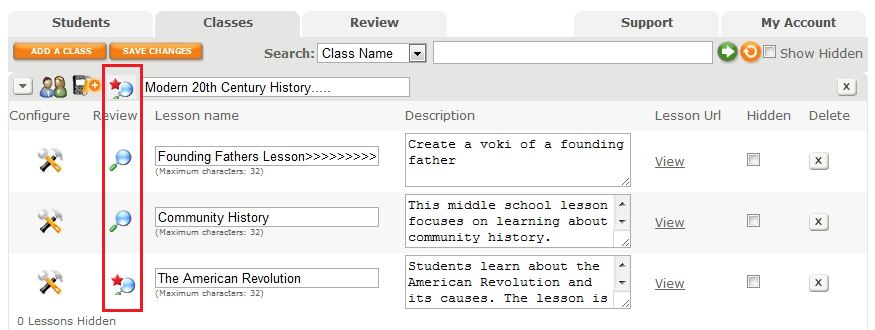
To improve your organization in Voki Classroom, we have introduced a visual that indicates that a Voki is Ready to Review. After you click the Classes Tab, you will see a list of your Classes and Assignments with the magnifying glass review icon. If there are new Vokis to review in a Class or Assignment, a red star will appear on the magnifying glass as a notification. By clicking on the notification icon, you will be taken to the Vokis that need to be reviewed.

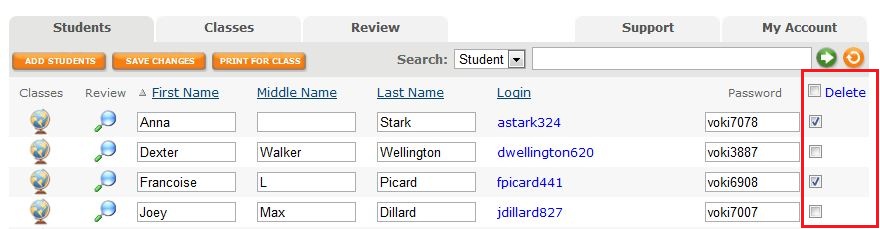
It’s now possible to delete more than one student at a time  with the new multi-delete function. Select the students you would like to delete then click on the delete button at the top of the column. Click the check box at the top of the column to select all students. You may deselect students by clicking on the check box.

Ensuring your students’ information and Vokis are private is now easier to manage with our streamlined Assignment Configuration tool. When it comes time to set up an Assignment Page, the module that pops up allows you to set your Assignment Page Security to public or private and include a password for access. You also have the option to show your students’ names or their initials only. It’s all up to you!

We hope you are enjoying Voki Classroom and always look forward to hearing your feedback! Your opinions matter. If you think of something we could do to make  your experience better, drop us a line at feedback@voki.com.

Until Next Time,

The Voki Team

Voki Poet: A Poem by Emily Dickinson

Voki Poet: A Poem by Emily Dickinson

We hope you were able to spend some time this month enjoying poetry in and out of the classroom! Happy National Poetry Month!

Hope is the thing with feathers 
That perches in the soul 
And sings the tune without the words 
And never stops at all.

by Emily Dickinson

Voki Tip of the Week: Say Something Nice

Voki Tip of the Week: Say Something Nice

If your students are needing a boost, cheer up the atmosphere by exchanging compliment Vokis! Have your students draw names from a bag. Next, ask them to create a Voki that says something nice about the person they drew. This can be a fun way to lift spirits and start the class on the right foot!

Voki Poet: Warm Summer Sun by Mark Twain

Voki Poet: Warm Summer Sun by Mark Twain

Warm Summer Sun

by Mark Twain

Warm summer sun,
Shine kindly here,
Warm southern wind,
Blow softly here.
Green sod above,
Lie light, lie light.
Good night, dear heart,
Good night, good night. 

Don’t forget to submit your favorite poem as told by Voki! Every Friday, we will post your submissions to our blog! To submit your Voki Poet, send the complete embed code along with the poem title and author’s name to feedback@voki.com.

Voki Tip of the Week: Weekly Lesson Recaps

Voki Tip of the Week: Weekly Lesson Recaps

Does it ever seem like your students let lessons go in one ear and out the other? Do you find yourself answering the same questions over and over again? Don’t fret! Try a Lesson Recap Voki instead!

At the end of every week, have each of your students make a Voki that describes one thing they learned. Some questions they could answer include:

1.      Who or what was the main topic of the lesson?

2.     Why is the lesson important?

3.     What was the most interesting thing you learned from this lesson?

4.     How is it related to your other lessons or studies?

Check out the Voki below to see this idea put into action!

Voki Poet: Oh, the Place You’ll Go! by Dr. Seuss

Voki Poet: Oh, the Place You’ll Go! by Dr. Seuss

Oh, the Places You’ll Go!
by Dr. Seuss

“You’re off to Great Places!
Today is your day!
Your mountain is waiting,
So… get on your way!”

Don’t forget to submit your favorite poem as told by Voki! Every Friday, we will post your submissions to our blog! To submit your Voki Poet, send the complete embed code along with the poem title and author’s name to feedback@voki.com.

Voki Tip of the Week: Use Voki to Start a Conversation

Voki Tip of the Week: Use Voki to Start a Conversation

Teacher: Good morning class! How are you? What did  you do this weekend?

Student: Nothing…

Teacher: Really? You didn’t go outside, or go to a movie, hang out with your friends?

Student: I watched tv, slept…

Sometimes starting a conversation with your first class on Monday can feel like pulling teeth. Instead of playing this game of tug-of-war to get a conversation started, use Voki to help your students tell their weekend stories!

Try this: Each Monday, have your students create a Voki that describes their favorite part of the weekend. Have them elaborate on what happened, who was with them, and why it was their favorite activity of the weekend.

By encouraging your students to open up in the beginning of class, you are paving the way for a more communicative environment where students will be able to express their feelings, doubts, and ideas. Check out the Vokis below to see examples of how this exercise can work!

-The Voki Team