Student passwords are automatically-generated in Voki Classroom whenever you create a Student account. But did you know that you can change your student’s password? Your students can even choose their own passwords!
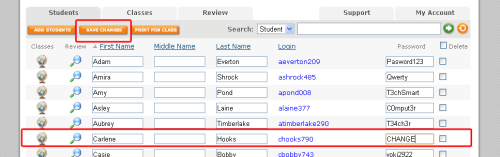
- To change your student’s password, find the account that you want to modify.
- Change the password here.
- Hit the Save button!
If you want your student to pick their own password, all you need to do is download the Voki Classroom list template and enter their passwords into the last password column! Download the template here.

Then just upload your list to your Voki Classroom account and your students can log into their Student account with their own password!
Have feedback, comments, or questions for Voki? Just send an email to feedback@voki.com!
Until next time,
The Voki Team
 The Voki Blog - Expanding Education
is it free
LikeLike
tell me
LikeLike
Hi Ellah,
Student accounts are part of Voki Classroom. Voki Classroom is a classroom management system for Voki. It is a paid subscription. For more information please visit: http://www.voki.com/products.php
Best,
The Voki Team
LikeLike
This web site doesn’t show up correctly on my droid – you may want to try and repair that
LikeLike
Hi there!
Please send some screenshots to feedback@voki.com!
The Voki Team
LikeLike