Voki Teach: An Engaging Way to Teach Common Core

Voki Teach: An Engaging Way to Teach Common Core


Hello Voki Users!

I am practically bursting at the seams with excitement. Why? You ask.

Well, Voki.com has just released its newest product— drum roll please….

 

vt featured image


Voki Teach

Voki Teach is a Common Core aligned, ready-to-teach curriculum, designed by teachers for teachers! 

Let’s face it, as a teacher you spend hours on the internet searching for content, followed by hours crafting your lesson plans and worksheets, followed by hours of wondering if your lessons are Common Core aligned. By the time you step in front of your students to teach, you are exhausted and drained.

We wanted to support teachers and provide students with the chance to engage with rigorous content in a positive, engaging, and meaningful way. And so, Voki Teach was born!
 

vt facilitate learning

Why Students Will Love It

Voki Teach is an academic experience. This experience allows students to interact with characters similar to the ones they admire on TV, but with a slight scholastic twist. In the classroom, the characters act as educators, mentors, and experts, taking students on scientific, literary, and analytical adventures.

 

vt prebuilt


Why Teachers Will Love It

Engaging Common Core aligned content in ready -to-teach form is hard to come by. Voki Teach provides teachers with common core aligned lessons crafted by certified teachers. With Voki Teach, teachers will spend more time facilitating learning and less time preparing materials.

vt designed by teachers


Here’s How We Did It

Our team of teachers, certified in Literacy, ESL, General Education, and Special Education, studied the Core Knowledge curriculum and molded lessons that they believed would benefit their own students. By infusing instructional best practices, they were able to generate lessons that maximize engagement and foster effective teaching.grades lessons
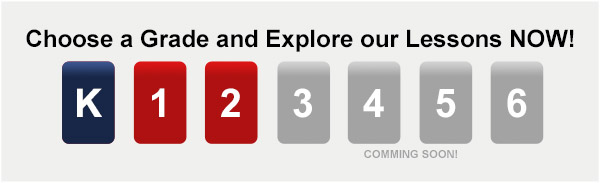
 

Right now, we have two domains available for kindergarten through second grade. Our team of teachers is continuing to craft engaging lesson plans and presentations. Our goal is to provide teachers with a variety of themes and topics to choose from in grades K through 6th.
VP with VT no pricing


There’s even more  good news! For a limited time, Voki Teach is available for free when you purchase Voki Presenter, or if you already have Voki Presenter!  Now is certainly the time to sign up for presenter if you haven’t already!

Click here to see a Voki Teach Lesson!

Let Us Know What You Think!

We would love to get your feedback! Please take some time to check out Voki Teach and please do not hesitate to share some of your suggestions.

Happy Teaching!

Until Next Time,

Heather 

HeatherBio: Heather is the Community Manager at Voki and is part of the Marketing Team at Oddcast.  Before she joined the Voki team, she was a teacher for 7 years!  She has taught in charter, private, and public schools all across NYC. With her teacher hat on, she will create meaningful, engaging, and relevant content that can be implemented in your classrooms.  She is excited to partner with you to engage and educate your students! 


Upcoming Events

Upcoming Events

Yes! Voki have some upcoming events that you may want to join! We will be hosting our very first Voki Demo on August 28th, 2014.

The Voki Demo would be great for new Voki users to learn more about Voki Classroom and Voki Presenter. Also, you’ll have a chance to talk to the Voki Team and ask questions!

To view all the upcoming events, check out our calendar below:

calendar


We have more events scheduled in the future! So don’t forget to check back!

If you have any questions, feel free to reach out to us at feedback@voki.com!

Until next time,

The Voki Team

Voki July Summer Special 2014

Voki July Summer Special 2014

You’ve got one more month to take advantage of Voki’s Summer Special! July is your last chance to receive a FREE month with your 1 or 2 year Voki Classroom, Voki Presenter, or Bundle subscription.

With the extra month, you can get your beach towels and sunglasses ready for some summer fun!

Summer Special

To receive your free month with your Voki Classroom and/or Voki Presenter subscription, all you need to do is sign up! We will take care of the rest.

Enjoy your vacation and we hope to see you soon!

Until Next Time,

The Voki Team

Voki Summer Specials are BACK!

Voki Summer Specials are BACK!

Summer will be here soon and our Summer Specials are BACK! That’s right! Starting in June through the end of July, you will receive FREE extra months when you buy a 1 or 2 year Voki Classroom,  Voki Presenter, or the Bundle subscription. This special is also great for teachers who are new to Voki Classroom and Voki Presenter and need some time to “play around” before school starts!

Summer Special


  • June Special – 2 extra months
  • July Special – 1 extra month


To take advantage of this Summer Special, please visit the Pricing page and sign up.

Have a great summer vacation!

Until next time,

The Voki Team

All New Voki Classroom Tutorials

All New Voki Classroom Tutorials

Q: I am having trouble with Voki Classroom. Do you have any video tutorials for Voki Classroom users?

We do now! We recently created new tutorials to help Voki Classroom users get started! These new tutorials (or lessons) go over the different sections in Voki Classroom and show users how they can add students, create classes and assignments, configure assignments, and review Students’ works.

Lesson 1 – Introduction to Voki Classroom

This first Voki Classroom lesson will provide you with a general overview of Voki Classroom. There are three main sections in Voki Classroom: Students, Classes, and Review. And there are also a Support section, and an Account Management section.

Lesson 2 – Creating Classes and Adding Students

This is the second Voki Classroom lesson. In this lesson, we will introduce two different ways to add students to your account: add each student or upload a list of students. Then, we will show you how to create a class and assign your students to a class.


Lesson 3 – Creating and Configuring Assignments

In the third Voki Classroom lesson, we will show you how to create and configure assignments. Each of your Assignment automatically generates its Assignment Page, where you can showcase your students’ work.

Lesson 4 – Reviewing Student Vokis

The fourth Voki Classroom lesson will show you how to review and approve your Students’ work.  You can view all Students’ work on the Review page.

Hope you enjoy the tutorials! Stay tuned for more tutorials!

Until next time,
The Voki Team

Interview with Educators | Rebecca Lallier

Interview with Educators | Rebecca Lallier

screen-shot-2013-06-10-at-6-44-14-pmFor this month’s interview, we have Rebecca Lallier from Dothan Brook School in Vermont. Rebecca is the creator of created School Counseling by Heart to share ideas, lessons, insights, experiences, inspirations!  For her first Voki project, she had her students imagined  him/herself in a future career!  Check them out here!

1.Tell us a little about yourself:

I’m Rebecca Lallier, an elementary school counselor at the Dothan Brook School in White River Junction, Vermont, US. I started using Voki in the spring of 2013.

2.What are your goals using Voki?

  • To give students the opportunity to explore their experiences and possibilities by stepping outside of themselves.
  •  Creating a Voki allows them to speak as if they have already accomplished something – behavioral change, a personal challenge, a future career – so they can “try on” the feeling of success, even before they’ve made much progress.

Sometimes it’s really hard to get kids who are self-defeating or feeling hopeless to push through and keep trying at something that is hard. This is one way to hold out a beacon to them and to help them believe in themselves.

3. How do you use Voki?

  • In the classroom setting – all 44 of my fourth graders made avatars of themselves in a future career as their final project for our Career Smarts unit. I will definitely be using Vokis in more classroom projects in the future.
  • In individual and small group counseling sessions to help kids express themselves.
  • To give directions that kids can access online as needed.

4. What are your 3 favorite things about Voki?

  • That it’s so engaging and intuitive for kids
  • That it is a great tool through which they can show what they have learned (and I can assess that learning)
  • That I can manage the classroom accounts easily

5. What would you add to the Voki product?

More options for kid characters in the classic style and more racial/ethnic, and facial/body shape choices. The customization is great, but it’s hard for some kids to approximate how they look without some more basic characters.
6. Do you have any Voki tricks up your sleeve?

Some kids and I are already cooking up some advice-giving Vokis!

____________________________________________________________

Like Rebecca’s Facebook: School Counseling by Heart

Follow Rebecca on Twitter: @SchCslgByHeart

Want to be interviewed for the Voki blog? Send us an email at submit@voki.com!

Until next time,

The Voki Team


Interviews with Educators | Christina Martidou

Interviews with Educators | Christina Martidou

Christina

Every month, we like to learn how teachers use Voki in the classroom. This month, we have another great interview with a tech-savvy educator! Christina Martidou is an English teacher who loves to use Voki to celebrate holidays!

Christina Martidou

My name is Christina Martidou and I have been working as an English teacher for the past eleven years. I currently work freelance as a private tutor and part- time for the British Council in Thessaloniki, Greece. My students vary from young learners to teenagers. I mainly prepare learners for the Cambridge ESOL exams, develop my own technology-based materials and love writing on my new blog (http://christinamartidou.edublogs.org). I have been using Voki since 2011!

What are your goals using Voki?

To make my ELT lessons more fun and engaging! With Voki the use of technology becomes meaningful!

How do you use Voki?

I mainly use Voki with my younger students especially to celebrate holidays like Halloween and Christmas. I also love the idea of assigning homework via Voki or giving oral instructions in this alternative way.

What are your 3 favorite things about Voki?

  • The fact that you can record your own voice and add sound effects to it!
  • It’s easy-to-use and safe!
  • Avatars can then be e-mailed or embedded in any social media site, blog or website.

What would you add to the Voki product?

I would extend the time limit of the recordings, add more celebrities among the speaking avatars and make it available for iPads & iPhones!

Do you have any Voki tricks up your sleeve?

I use Voki to play riddle games or a celebrity ‘guess who’ game!


Christina made a PhotoPeach presentation. Click the picture below to see it!

Chris

Check out Christina’s blog:  http://christinamartidou.edublogs.org

Follow Christina at: https://twitter.com/CMartidougr

Want to be interviewed for the Voki blog?
Send us an email at submit@voki.com and we’ll get in touch!

Guest Blogger: Phil Timmons from Byte Me

Guest Blogger: Phil Timmons from Byte Me

I’m always looking for new ways to share and communicate in ways that will be engaging enough to keep the attention of my lively bunch of 7 & 8 year olds. We use our Learning Platform extensively for communication and sharing news and information and as it has grown it is getting more likely that areas will get missed or forgotten. I have also had a problem with allowing access to the Learning Platform to younger children where reading levels make it difficult for them to find and navigate to the correct areas.

Voki has been the answer to all the problems for me in one place. I created a character for our Learning Platform (we use frog primary) called Frogbot. He is a little robot Voki to act as a guide and a way to share news. The character appears around the Platform offering advice and direction to pupils and staff. The areas that were getting lost and forgotten are now being used again and children who find reading difficult now enjoy using the Learning Platform where they were somewhat reluctant before. The Internet can be a very ‘wordy’ place!

After embedding the Voki into our Learning Platform I started wondering how else I could use Voki. I happened to be doing speech and dialogue at the time and thought Voki would lend itself nicely to the topic. I created a new character called Doug who had a lot to say for himself. He was originally going to be used online until I stumbled upon a YouTube video. I use Smart Notebook and found out that there is a widget that you can download and embed your Voki straight into a Smart file. I used the Voki on my Smart page for the children to write the sentences using the correct punctuation. We used the idea then to do some further work about using alternatives for the word said and added them to the sentences we had written. Massive thank you goes to Doug for helping teach my class how to use speech marks and keep the engaged and excited at the same time.

I’m now looking at using Voki to make characters with the children to make conversations we can embed into Smart for the class to write up the next day.

_______________________________________________________________________________

Phil runs the site Byte Me with his partners to provide helpful advice and suggestions for teachers.

Follow Phil on Twitter: @Bytemeict

Voki Tip of the Week: Voki on Popplet

Voki Tip of the Week: Voki on Popplet

We know that some of our Voki teachers use Popplet in their class! What if you want to have your Voki character there? We have the solution here!

Direct Link

  1. Go to www.voki.com.
  2. Create and publish your Voki.
  3. Select your Voki size and copy your Voki link.1
  4. Go to www.popplet.com and sign in.2
  5. Click to Make new popplet and double click to create a popple.3
  6. Paste your Voki link into the popple.4
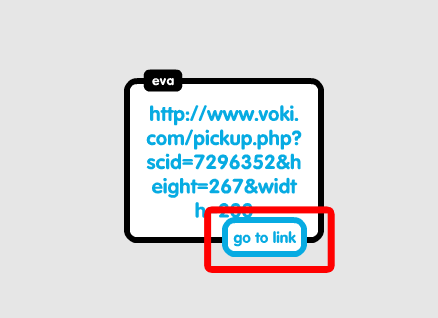
  7. Hover your mouse over the Voki link and click on Go to link.5

Now you go to your Voki from Popplet!

Note: If you want your Voki to appear in full screen, read this Tip of the week to learn how!

Voki Video

  1. To save your Voki as a video file, check out this Tip of the week.
  2. Upload it on YouTube.
  3. 6Go to www.popplet.com and sign in.2
  4. Click to Make new popplet and double click to create a popple.3
  5. Click on the upload icon.
  6. Click on the YouTube icon.7
  7. Search for your video.8
  8. Select your video and click Add to popple.9

Now you can view your Voki directly on Popplet!

If you have any feedback, comments, or suggestion for Voki, send us an email at feedback@voki.com!

Until next time,

The Voki Team

Guest Blogger: Joann Claspill

Guest Blogger: Joann Claspill

JCEvery once in a while, a new tech tool comes along that really makes an impact with me and my students. www.voki.com has been that website for me since last school year.

I discovered Voki when I was doing the novel study for “No Talking”, by Andrew Clements. I was online searching for activities to enrich and engage my students and saw that someone has made Vokis for the 2 main characters. I checked them out and was hooked! I used these to introduce the characters to my students, and then using Voki took off in my classroom.

We did another novel study on “Julie of the Wolves” later in the year. To work on summarizing text, I made a Julie voki (the main character) and had her summarize the chapter for the class. This was the “I do it” stage. Next, we developed a Julie voki together and posted it – the “We Do It” stage. Finally, it was my students’ turn.

Student One

Student Two

Student One chose to use his own voice for recording, student two used one of the many, many choices available on Voki as his characters’ voice. The abundance of choices is one of the reasons we love Voki. Students not only choose voice, they choose characters physical traits, backgrounds and more. There are even animal avatars to pick from!

Besides using Voki as a tool for reading instruction, I use it frequently to review or introduce History ideas. If we are learning about roles played in a war, I create Vokis to reinforce concepts to the students. Something as simple as hearing it from a Voki avatar makes it more interesting than just hearing it from me. I also review vocabulary terms using Voki.

SS Vocab

My students this school year are just getting into Voki and I can’t wait to see what develops. The site is user friendly, the students love creating these and I love the engaged learning that takes place when I use Voki in my classroom!

Joann Claspill
Langford Elementary
5th Grade