Interview with Educators | Bronwyn Joyce

Interview with Educators | Bronwyn Joyce

935860_689610657722762_237737742_n

Bronwyn is a classroom teacher at Liddiard Rd Primary School, Victoria Australia, iEARN Presenter iEARN World Conference Doha, Qatar 2013 and a member of the iEARN Australia Management team.  Her passion is globalising education and using ICT in the classroom as a 21st Century Learning tool.

1.    Tell us about yourself.

I am Bronwyn Joyce, a grade 5/6 teacher from Liddiard Rd Primary School, Australia. I started using Voki’s in 2013 as a way for my students to engage with technology in a fun and interactive way.

2.    What are your goals for using Voki? 

  • To give my students a voice to explain, have an opinion and to reflect.
  • To interact through technology when participating in global projects.
  • To enable our international friends to learn ways of interacting through technology without language being a barrier.
  • To help teach my international colleagues ways to enhance English skills and oral communication in their classrooms.

Vokis are bright, interactive and a simple way to build students skills in using technology while building their self esteem. They allow my students to communicate, when at times they feel like they don’t have a voice. Vokis help up connect with the world.

3.    How do you use Vokis?

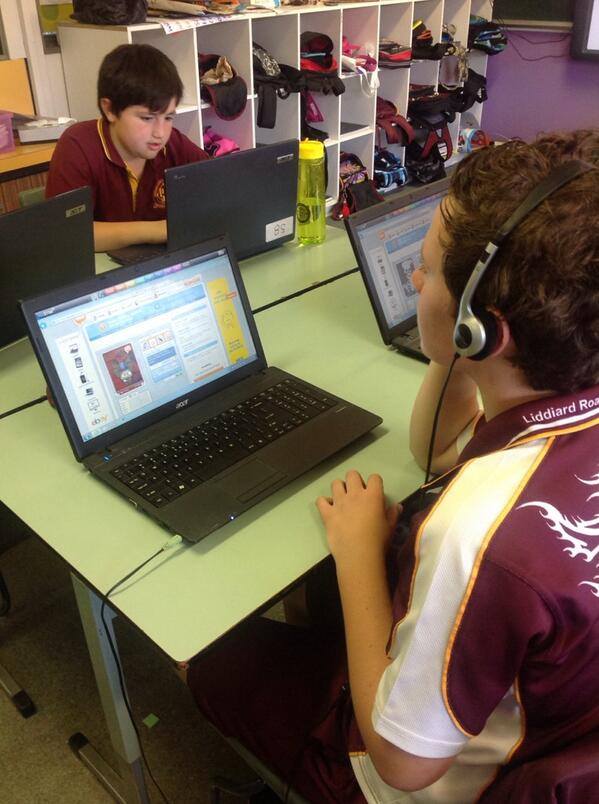
When my class hear we are creating Voki’s the room erupts, they know we are going to be sending a message to the some one or the world.

I use Voki to:

  • Introduce my students in our global projects.
  • To reflect on their learning goals.
  • To explain their thinking on global issues eg Why Global Education is important in our classroom?
  • To teach my international teacher friends how to use Voki to build English communication skills.
  • To build intercultural relationships between classrooms around the world.
  • To introduce technology to foreign visitors who visit our school – I run a Voki lesson with our foreign visitors

1425537_746669115350249_1983210541_n4.    What are your 3 favourite things about Voki? 

  • It is interactive and engages student with creative ways of communicating.
  • The idea of a talking avatar hooks the students in.
  • It is global and can be embedded in to websites, blogs and places that can showcase students’ work across the world.

5.    What would you add to the Voki product? 

I would like to find an easier way to embed my students work. Sometimes we make some amazing Voki’s and when we publish they will not embed and the students get really disappointed or they lose their work and they have to start again.

 6.    Do you have any Voki tricks up your sleeve? 

Promoting my love and success of using Voki in my classroom with more global collaboration projects and teachers across the globe who has never used Voki before.

Watch out, I think we might make some Vokis to give the Voki team some advice and feedback on how we use and benefit from such a fabulous Web 2.0 tool. Stay tuned.

Voki is a way students can communicate cross-classroom, worldwide. It provides opportunities to build confidence through its communication options. Students can be academic, creative and critical thinkers while building colourful avatars that enable individual design and engagement in their classrooms. In my classroom Voki is voted the number one Web 2.0 tool because everyone can interact with ICT in their own individualised way.

____________________________________________________________

Check out Bronwyn’s blog:  56jclassroom.wordpress.com

Follow Bronwyn on Twitter: @JoyceBronwyn

Want to be interviewed for the Voki blog? Send us an email at submit@voki.com!

Until next time,

The Voki Team

Voki Tip of the Week: Post-New Year’s Project

Voki Tip of the Week: Post-New Year’s Project

It’s always a good idea to start off the first lesson back after their holiday break with a fun Voki project! Have your students create a Voki to talk about their holiday. Make sure that they use the correct past tense!

Check out an example below:

If you have any feedback, comments, or suggestion for Voki, send us an email at feedback@voki.com!

Until next time,

The Voki Team

Voki “Guess the Name” Contest Winner

Voki “Guess the Name” Contest Winner

We’re so excited to receive thousands of entries to the Voki “Guess the Name” Contest! Thanks so much to everyone who submitted their guess!

So who’s the lucky winner? The winner of the Apple iPad is… Charles L. from NY! The runner ups are Marilyn W. from MI, Bev H. from MO, and Hanbi C. from NY.

Here’s a thank you message from Charles:


Congratulation to all the winners! We hope you enjoy the prize!

Until next time,

The Voki Team

Guest Blogger: Trine Mork

Guest Blogger: Trine Mork

I’ve been using Voki for a couple of years now in one of my EFL courses in one particular Japanese university class. This year I decided to procure some student feedback and reflect on how things were going with the platform. The main pedagogical impetus for taking on this application was threefold:

  1. to expose students to one of many fun tools available online through which they could practice their speaking in a safe and secure setting (privacy controlled).
  2. to expose students to computer applications in general, as computer competency tends to be low, and students need confidence to adapt to an ever increasingly digital world upon graduation.
  3. to provide a medium though which students could record and share some clips of their speaking for evaluation purposes.

Students in this particular full-year course used Voki twice in their first semester, and will do so once again at the end of the second semester. (Japanese universities generally start the academic year in April.) The time they will have spent with the platform is therefore minimal. For their first Voki assignment, they had to record a self-introduction and paste their Voki avatar onto their blogs. This first assignment was not only to help them get used to both Voki and the WordPress blogging platform (several students were not even aware of the concept of blogging), but also to get them used to having to deal with this technology in a foreign language. It was highly intimidating for some. The second VOKI recording also had to be posted to their blogs and was part of a larger semester review activity that was assessed and weighted at 30% of the semester grade, as will be the case for the 3rd assignment next term. I have always perceived formal speaking assessments as class time wasters and have preferred to assess student L2 (second language) speaking throughout the term through monitoring in-class activities such as task-based speaking activities and discussions. Tools like Voki have added another dimension in addressing teachers’ need to get feedback on student performance while at the same time maximizing the few contact hours they have with their students on campus.

From a teacher’s perspective, Voki indeed has a lot to offer, which is why I use it. There are issues I continue to have, however, but these actually have less to do with the Voki platform itself than other issues such as language ability. The first main problem I have is that despite having in-class screen demos on how to use the platform and embed Vokis onto their blogs, students still get stuck with the technology. Instead of taking the extra time (of which I have none, so I really don’t have a choice) to help individual students troubleshoot outside of class, I make it a point to challenge students to be autonomous learners and try to figure out how things work by trial and error; to have to the curiosity to click buttons to see what happens, and to take the initiative to collaborate with their peers if stuck. Sadly, this approach to learning does not come easily to Japanese learners, who by university age are used to a teacher-centered, top-down approach to acquiring any knowledge or skill.

A second issue I have is the existence on Voki of the option to type in desired speech. Despite what I hoped were clear instructions, and despite what I thought was an obvious goal that Voki was to be used as a speaking activity, almost 20% of my students in the 2013 spring term typed in their content and had the Voki speaking machine do its magic for them. Whether this was a result of foreign language misunderstanding, poor instruction on my part, or a simple lack of common sense from students is yet to be ascertained, but it is certainly not the fault of the Voki platform, and neither is the third problem I had: In any out-of-class speech recording, teachers cannot control how students record their voice. The goal is to have students prepare their opinions about certain issues before recording their voice, and to have those recordings be completely natural and unscripted. It is easy for teachers to know when second language learners are reading from a prepared script and when they are speaking off the top of their heads. Sadly, only about half of students were doing as I had reminded them several times to do: Don’t read from a script; speak naturally! At my university, privacy-related fears have prompted a ban on online video use, so teachers have unfortunately not been able to make use of tools such as Youtube for recording student work, despite the existence of privacy settings. However, even video to some extent would not eliminate the issue of script reading. Cues could be held off camera, after all. This is the main reason why I would use Voki or any similar tool as neither a major form, nor the only form, of speaking assessment.

As I was curious to know how students perceived the Voki platform, using Survey Monkey, I questioned my 31 students after having completed their second Voki assignment at the end of the 2013 spring term. 55% of students enjoyed using Voki, 18% enjoyed it sometimes, another 18% were neutral about it, and 9% did not enjoy their Voki experience. These are the optional comments I received regarding their enjoyment:

  • It is interesting to create my own character.
  • Making my Voki was fun!
  • To make my own picture was really fun!
  • It is good for practicing my pronunciation.
  • It was interesting because the picture spoke what I want to say. Also, I could listen to my own talking, so I can notice my bad point of speaking.
  • It was fun to listen other’s opinion by voice instead of just reading the text.
  • I enjoyed listening to some of my friends’ Vokis. I didn’t listen all of them because I wasn’t interested in other classmates’ Vokis.
  • I was too nervous while recording, so I wanted to enjoy more!
  • It was interesting that I can record my voice and publish on blog.  

When I surveyed students about Voki’s ease of use, none replied that it was extremely easy, but almost 37% responded that it was easy enough and they had no major difficulties. 18% said it was generally OK, another 18% said is was sometimes tricky, and unfortunately over 27% reported that it was challenging to use. These are the optional comments I received, from positive to more negative:

  • At first tiles, it is difficult to put voki on the blog, but once I understand how to do, it is not difficult to use voki.
  • I confused a little at the first time, but it’s ok now.
  • First , I had trouble, but easy to understand.
  • Hard to use it.
  • I didn’t like the homepage. Hard to understand.
  • I thought putting Voki on my blog was a little difficult.
  • I’m good at SNS tools, but it was difficult to find a microphone to record the voice. Our classroom is the only capable for record anyway…
  • I could’t record my voice at home, so I had to do it at university. Also, PC at university was limited to use, so I felt little confused to search the available PC room to use it every time.
  • At first, I was confused to upload Voki to the blog.
  • I think it should be easier to record and upload on blogs.
  • It was hard to record the voice. My Mac PC didn’t work. I could record but couldn’t save it… so I had to use school PC but the LLclass opening time was limited and also I had PTJ 6 days a week so it was really hard to make the pinpoint time for it ;( anyway, I enjoyed the system. so I wish it gonna be more smoother to save the voice.
  • It had some problems, for example, most of us couldn’t record with own PC at home, I mean we couldn’t do homework at home.

 The comments above indicate that students’ issues were more related to hardware access and blog embedding than using the Voki application itself. Inability to get the code to display correctly occurred often because students were pasting Voki embed code into the WYSIWYG editor as opposed to the html section of their WordPress blogs. Even though Voki has a short cut of getting them to login to their WordPress blogs directly from the platform, perhaps the additional method served to confuse students? Instruction on both methods was offered to students in class, so I can only assume that they failed to either pay attention, take good notes, or express any lack of understanding at the time. It could also be that the instruction session was either too difficult (it was indeed given in English), or given too far in advance of the homework assignments and students forgot. I imagine that most students did in fact have the necessary hardware (microphone, etc.) needed to record a Voki on their home computers, but did not make the effort to troubleshoot in English for reasons I have stated earlier.

Almost 64% of students indicated they would use Voki again on their own, and the rest said they would not. Again, here are their optional comments:

  • I think recording my voice and listening my speech will help improve my pronunciation skills.
  • I can record my voice and check my speaking skills.
  • I want to use Voki more to train my speaking!
  • It is the easy system to record my voice in English.
  • No, because I don’t have a private blog where I can put Voki.
  • No, because I don’t have any idea where to use.
  • I don’t have an opportunity to use it.
  • No, me and many people around me had trouble making a Voki.
  • I already used Facebook and Twitter. It’s enough.

 In my final survey question, I asked students to offer their general impressions about the Voki system in terms of how it related to their learning, and here are some examples of the feedback I received:

  • It is useful to take an oral test in English.
  • I think I study English while enjoying myself if I use voki
  • Useful: I could learn how I am speaking to people easily.
  • Not useful: hard to record!
  • Voki is so fun for me because I can record my own voice and check it after that. However, I don’t think Voki is not so useful for learning English.
  • It’s useful to know my speaking skill of English directly.
  • It was good to record my voice and listen to it because I can’t listen my English usually.
  • I could listening my own English speech and improve my English speech skill.
  • At the point of speaking in English, it is useful because they can record their talking and listen to them again and again. But I think it is more important that others listen to that and comment on that.
  • When I become a senior year, I didn’t have a enough opportunity to speak in English. However, Voki is a good chance to tell something another classmates. It is so nice that my friend replay me.
  • Useful. We could use Voki a few times for free. This was a good service for English learner.
  • I’m sorry to say but it was not useful for me.


In conclusion, overall Voki usage in my EFL class has been a positive experience. As a teacher, I perceive the platform to be extremely easy to use, but because students coming into the course in which I use it have had very limited online application experience, and because English is not their first language, there are obstacles for both teachers and students to overcome. With practice, teachers get better at explaining how to use Voki, and with practice, students will surely get over their anxiety in using the platform, and become more confident the next time they need to produce a Voki or dive into yet another English-only, online app.

Interview with Educators | Paul Solarz

Interview with Educators | Paul Solarz

Paul

This month, we have great interview with another tech-savvy educator! Paul Solarz is a 5th grade teacher who loves to use Voki! Check out Paul’s interview below!

1. Tell us a little about yourself:

  • Paul Solarz
  • 5th Grade Teacher
  • Westgate Elementary School
  • Arlington Heights, Illinois, USA
  • Voki user since 2012.

2. What are your goals using Voki?

  • Introspection
  • Reflection
  • Creative expression
  • Fun

3. How do you use Voki?

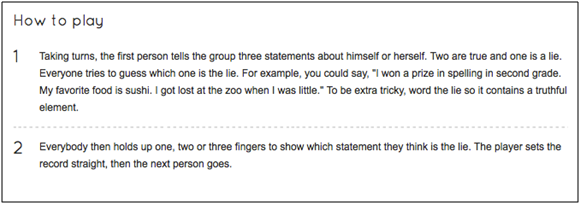
  • To start the year, I have my students play the game, “Two Truths and Lie” to introduce themselves to each other using Voki.  Here is how the game is traditionally played:

2Truth1Lie

  • Instead of telling people their three statements in person, they record them on a Voki.
  • They embed their Vokis on their ePortfolio.  Some add a poll to capture students’ votes, and everyone reflects on the experience.  When students have time, they listen to their friends’ Vokis and type their guess as to which one was the lie in the comments section of the ePortfolio.  Link to an example.
  • I also had my students create a Voki that introduced their Revolutionary War persona to the class.  We all transported back to 1763 and ended up in Boston.  Since we had no food, shelter, or clean clothes, we had to find apprenticeships and start working.  Each of us became a new person with the same first name, but our last name was now our profession.  I asked students to predict why they thought they were transported back in time, and what they hoped to learn while there.  All of this was done on a Voki.  Link to an example.

4. What are your 3 favorite things about Voki?

  • It’s free!
  • My students can all log into one account at the same time.
  • Embeddable on their ePortfolios.

5. What would you add to the Voki product?

  • An automatic saving feature so students don’t lose their work if they have to stop early or if we lose our wireless connection.
  • Improve (or clarify what we’re doing wrong) the voice recording feature – it only works for us some of the time.

6. Do you have any Voki tricks up your sleeve?

  • No.

Want to be interviewed for the Voki blog? Send us an email at submit@voki.com and we’ll get in touch!

Tip of the Week: Adding Voki to your RSS feed Reader

Tip of the Week: Adding Voki to your RSS feed Reader

Did you know that we have a RSS feed for the Voki blog? Add the Voki blog to your RSS feed Reader so you can be up to date with the latest announcements, tip of the weeks, guest bloggers, and interviews with educators!

Just follow these simple steps to add the Voki blog feed to your RSS feed reader!

Chrome users

1. Click the Chrome menu on the browser toolbar. Chrome1

2. Select Settings.

Chrome2

3. Select Extensions.

Chrome3

4. Click on Get more extensions.

Chrome4

5. Search RSS.

Chrome5

6. Find RSS Feed Reader.

7. Click Add to Chrome.

Chrome6

8. A pop-up will appear and click Add. A notification will show up once the extension is added to Chrome. The RSS Feed Reader will be added to the side of the address bar.

Chrome7

9.To open the RSS Feed Reader, click on the icon.

Chrome8

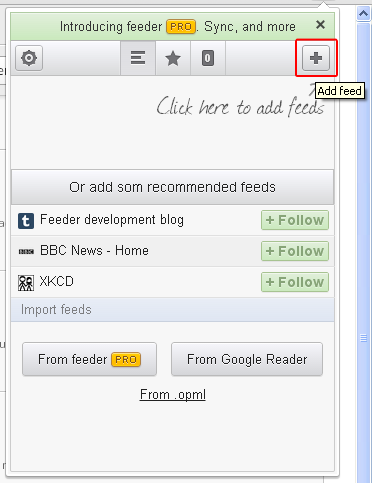
10. Click the + icon to add feed.

Chrome9

11. Type in blog.voki.com and click search.

Chrome10

12. Find The Official Voki Blog >> Feed and click Follow.

Chrome11

13. The RSS feed for the Voki blog is added to your RSS Feed Reader. Click on it to see the list of new posts.

Chrome12

FireFox user

1. Click on Tools.

FF1

2. Click on Add-ons. (Note: You can also press CTRL+SHIFT+A to open Add-ons.)

FF2

3. Search for RSS Reader.

FF3

4. Find Simple RSS Reader and install.

FF4

5. Click on Restart Now to restart your browser.

FF5

6. Go to blog.voki.com/feed.

7. Select Live Bookmarks and click Subscribe Now.

FF6

8. A pop up will appear. Click Subscribe.

FF7

9. The RSS feed for the Voki blog will appear under your address bar.

Internet Explorer users

1. Go to blog.voki.com/feed.

2. Click on Tools.

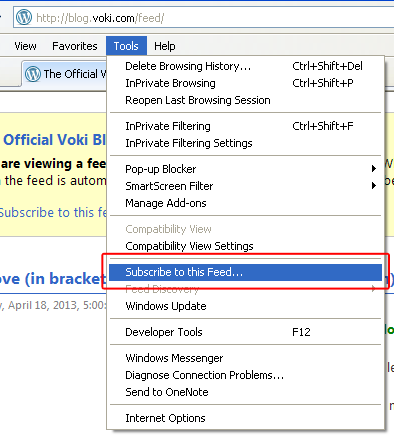
3. Click on Subscribe to Feed.

IE1

4. A pop up will appear. Click Subscribe.

IE3

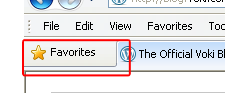
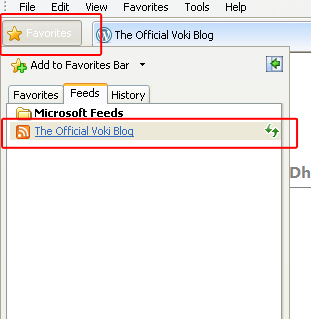
5. Click on Favorite, or press CTRL+J, to open up your RSS feed.

6. The RSS feed for the Voki blog is added to your feed. Click to open.

 IE4

If you have any feedback, comments, or suggestion for Voki, send us an email at feedback@voki.com!

Until next time,

The Voki Team

Voki Tip of the Week: Thanksgiving Poems

Voki Tip of the Week: Thanksgiving Poems

Gobble gobble everyone! Thanksgiving will be here soon! Remember those handprint turkeys we used to make in school? Let’s celebrate Thanksgiving this year by reciting a Thanksgiving poem. Have your students research a short (or funny) Thanksgiving poem and recite it!

Encourage them to share it with their family at their Thanksgiving dinner!

Let’s listen to our Thanksgiving poem, If Turkeys Thought, by Jack Prelutsky.


Do you have a Thanksgiving poem or quote you would like to share? Share it with us on our Facebook page or tweet it to us @officialvoki!

Until next time,
The Voki Team

Voki Lesson Plans: Thanksgiving Lesson Plans

Voki Lesson Plans: Thanksgiving Lesson Plans

Gobble, gobble! Are you ready to make some cranberry sauce and stuff the turkey? Get your students ready for Thanksgiving with our new Thanksgiving lesson plans! Let them take a closer look at the Mayflower’s voyage to the New World, how the Pilgrims survived in the New World, and the First Thanksgiving.

Traveling on the Mayflower – In this lesson, students will learn what it was like to be on the Mayflower. They will take a closer look at the Mayflower’s history and why the Pilgrims came to the New World. Students will be responsible for creating a Voki to send back to their family or friends in England. The Voki will talk about their experience on the Mayflower.


Settlement in the New World After the Pilgrims arrived at the New World, they had a hard time surviving the winter. With the help of the Wampanoag, the Pilgrims were able to make their own shelters and grow their own crops. Students will compare and contrast the living conditions of the Pilgrims and the Wampanoag. They will create a Voki reporting the similarities and differences.


First Thanksgiving In 1621, the Pilgrims held a feast held a year known as the first Thanksgiving. Students will learn about how the First Thanksgiving started, how long it lasted, who was there, and what type foods were served. They will be required to create a Voki describing one dish that they will bring to the first Thanksgiving feast.


Remember: The grade level assigned to each lesson plan is not set in stone. You can use Voki lesson plans for a higher, or lower, grade than the one you teach. Feel free to customize the lesson plans to fit your needs. These Voki lesson plans can be adapted to fit your style or your students’ abilities!

Have a lesson plan that you want to share with us? Send it to lessonplans@voki.com!

Until next time,

The Voki Team

Interview with Educators | Rebecca Lallier

Interview with Educators | Rebecca Lallier

screen-shot-2013-06-10-at-6-44-14-pmFor this month’s interview, we have Rebecca Lallier from Dothan Brook School in Vermont. Rebecca is the creator of created School Counseling by Heart to share ideas, lessons, insights, experiences, inspirations!  For her first Voki project, she had her students imagined  him/herself in a future career!  Check them out here!

1.Tell us a little about yourself:

I’m Rebecca Lallier, an elementary school counselor at the Dothan Brook School in White River Junction, Vermont, US. I started using Voki in the spring of 2013.

2.What are your goals using Voki?

  • To give students the opportunity to explore their experiences and possibilities by stepping outside of themselves.
  •  Creating a Voki allows them to speak as if they have already accomplished something – behavioral change, a personal challenge, a future career – so they can “try on” the feeling of success, even before they’ve made much progress.

Sometimes it’s really hard to get kids who are self-defeating or feeling hopeless to push through and keep trying at something that is hard. This is one way to hold out a beacon to them and to help them believe in themselves.

3. How do you use Voki?

  • In the classroom setting – all 44 of my fourth graders made avatars of themselves in a future career as their final project for our Career Smarts unit. I will definitely be using Vokis in more classroom projects in the future.
  • In individual and small group counseling sessions to help kids express themselves.
  • To give directions that kids can access online as needed.

4. What are your 3 favorite things about Voki?

  • That it’s so engaging and intuitive for kids
  • That it is a great tool through which they can show what they have learned (and I can assess that learning)
  • That I can manage the classroom accounts easily

5. What would you add to the Voki product?

More options for kid characters in the classic style and more racial/ethnic, and facial/body shape choices. The customization is great, but it’s hard for some kids to approximate how they look without some more basic characters.
6. Do you have any Voki tricks up your sleeve?

Some kids and I are already cooking up some advice-giving Vokis!

____________________________________________________________

Like Rebecca’s Facebook: School Counseling by Heart

Follow Rebecca on Twitter: @SchCslgByHeart

Want to be interviewed for the Voki blog? Send us an email at submit@voki.com!

Until next time,

The Voki Team


Voki Tip of the Week: Halloween Voki Assignment

Voki Tip of the Week: Halloween Voki Assignment

Before we know it, Halloween will be around the corner! Maybe you are planning to assign some short horror stories from Poe or some excerpts from classic horror novels, like Shelley’s Frankenstien or Stoker’s Dracula. Here’s a fun activity that you can do with your students: create a Voki on their favorite character and their favorite quote from the story/novel.

 
Check out some examples below! Can you guess which characters they are?


If you have any feedback, comments, or suggestion for Voki, send us an email at feedback@voki.com!
 
Until next time,
The Voki Team