Voki is giving away an iPAD!

Voki is giving away an iPAD!

Banner Mock-up4Voki is giving away an iPad! All you need to do is “Like” Voki and enter your contest entry! It only takes two minutes to complete your entry.

The objective is to correctly guess the name of our upcoming new Voki product.

The contest will soon be over, but so far no correct entries have been submitted. This means your odds of winning are very high if you submit the right answer!

To help you solve this puzzle, take a look at some of our recent clues:


Voki Clue #12: Easily adding different Vokis to your SLIDES!

Voki Clue #14: With Voki as your virtual assistant on your SLIDES, you can focus more on your students!

Voki Clue #15: Capture your students’ attention with fun PRESENTATIONS.


For a full list of clues visit the Voki Blog.

To enter the contest, go to our contest page. Do it now because the contest will soon be over, and you will have missed your opportunity!


Good luck!

The Voki Team

P.S. Since you read this far, how about a secret extra clue, just for you? The new product’s name starts with the letter P and ends with an R !  (Shhhh…)

Voki Tip of the Week: Who am I? – Voki Guessing Game

Voki Tip of the Week: Who am I? – Voki Guessing Game

Finished a book in English class? Having a quick review on historical figures? Here’s a quick activity that you can do with your students! Tell your students to create a guessing game using Voki. Have them write up hints or important facts about the character or historical figure and let the rest of the class guess!


Check out this example! Can you guess what historical figure she is?


If you have any feedback, comments, or suggestion for Voki, send us an email at feedback@voki.com!
 
Until next time,
The Voki Team

Tip of the Week: Voki Invitation

Tip of the Week: Voki Invitation

Do you have a Parent-Teacher Conference coming up? Or your class is putting up a class play? Or maybe a class bake sale? Send a fun Voki Invitation to your students’ parents. Have your students create a Voki invitation and send it to their parents!

 
Check out an example below:


Have any feedback, comments, or questions for Voki? Send us an email at feedback@voki.com!

 
Until next time,
The Voki Team

Guest Blogger: Kyle Dunbar

Guest Blogger: Kyle Dunbar

me-smallI still remember the first time I was introduced to Voki, I was at a tech conference. The presenter was showing a number of different fun, new, tools, but Voki stole the day. Honestly, I can’t remember the next 20 minutes of the presentation because I was so busy having fun playing with Voki, recording myself, giving myself new outfits, sending emails back to my boss saying things like “Vokis are so much fun!” I was immersed in learning the new tool and practicing my digital literacy and fluency. It is the same for our students.

Voki opens up a world of hands-on creativity for your students.

Show any classroom of students Voki, and you will immediately see them trying it out in a myriad of ways. I had the pleasure of joining a student tech club after school one day and I did a quick demo of Voki. The teacher and I had a plan that they would use their Vokis to introduce themselves to me (a visitor for the day) and then we would share what each student did. It was a nice plan, and the students would have done it. But we quickly realized, we had set the bar way too low, these kids had more ideas about what they wanted to do!

Voki lets you have your Voki speak in several languages.

Some students immediately started playing with the language feature of Voki. While this tech club is in a richly diverse school, where many languages are heard every day, these students still had a great time listening to phrases spoken in languages they had never heard before.

Voki allows you to re-record until you like how it sounds.

Some students probably practiced what they wanted to say 5-7 times before they saved their Voki. This repeated practice is fantastic for English Language Learners and other students working on their oral language skills. Asking a student to re-read passages can be tiresome, but ask them to make a Voki and they will repeat the passage until they like how it sounds, over and over again.

Voki lets students play around with identity.

 Let’s face it, not all students are pleased with their self-image. I’ve seen students change their avatar dozens of times to find a “look” that they want to project. Don’t overlook the importance of this! As students travel the weary path of adolescence and pre-adolescence, they crave opportunities to try on different looks and personas. Using Voki to do this is a safe and fun way to change your hair color, add an earring or see how a British accent sounds. Letting students play with these avatars as they complete a content-based assignment is as developmentally appropriate as free play in Kindergarten.

Voki is a great way to discuss Digital Citizenship.

Our students might not need our guidance when it comes to figuring out how to make a Voki, but they do still need our guidance about what makes a good and appropriate Voki. Voki is a fun way to get students talking about what make a quality presentation. If the assignment is to have an Abraham Lincoln Voki talk about three of the most important parts of his presidency, showing him with sunglasses on isn’t the best way to convey your message. Likewise, students should never use Voki to share too much information about themselves or to embarrass others. It is imperative that we have these conversations with students and why not do it with a tool they love!

Voki can be used in any classroom:

Science: Make a Voki to explain the outcomes of a lab. (I’ve seen students do this for their Science Fair presentations!)

Social Studies: Choose a Voki of an historical figure and have them give three important facts about their lives.

English: Make a Voki that represents a character from a novel. Have them “saying” the theme of the novel.

Math: There is a lot of vocabulary in Math. Have a Voki provide definitions for key terms.

World Language: Provide a description of a person in the target language, see if the students can make a matching Voki.

Physical Education/Health: Let a Voki give facts about staying fit and healthy.

To get the most out of Vokis, make sure you give your students time to play when making their Vokis, you’ll be surprised with the results!

-Kyle Dunbar

________________________________________________________________________

For Kyle’s blog, go here: EdTechDunny

Follow Kyle on Twitter: @edtechdunny

Voki Lesson Plans: Music and Math Lesson Plans

Voki Lesson Plans: Music and Math Lesson Plans

There’s a strong relationship with music and math. So how can you integrate some music theory into your math lesson? It’s easy! We prepared 3 great lesson plans to get your students excited about learning math and music.

Musical Fraction – In this lesson, students will learn how to add fraction using musical notes. Students will learn about the different types of musical notes (whole note, half note, quarter note, eighth note, and sixteenth note). They will learn how to add and subtract using musical notes. Students will have to create their own musical fractions to present to class.

Multiplication Songs This lesson will teach your students how to learn and memorize the multiplication table using songs. Students will sing along to songs that they are familiar with (i.e. Twinkle, Twinkle Little Star, Row, Row, Row Your Boat, etc.). They will create a Voki and record one multiplication song to share with the class.

Beat Patterns – Students will learn about patterns. They will learn what patterns are and how they can create their own patterns. Students will have to create their own patterns by clapping, stomping, snapping, etc. They will create a Voki to explain their patterns and why it is a pattern.

Remember: The grade level assigned to each lesson plan is not set in stone. You can use Voki lesson plans for a higher, or lower, grade than the one you teach. Feel free to customize the lesson plans to fit your needs. These Voki lesson plans can be adapted to fit your style or your students’ abilities!

Do you want to share your lesson plans with us? Send it to lessonplans@voki.com!

Until next time,

The Voki Team

Voki “Guess the Name” Contest Clues and Hints

Voki “Guess the Name” Contest Clues and Hints

Banner Mock-up4Some of your may have missed some clues and hints that we posted in the past. So we decided to compile a list! Be sure to check back for an updated list!

Be sure to check out this blog post for instructions on how to enter the contest! Or… go here to enter into the Voki “Guess the Name” Contest!

#VokiNextBestThing posts:

July 30, 2013 – Did you know that PowerPoint was launched in May 22, 1990?

July 31, 2013 – The chalkboard was made of black slate so it was called a blackboard.

August 1, 2013 – The record for the longest lecture marathon lasted for 121 hours by Errol Muzawazi (Poland) in 2009.

August 2, 2013 – Did you know that the first whiteboards were very expensive and were made of enameled steel?

August 5, 2013 – In the 16th century, blackboards were used for music education and composition in Europe.

August 6, 2013 – The first whiteboard was invented by Martin Heit to take down phone messages.

August 7, 2013 – The use of computer hardware and software in education and training dates to the early 1940s.

August 8, 2013 – Blackboard was introduced to the US education system in 1801.

August 9, 2013 – By the late 1990s, teachers are using video projectors in class.

August 12, 2013 – The first overhead projector was used for police identification work. It became a part of the classroom in the early 1960s.

August 13, 2013 – Over 6 million teachers around the world use PowerPoint.

August 14, 2013 – Chalk is used to make cement and is used by gymnasts and other athletes to provide grip.

August 15, 2013 – Albert Einstein did much of his important work using chalkboards.

August 16, 2013 – One of the oldest whiteboard companies in the world is the UK-based, Magiboards.

August 19, 2013 – The average PowerPoint slide includes 40 words.

Voki clues:

Voki Clue #1 – The new Voki product is cloud-based. You and your students can access your projects anywhere, anytime!

Voki Clue #2 – With the new Voki product, you can easily share your project with anyone!

Voki Clue #3 – With the new Voki project, you can have unlimited audio by creating and adding as many Vokis as you want.

Voki Clue #4 – Easily project your project from your computer and share it with your students.

Voki Clue #5 – Engage your students and increase class participation by adding Vokis to your projects.

Voki Clue #6 – Imagination is the limit. Add fun backgrounds and text to your Voki project.

Voki Clue #7 – Use your favorite Voki as your virtual assistant. Students will be surprised by how fun learning can be.

Voki Clue #8 – The new Voki project is a tool created for teachers to assist them in engaging their students.

Voki Clue # 9 – Using the new Voki project can help captivate your students and make your lesson more fun and exciting.

Voki Clue #10 – Engage your students and increase class participation by adding Vokis to your projects.

Voki Clue #11 –
548415_721773821173112_2060846831_n

Voki Clue #12 –  Easily adding different Vokis to your slides!

Voki Clue #13 –

1383690_725689280781566_167518052_n

There is no purchase required to win. Contestants must be 18 year of age or older and be a resident of one of the eligible countries.

For more complete information please see  the terms & conditions.

Good luck!

The Voki Team
Voki “Guess the Name” Contest

Voki “Guess the Name” Contest

Hi Voki fans!

Voki is hosting a naming contest for a *top-secret* project that we’re working on!  Voki fans will have a chance to guess the name of our upcoming new Voki product.
Starting today, and for the next several weeks until the contest is over, users may submit their entries  (no more than one entry a day per person). The Voki Team will periodically post clues and hints! Clues and hints will be posted to Voki’s Facebook, Twitter, and Google+ page. (Hint: Find the posts with #VokiNextBestThing.) Be sure to check back often!

Banner Mock-up4

Entering the Voki contest is easy. Just follow these steps:

  1. Like the Voki Facebook page
  2. Enter your information.
  3. Type in your guess.

Note: Must have a valid Facebook account to enter.

Increase your chances by entering once a day. You may provide the same entry each time or a different one.

What’s the prize? Those who correctly guess the name of the new Voki product will be entered to win one of ten (10) annual subscriptions to the new product. In addition, one lucky winner will be drawn from all correct guesses to win one (1) iPad and a free 1-year subscription to the new Voki product.

There is no purchase required to win. Contestants must be 18 year of age or older and be a resident of one of the eligible countries.

For more complete information please see  the terms & conditions.

Good luck!

The Voki Team

Tip of the Week: Voki Welcome Message

Tip of the Week: Voki Welcome Message

Summer is ending soon. You know what this means? This means school is just around the corner! Start off the new school year with a Voki welcome message to your students. Send a friend message with a Voki to your students and welcome them to the new class and what you expect from them in the new school year!

Check out an example below:

Have feedback, comments, or suggestion for Voki? Send us an email at feedback@voki.com!
Until next time,
The Voki Team

Guest Blogger: Sonya terBorg

Guest Blogger: Sonya terBorg

In our previous unit under the theme How We Express Ourselves my students were asked to create a Voki avatar to persuade people to send their kids kids to our school – essentially answering the question “Why Riverstone?” from their perspective. We had used Voki in the past, and I wanted to revisit it in a more formal (rather than optional) way to really see if this was something worthwhile to do.

My class has Voki Classroom accounts. This is different to the regular, free version of Voki. What it does differently, is that it allows you access to your kids work prior to publishing. As the teacher, you set the assignment and send this to each child’s account. They log in (with usernames and passwords that you have access to) and click on the appropriate task, read the instructions and carry out the assignment. When they are finished, they submit it to you for review. You can ‘approve’ it or send it back to them to work on it some more.
Here are what I consider the key strengths of Voki:

  • you get an oral presentation without the pressure of performing live in front of an audience. Yes, I know performing live is valuable, but so is hearing people applaud your clear, confident, expressive speech that normally may have been muffled and quiet and spoken into your armpit.
  • some kids will knock your socks off! I was crazy impressed with the majority of the Voki’s that were produced for this assignment and some kids really stood out from the rest – and not necessarily the kids you would expect either. I love that.
  • it is really intuitive. We had used it before but even then, all it took was one class lesson on the Smartboard and they were off. There were a few glitches along the way but that was my doing – not Voki’s or my kids!

Which leads me to my recommendations:

  • make sure you set the assignment up first! I know, this seems simple, but in all the organizing, actually sending out the last assignment to their accounts was missed off my to-do list. Major bummer.
  • keep a printed list of usernames and passwords – they are easy to remember but we use a lot of sites and so having them handy is a must so those who forget can quickly access them
  • start with some fun, non-assessed assignments – let them play with Voki! I started with a book review from a character’s perspective and each child introducing themselves.

Prior to beginning the assignment, I shared the following with my class. Click on the image to enlarge. Click to download a PDF version.

screen-shot-2013-02-24-at-1-59-36-pmscreen-shot-2013-02-24-at-1-59-23-pm

After you have approved their work, it is very easy to embed the finished Voki in your blog. I have found in the past that there are many embedding codes that don’t work with WordPress (the blogging platform we use at school) but Voki is not one of them. At the conclusion of the assignment I was able to easily export the Voki’s to our class website to share with the students and their families. Here are a couple of examples of our Voki’s:


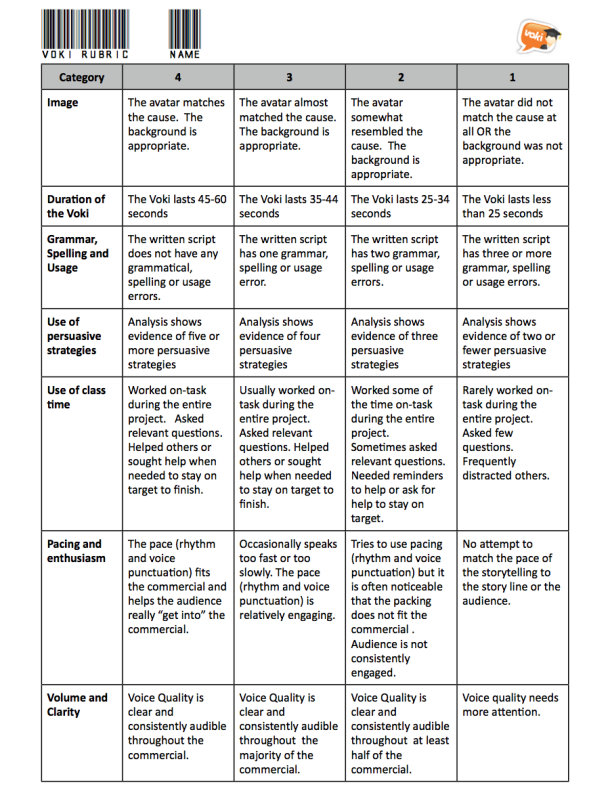
When they were uploaded, each student was tasked with drawing five names from a hat, finding that Voki online, and reviewing their work using the following form. The grid of persuasive strategies is from the awesome website, ReadWriteThink.

screen-shot-2013-02-24-at-2-03-09-pm

In addition to this personalized, specific feedback, we watched all the Voki’s as a class and rated them ‘live’ using the online student response tool: Socrative. If you have not used Socrative before, please check it out! It is really cool – and as the byline says, “as easy as raising your hand”. Once you set up a teacher account, students log on with any device and plug in your ‘room number’. You control the pace of the questions or allow them to go at their own pace. As they answer your questions, their responses show up live on screen. We watched each Voki together and then rated them on persuasive effectiveness on a scale of 1-5. Check this video out for further information:


Socrative introduction video (new) from Socrative Inc. on Vimeo.

In Summary:

I would highly recommend the use of Voki in your classroom. I like the education version, Voki Classroom, mostly because of it’s editing/reviewing options and because your recordings can be up to 90 seconds (as opposed to 60 seconds in the free version). It is easy to see where each student is at on the project and feedback can be delivered instantly to them from your account to theirs. I love that you can embed the finished Voki’s and the quality of both the avatar and the voice options are excellent. In addition to the stock backgrounds, you can also upload your own images = the first Voki featured in this post actually has a photo of the front of our school as the background. This feature allows you to incorporate aspects of visual language into your curriculum by challenging students to come up with the most appropriate look to their Voki that suits their message.

__________________________________________________________________________

For Sonya’s blog, go here.

Follow Sonya on Twitter: @terSonya

Interviews with Educators | Jennifer Matthews

Interviews with Educators | Jennifer Matthews

227920_10150181942052987_2072322_n

This month’s Interview with Educators features Jennifer Matthews. She is a tech-savvy teacher at Southampton Township School District in New Jersey. She works with students from kindergarten to fifth grade. Jennifer is a Voki user since 2012!

Check out Jennifer’s interview below and the Vokis her students created!

1.Tell us a little about yourself.

My name is Jennifer Matthews and I am the computer/technology and the Gifted and Talented teacher in the Southampton Township School District, which is in Southampton, New Jersey. I service students Kindergarten through 5th grade. I am also the schools webmaster, an adviser for the Media club and the Middle School cheer-leading coach. I have been a teacher for 15 years.

2. What are your goals using Voki?

I wanted a way for my S.T.E.P. (Southampton Township Enrichment Program) students to incorporate more technology into their units of study and to be able to share their thoughts, feelings and information publicly and creatively. Voki Classroom was perfect.

3. How do you use Voki?

My 3rd, 4th, and 5th grade S.T.E.P. students each create a Voki regularly to introduce an important person they are studying, explain a concept which they have learned and express their ideas in a fun and unique way.

4. What are your 3 favorite things about Voki?

There are many things I like about Voki and Voki classroom.

It is engaging to the students and lets them create an avatar that presents information to the world safely.

It is very easy to use and control. The students needed little instruction to use the tools to build their Voki avatar.  As the educator, I can easily add lessons and review what the students create before posting.

Affordability, Voki classroom is very affordable and easily adds technology to every unit of study.

5. What would you add to the Voki product?

Adding more design choices to the Voki’s look would be a wonderful addition as well as possibility having Voki’s interact with one another.
6. Do you have any Voki tricks up your sleeve?

I post my student’s Voki’s on my teacher’s website so all the students (and the world) can see what my students are learning and they can connect to a wide diverse audience.

Here is the link: http://school2.nj.sts.schoolinsites.com/?PageName=TeacherPage&Page=15&StaffID=188719

Want to be interviewed for the Voki blog?
Send us an email at submit@voki.com and we’ll get in touch!