Voki Tip of the Week: Voki on Pinterest

Voki Tip of the Week: Voki on Pinterest

Many teachers use Facebook, Twitter, blogs, QR codes, and other technologies in class. We also know that many teachers use Pinterest to share teaching materials, classroom ideas and activities. Continue reading to find out how you can pin your Voki!

  1. Go to www.voki.com.
  2. Create and publish your Voki.
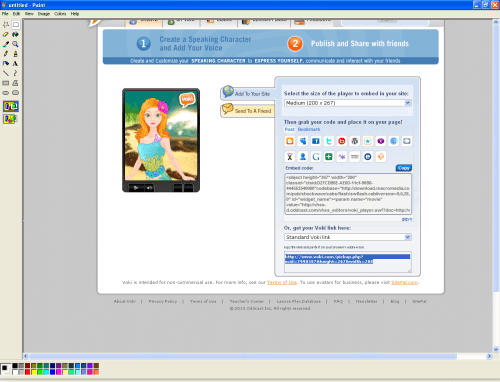
  3. Click the Print Screen button on your keyboard.
  4. Open Paint and paste the screen shot.
  5. Crop your Voki. Then save.Pinterest4
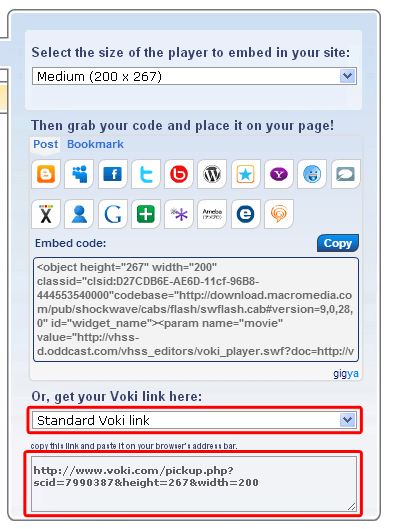
  6. Return to your published Voki and select Standard Voki link to get the URL.
  7. Highlight and copy the URL.Pinterest
  8. Go to www.pinterest.com.
  9. Log into your Pinterest account.Pinterest2
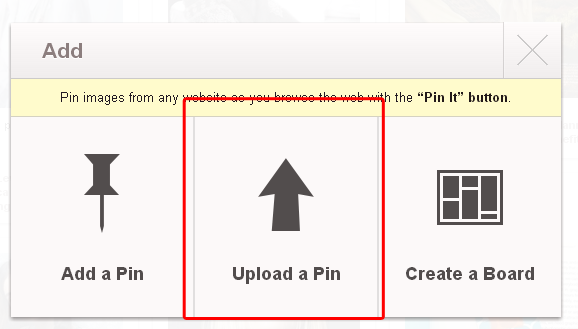
  10. Click Add+.Pinterest3
  11. Select Upload a Pin.Pinterest6
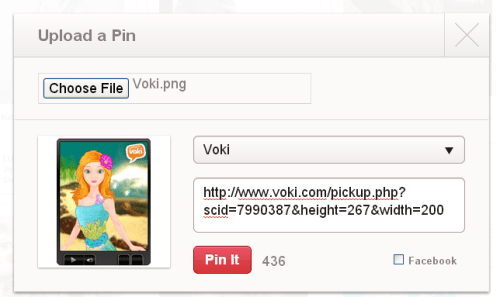
  12. Find your Voki picture and upload.
  13. Paste your Voki link into the description box.Pinterest5
  14. Pin it!

If you have any feedback, comments, or questions, send an email to feedback@voki.com!

Until next time,

The Voki Team

Voki Classroom Summer Specials are BACK!

Voki Classroom Summer Specials are BACK!

What’s more exciting than the summer? It’s getting extra months for Voki Classroom! That’s right! Voki Classroom Summer Special is back this year.  All you have to do is subscribe to a 1 or 2 year Voki Classroom subscription and get extra months added on.

Check out the schedule below!


  • May Special – 3 extra months
  • June Special – 2 extra months
  • July Special – 1 extra month


What are you waiting for? Take advantage of this Voki Classroom Summer Special today! Visit the Voki Classroom website. Have a great vacation!

Until Next Time,

The Voki Team

Guest Blogger: Shana Ellason

Guest Blogger: Shana Ellason

Our students are growing up in a digital age where they can show their creativity through oodles of different media opportunities. Educational technology is engaging and can hold their attention span without them even knowing they are learning in the process. However, many students are still held captive in the pencil-paper classroom. So, why not tap into that engagement by bringing technology into the classroom? That’s why I love and recommend Voki to all educators. Voki is a fun way of introducing technology into your lessons. Teachers love it because it motivates students to showcase their knowledge. Students love it because they can be creative in their work while designing their own avatar from a variety of character and setting choices. The coolest thing about Voki is it allows you to record your own audio for the avatar by phone, uploading an audio file, or the text-to-speech feature. Voki is appropriate for any age or grade level from early childhood to adults. Here are a few ideas on how to integrate Voki into your classroom.

  • Have students record themselves reading a poem or passage. It is a great way to practice fluency, expression, and intonation.
  • Students can summarize a story.
  • For students that are shy and timid, Voki is an ideal method to deliver speeches or presentations. They don’t have to feel embarrassed to get up in front of their peers; instead they can have their Voki do it for them!
  • English language learners can build confidence by practicing vocabulary skills.
  • Emergent readers and writers can demonstrate their knowledge of content orally by retelling.
  • Have students debate a topic with each other’s Voki.
  • Students can explain a math formula, science hypothesis, or theory.
  • They can recite fast facts about a topic.
  • It can be a great way to do an “About Me” at the beginning of the school year to learn about one another.
  • Teachers and students can make Who am I? or What am I? Voki’s.
  • Teachers can use it as an instructional tool for recording directions for centers or homework.
  • Teachers can record classroom sing-along songs.

The possibilities are endless!

Here is an example of a kindergarten student singing the Days of the Week song. We only did one take so you’ll notice she has a challenge saying Saturday, but what a way to practice the days!

Here is a Who am I? example.

Another wonderful feature of Voki, you can share all your awesome creations through email, website link, or embed it within your blog or website. So what are you waiting for? Have fun getting your Voki on!

__________________________________________________________________________

For Shana’s blog, go here: Enchanted with Technology

Follow Shana on Twitter: @sellason


Voki Tip of the Week: Voki Math Activity

Voki Tip of the Week: Voki Math Activity

12X12= 144… A=πr2… a2+b2=c2

Whether you’re learning your multiplications, area of a circle, or the Pythagorean Theorem, learning math doesn’t have to be boring! You can spice up the lesson with a Voki activity. Here’s a fun activity that you can do with your students. Have your students create a Voki to explain word problems. Then, end your class with a quick summary of the next math lesson.

Check out an example below:

Have any feedback, comments, or questions for Voki? Send us an email at feedback@voki.com!

Until next time,

The Voki Team

Voki Lesson Plans: Poetry Lesson Plans

Voki Lesson Plans: Poetry Lesson Plans

To end our celebration for National Poetry Month, we have prepared 3 fun poetry-related lesson plans that you and your students will enjoy! Your students will have fun learning about poetry and how to write a Haiku and diamante poem.

Remember:  You can use Voki lesson plans for a higher, or lower, grade than the one you teach. These Voki lesson plans can be adapted and customized to fit your unique style or your students’ abilities!

My Favorite Poem – Students will learn about the characteristics of a poem. They will read several sample poems and discuss how they feel about each poem. They will research and identify their favorite poem. Students will create a Voki discussing why it is their favorite poem.

Haiku In this lesson, students will learn about Haiku poems. Haiku is a type of Japanese poem. Students will learn about the characteristics of Haiku poems. They will learn to write Haiku poems about nature and create a Voki reciting their Haiku poem.

Diamante Poem – This lesson will teach your students how to write a diamante poem. They will learn how to write a synonym diamante poem and an antonym diamante poem. Students will learn about nouns, verbs, adjectives, antonyms, and synonyms. Students will write their own diamante poem.


Note: We have more poetry-related lesson plans in our Lesson Plan Database!

If you have a lesson plan that you want to share with us, send it to lessonplans@voki.com!

Until next time,

The Voki Team

Interviews with Educators | Christina Martidou

Interviews with Educators | Christina Martidou

Christina

Every month, we like to learn how teachers use Voki in the classroom. This month, we have another great interview with a tech-savvy educator! Christina Martidou is an English teacher who loves to use Voki to celebrate holidays!

Christina Martidou

My name is Christina Martidou and I have been working as an English teacher for the past eleven years. I currently work freelance as a private tutor and part- time for the British Council in Thessaloniki, Greece. My students vary from young learners to teenagers. I mainly prepare learners for the Cambridge ESOL exams, develop my own technology-based materials and love writing on my new blog (http://christinamartidou.edublogs.org). I have been using Voki since 2011!

What are your goals using Voki?

To make my ELT lessons more fun and engaging! With Voki the use of technology becomes meaningful!

How do you use Voki?

I mainly use Voki with my younger students especially to celebrate holidays like Halloween and Christmas. I also love the idea of assigning homework via Voki or giving oral instructions in this alternative way.

What are your 3 favorite things about Voki?

  • The fact that you can record your own voice and add sound effects to it!
  • It’s easy-to-use and safe!
  • Avatars can then be e-mailed or embedded in any social media site, blog or website.

What would you add to the Voki product?

I would extend the time limit of the recordings, add more celebrities among the speaking avatars and make it available for iPads & iPhones!

Do you have any Voki tricks up your sleeve?

I use Voki to play riddle games or a celebrity ‘guess who’ game!


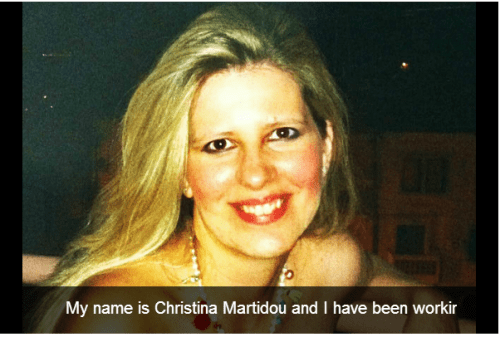
Christina made a PhotoPeach presentation. Click the picture below to see it!

Chris

Check out Christina’s blog:  http://christinamartidou.edublogs.org

Follow Christina at: https://twitter.com/CMartidougr

Want to be interviewed for the Voki blog?
Send us an email at submit@voki.com and we’ll get in touch!

My Love (in brackets) By Nuala Ní Dhomhaill (Irish Poem)

My Love (in brackets) By Nuala Ní Dhomhaill (Irish Poem)

Mo Ghrá-sa (idir lúibíní)

le Nuala Ní Dhomhaill
Níl mo ghrá-sa
mar bhláth na n-airní
a bhíonn i ngairdín
(nó ar chrann ar bith)

is má tá aon ghaol aige
le nóiníní
is a chluasa a fhásfaidh siad
(nuair a bheidh sé ocht dtroigh síos).

Ní haon ghlaise cheolmhar
iad a shúile
(táid róchóngarach dá chéile
ar an gcéad dul síos)

is más slim é síoda
tá ribí a ghruaige
(mar bhean dhubh Shakespeare)
ina wire deilgní.

Ach is cuma sin.
Tugann sé dom
úlla
(is nuair a bhíonn sé i ndeá-ghiúmar caora fíniúna).

My Love (in brackets) 

By Nuala Ní Dhomhaill

My love is not
Like the blackthorn blossom
That grows in gardens
(Or on any tree at all)

And if he has anything to do
With daisies
They will grow out of his ears
(When he’s eight feet under)

No harmonising green
His eyes (or No Musical stream his eyes)
(They’re too close together
To begin with)

And if silk is smooth
The hairs on his head
(Like Shakespeare’s Dark Lady)
Are thorny wires

But it doesn’t matter
He gives me
Apples
(And grapes when he’s in good humour)

Translation sourced: Gléasnótaí Gaeilge 2014. Dublin: Mentor Books

Don’t forget to submit your favorite poem as told by Voki! To submit your poem, send the complete embed code along with the poem title and author’s name to feedback@voki.com.

Voki Tip of the Week: Voki Classroom: Using the My Account Tab

Voki Tip of the Week: Voki Classroom: Using the My Account Tab

If you are Voki Classroom user, you are probably accustomed to the My Account tab. Let’s take a look a good look at the My Account tab and see what you can do! To get to the My Account tab, just follow these steps:

  1. Go to www.voki.com.
  2. Click on the Voki Classroom tab and log in to your account.
  3. Click on the My Account tab.

Personal Information

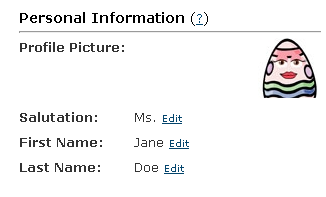
Your personal information is visible in the Student view and the Assignment Page. Under this section, you can change your salutation and your first and last name. You can even upload your own picture! The picture can be a picture of you or any pictures that represents your class. It can also be left blank.

To change your personal information, click Edit, input your new information, and remember to click Save.

VCA1

Personal Settings

Under personal settings, you can edit your email address and your password. The email address displayed under this section is the email address you use to log into your Voki and Voki Classroom account. Be sure to use a valid email address so that you can receive your account information! The password you chose will be used to into your Voki and Voki Classroom account.

To change your email and your password, click Edit, input your new email/password, and remember to click Save. You will receive a notification informing you that your email address has been updated.

Note: Do not give your password away to your students. Each student has his/her own login ID and password for Voki Classroom. VCA3

Account Settings

Account setting is where you can find information about your Voki Classroom account. Here, you can find out when your account expires, what kind of payment method you have on file, enable or disable automatic billing, how many student accounts and classes you have, your account ID,  how long you’ve been a valued Voki Classroom user and past invoices.

If your Voki Classroom account is expiring, you can click on Extend. Then select the subscription you want and proceed with checkout. If you have a payment method on file, you can enable to disable automatic billing. By checking the automatic billing box, the payment method you have on file will automatically be charged when your Voki Classroom account is about to expire. Your Voki Classroom account will be extended by the same time period you selected at sign up.

Some Voki Classroom users have more than 100 students or more than 5 classes. To add more student accounts or classes, simply click Add More next to the student or class limit you wish to increase. You
will then need to select the number of student accounts or class you wish to purchase.

VCA4

Don’t have a Voki Classroom account? Sign up now for our 15-Day Free Trial!

Until next time,

The Voki Team
The Squirrel by Anonymous

The Squirrel by Anonymous

The Squirrel

by Anonymous

Whisky, frisky,
Hippity hop;
Up he goes
To the tree top!

Whirly, twirly,
Round and round,
Down he scampers
To the ground.

Furly, curly
What a tail!
Tall as a feather
Broad as a sail!

Where’s his supper?
In the shell,
Snappity, crackity,
Out it fell.

Don’t forget to submit your favorite poem as told by Voki! To submit your poem, send the complete embed code along with the poem title and author’s name to feedback@voki.com.

Guest Blogger: Phil Timmons from Byte Me

Guest Blogger: Phil Timmons from Byte Me

I’m always looking for new ways to share and communicate in ways that will be engaging enough to keep the attention of my lively bunch of 7 & 8 year olds. We use our Learning Platform extensively for communication and sharing news and information and as it has grown it is getting more likely that areas will get missed or forgotten. I have also had a problem with allowing access to the Learning Platform to younger children where reading levels make it difficult for them to find and navigate to the correct areas.

Voki has been the answer to all the problems for me in one place. I created a character for our Learning Platform (we use frog primary) called Frogbot. He is a little robot Voki to act as a guide and a way to share news. The character appears around the Platform offering advice and direction to pupils and staff. The areas that were getting lost and forgotten are now being used again and children who find reading difficult now enjoy using the Learning Platform where they were somewhat reluctant before. The Internet can be a very ‘wordy’ place!

After embedding the Voki into our Learning Platform I started wondering how else I could use Voki. I happened to be doing speech and dialogue at the time and thought Voki would lend itself nicely to the topic. I created a new character called Doug who had a lot to say for himself. He was originally going to be used online until I stumbled upon a YouTube video. I use Smart Notebook and found out that there is a widget that you can download and embed your Voki straight into a Smart file. I used the Voki on my Smart page for the children to write the sentences using the correct punctuation. We used the idea then to do some further work about using alternatives for the word said and added them to the sentences we had written. Massive thank you goes to Doug for helping teach my class how to use speech marks and keep the engaged and excited at the same time.

I’m now looking at using Voki to make characters with the children to make conversations we can embed into Smart for the class to write up the next day.

_______________________________________________________________________________

Phil runs the site Byte Me with his partners to provide helpful advice and suggestions for teachers.

Follow Phil on Twitter: @Bytemeict