Experiment by Danielle Sensier

Experiment by Danielle Sensier

Experiment

by Danielle Sensier

 At school we’re doing growing things

with cress.

Sprinkly seeds in plastic pots

of cotton wool.

Kate’s cress sits up on the sill

she gives it water.

Mine is shut inside the cupboard

dark and dry.

Now her pot has great big clumps

of green

mine hasn’t

Teacher calls it Science

I call it mean!

Don’t forget to submit your favorite poem as told by Voki! To submit your poem, send the complete embed code along with the poem title and author’s name to feedback@voki.com.

National Poetry Month Celebration

National Poetry Month Celebration

It’s time to celebrate National Poetry Month! Last year, we have Voki users shared some of their favorite poetry with us. Take a look at them below:

A Poem by Emily Dickinson

Oh, the Places You’ll Go! By Dr. Seuss

Warm Summer Sun by Mark Twain

We would love for you to send in more of your favorite poems. Just send us the embed code of your Voki poet to feedback@voki.com! Be sure to include the title, entire poem, and the poet’s name!

In addition to posting your favorite poems, we will be posting a fun Tip of the Week with a great poetry activity to do with your students! So be on the lookout for them!

Until next time,

The Voki Team

Voki Tip of the Week: Voki on Popplet

Voki Tip of the Week: Voki on Popplet

We know that some of our Voki teachers use Popplet in their class! What if you want to have your Voki character there? We have the solution here!

Direct Link

  1. Go to www.voki.com.
  2. Create and publish your Voki.
  3. Select your Voki size and copy your Voki link.1
  4. Go to www.popplet.com and sign in.2
  5. Click to Make new popplet and double click to create a popple.3
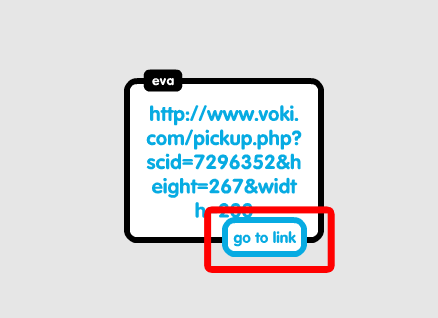
  6. Paste your Voki link into the popple.4
  7. Hover your mouse over the Voki link and click on Go to link.5

Now you go to your Voki from Popplet!

Note: If you want your Voki to appear in full screen, read this Tip of the week to learn how!

Voki Video

  1. To save your Voki as a video file, check out this Tip of the week.
  2. Upload it on YouTube.
  3. 6Go to www.popplet.com and sign in.2
  4. Click to Make new popplet and double click to create a popple.3
  5. Click on the upload icon.
  6. Click on the YouTube icon.7
  7. Search for your video.8
  8. Select your video and click Add to popple.9

Now you can view your Voki directly on Popplet!

If you have any feedback, comments, or suggestion for Voki, send us an email at feedback@voki.com!

Until next time,

The Voki Team

Guest Blogger: Joann Claspill

Guest Blogger: Joann Claspill

JCEvery once in a while, a new tech tool comes along that really makes an impact with me and my students. www.voki.com has been that website for me since last school year.

I discovered Voki when I was doing the novel study for “No Talking”, by Andrew Clements. I was online searching for activities to enrich and engage my students and saw that someone has made Vokis for the 2 main characters. I checked them out and was hooked! I used these to introduce the characters to my students, and then using Voki took off in my classroom.

We did another novel study on “Julie of the Wolves” later in the year. To work on summarizing text, I made a Julie voki (the main character) and had her summarize the chapter for the class. This was the “I do it” stage. Next, we developed a Julie voki together and posted it – the “We Do It” stage. Finally, it was my students’ turn.

Student One

Student Two

Student One chose to use his own voice for recording, student two used one of the many, many choices available on Voki as his characters’ voice. The abundance of choices is one of the reasons we love Voki. Students not only choose voice, they choose characters physical traits, backgrounds and more. There are even animal avatars to pick from!

Besides using Voki as a tool for reading instruction, I use it frequently to review or introduce History ideas. If we are learning about roles played in a war, I create Vokis to reinforce concepts to the students. Something as simple as hearing it from a Voki avatar makes it more interesting than just hearing it from me. I also review vocabulary terms using Voki.

SS Vocab

My students this school year are just getting into Voki and I can’t wait to see what develops. The site is user friendly, the students love creating these and I love the engaged learning that takes place when I use Voki in my classroom!

Joann Claspill
Langford Elementary
5th Grade

New Voki Characters: Fairy Tale Characters

New Voki Characters: Fairy Tale Characters

Thanks to the feedback of Voki fans, we decided to create a new set of Voki characters! This month, we are expanding our collection of Voki characters to the magical land of Happily Ever After. Our new Voki fairy tale characters include some of your favorites.

We have a beautiful princess, a charming prince, a noble knight, a mischievous fairy, a funny jester, and a majestic unicorn and they’re available to all Voki users! Click here then go to the Fairy Tale category to see them in action!

Let’s take a look at some examples below:

Oh, and stay tuned for more fairy tale characters! We have more brewing in our cauldron!

If you have any feedback, comment, or question for Voki, send an email to feedback@voki.com!

Until next time,
The Voki Team

Voki Lesson Plans: Spring Lesson Plans

Voki Lesson Plans: Spring Lesson Plans

Here comes the sun! That means spring is right around the corner. So, we prepared 3 new lesson plans to get your students ready for spring! Teach your students about similes, the life cycles of a butterfly, and how to write a limerick. We know your students will enjoy learning it!


Remember: The grade level assigned to each lesson plan is not set in stone. You can use Voki lesson plans for a higher, or lower, grade than the one you teach. Feel free to customize the lesson plans to fit your needs. These Voki lesson plans can be adapted to fit your style or your students’ abilities!

Spring Simile –   In this lesson, your students will learn about how to identify and write similes. Similes are phrases that compare two unrelated nouns using “like” or “as”. Students will write a short story with at least 5 similes about spring for their Voki.  The rest of the class will be required to identify the similes.


Life Cycle of a Butterfly Students will learn about the life cycle of a butterfly based on the book, The Very Hungry Caterpillar by Eric Carle. They will learn that a butterfly goes through a growing process that changes their appearance and the different stages of a butterfly’s life. Students will write a short story on where they think the adult butterfly will go after they fly off.


Limericks – This lesson will teach your students how to write a limerick. A limerick is a short poem with five lines and a specific rhyme scheme. Your students will learn about the rhyme scheme and the rhythm scheme of a limerick. Students will be required to write their own limerick and create a Voki reciting it.

Have a lesson plan that you want to share with us? Send it to lessonplans@voki.com!

Until next time,

The Voki Team

Voki Tip of the Week: Voki Classroom – Student Search

Voki Tip of the Week: Voki Classroom – Student Search

It’s difficult to scroll through a list of 100 students! But instead of going through the LONG list, why not just search for their name?

First, click on your Students tab and type in your student’s name. Then hit enter or the green arrow button.

search

Now you can see if your student finished their assignment!


search2

If you have any feedback, questions, or comments for Voki, feel free to send an email to feedback@voki.com!

Until next time,
The Voki Team

Interview with Educators | Stacy Brown

Interview with Educators | Stacy Brown

StacyWe bring you a wonderful interview with Stacy Brown! Stacy is the 21st century learning coordinator from the Davis Academy in Georgia. Stacy is a Voki user since 2010! Her goals in introducing Voki to the Davis Academy are to encourage student engagement, ownership and creativity!
Here are the things Stacy loves about Voki:

  • Voki is very easy to use
  • Voki captures the students’ interest
  • Voki helps integrate technology into the curriculum

Check out Stacy’s full Voki interview here!

____________________________________________________________

Follow Stacy on Twitter: @21stStacy

Want to be interviewed for the Voki blog? Send us an email at submit@voki.com!

Until next time,

The Voki Team

Voki Tip of the Week: Voki Classroom Student Password

Voki Tip of the Week: Voki Classroom Student Password

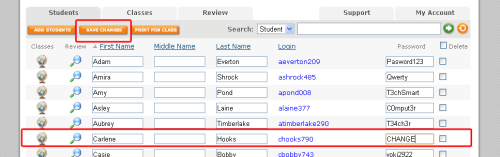
Student passwords are automatically-generated in Voki Classroom whenever you create a Student account. But did you know that you can change your student’s password?  Your students can even choose their own passwords!

  1. To change your student’s password, find the account that you want to modify.
  2. Change the password here.
  3. Hit the Save button!password2

If you want your student to pick their own password, all you need to do is download the Voki Classroom list template and enter their passwords into the last password column! Download the template here.

password

Then just upload your list to your Voki Classroom account and your students can log into their Student account with their own password!

Have feedback, comments, or questions for Voki? Just send an email to feedback@voki.com!

Until next time,

The Voki Team

Guest Blogger: A Voki Spin on an Old Math Favorite – Jessica Johnston

Guest Blogger: A Voki Spin on an Old Math Favorite – Jessica Johnston

As an Instructional Technology Specialist, I love it when teachers find easy ways to incorporate technology into their everyday lessons.  Technology shouldn’t be separate from what you’re doing in the classroom – it should be woven into what you’re already doing in the classroom.  Voki is a tool that we use in just about every grade level and subject area in my district.  It’s versatile, easy to use, and the kids (and teachers!) love it!

It was no surprise when Staci Stephens, 6th grade math teacher at Brenham Middle School, emailed and asked if I could help her with a Voki lesson in her classroom.  Our school got a new Chromebook cart this year and we were brainstorming ways to use the cart in her math class.  Staci decided to let her kids draw a math problem from the “problem paper bag” – like they had done a dozen times before – but this time they would have to script how they solved the problem.  With a little help from Google Docs, the kids worked through their math problems and typed out every single step.

Normally students would groan about this kind of activity – math AND writing?!  However, when you hold a flashy tool like Voki in front of them, all of a sudden writing about math looks like fun instead of work!  Staci and I were amazed at the detail the students included in their writing and we marveled at the level of engagement and deep thinking that was going on in the classroom.  You could have heard a pin drop – until the avatars started speaking!

Watching the students light up as their writing came to life in the form of a Voki avatar was priceless.  In a single class period, the students had created virtual speaking tutors for dozens of fraction problems.  In the process, not only did they ask meaningful questions about math and writing, but also about technology.  Voki got the students to really THINK about how they solve a math problem, but in a fun and non-threatening way!  Even struggling learners can feel successful with an activity like this.  Here’s what some of the students had to say about this lesson and using Voki:

  • Katherine: I think it helped me because if you are visual learner or you need to hear it it helps you.  You can hear the problem and it helps you work it out.  The Voki was very helpful to all students whether they know it or not.
  •  Rylie: Voki really helped me in Math.  It brought the math problem to life.  I now understand math a lot easier.
  •  Estefania: Well Voki taught me how to cut short sentences for only the important things.  Voki also is very fun to create your own character, to express who you are on your Voki.
  • Jesse: I like Voki because it is fun to do.  It helps me learn because when I hear about stuff it gets stuck in my mind.  It is fun to do because you help other people learn.
  • Arreyus: It’s technology and technology is well known in our century.  It’s fun, but we still learn while having fun.  Voki is a wonderful way for kids in this century to learn things.

Staci published the completed avatars on her teacher website with images of the problems being solved.  Publishing completed work gives the students an audience which makes the learning real and more meaningful.  See the completed avatars here: http://goo.gl/kDjbU.  Here’s what Staci had to say about this lesson:

I like that Voki motivates students to communicate their thinking in a new and exciting way.  Instead of solving 20 addition and subtraction of fraction problems, I learn much more about their problem solving process by having them explain 1 problem step by step.  It is so difficult to hear the voices of each of my students on a daily basis, especially my shy students, but Voki enables each student to explain what they were thinking without the fear often involved with speaking up in class.  I’m a big believer that learning mathematics is more than just solving problems- it is a problem solving process, but often when I ask students to write about or explain the process my students are very hesitant.  Generally, they do not like writing, and do not feel they are good writers, but Voki gives them a way to communicate their thinking in a way they enjoy!
If you are looking for an easy (and FREE!) tool to use with any age students in any content area, I can highly recommend Voki and I know my staff and students would say the same.  Brenham ISD loves Voki and I am certain your organization will, as well!
__________________________________________________________________________

For Jessica’s blog, go here: EdTechChic

Follow Jessica on Twitter: @EdTechChic

Like Jessica’s Facebook page: EdTechChic Facebook