Voki Lesson Plans: Holiday Lesson Plans

Voki Lesson Plans: Holiday Lesson Plans

Welcome back to school! To kick off the school year, we have prepared 3 new lessons plans your students are sure to enjoy!

This month’s theme is Holidays! Do you think it’s too early to talk about holidays? Well the folks at Voki don’t! It’s never too early to start preparing lessons for the holiday season.

 Remember: The grade level assigned to each lesson plan is not set in stone. You can use Voki lesson plans for a higher, or lower, grade than the one you teach. Feel free to customize the lesson plans to for your needs. These Voki lesson plans can be adapted to fit your unique style or your students’ abilities!

Halloween – Scary Stories (Middle School) – Students will learn about the history of Halloween, including the origin of trick or treating, costume wearing, and pumpkin carving. In this lesson, students will learn the elements that go into writing a scary story.  Then they will learn how to write their own scary story and share it with the rest of the class.

Thanksgiving Poem (Primary School) In this lesson, students will learn about the origin of Thanksgiving and how the first Thanksgiving was celebrated. They will discuss what they are thankful for and what it means to be thankful. Then, they will write special cinquain poem about what Thanksgiving means to them.

Christmas around the World (Middle School) – Students will learn about the different Christmas traditions and customs from different countries and how it is different from their own tradition. They will discuss about the legend of Santa Claus and the different symbols that represent Christmas.

Want to share your own lesson plans with us? Just send us an email at lessonplans@voki.com!

Until Next Time,

The Voki Team
Voki Tip of the Week: Voki Classroom Support

Voki Tip of the Week: Voki Classroom Support

Did you know that one of the many advantages of Voki Classroom is full online support? That’s right! You can directly email our Voki Support Team with any questions or feedback. This is an exclusive feature in Voki Classroom found in the Support tab when you log in.

Also available in the Voki Classroom Support tab are a variety of resources. The Voki Classroom FAQ cover some of the most commonly asked questions. In the Teacher’s Corner, you can connect with other teachers, ask questions, and make suggestions. If you are a first time user, we recommend reviewing the Getting Started Guide. The Voki Classroom User Guide provides in depth information on every feature.

Don’t fret if you’re not a Voki Classroom user! Many of these resources can be found in the Learn tab. In addition to the Teacher’s Corner and Guides, you should check out our blog, Facebook posts, and tweets for up-to-the-moment information. Click here to learn more about the Voki Classroom 15 Day FREE Trial!

Until next time,
The Voki Team

Voki Tip of the Week: Voki Icebreaker

Voki Tip of the Week: Voki Icebreaker

It’s that time of the year again. After a long and relaxing summer vacation, school finally started! It’s a new school year with new faces in the classroom. And you know how scary it first day of school is for students! Well, this is the perfect time for a Voki icebreaker on the first day of class! Ask them to introduce themselves with Voki . Your students will LOVE it!

Check out these examples and create your own Voki icebreaker today!


Best wishes for a successful school year,
The Voki Team

Voki Tip of the Week: Changing Your Voki Login Emails

Voki Tip of the Week: Changing Your Voki Login Emails

So you’re a long time Voki fan and want to have a new email address associated with your Voki account. This is the scoop on how this feature works in Vok and Voki Classroom.

For Basic Voki Users:

Basic Voki users’ emails cannot be changed, but you can easily create a new account with a different email! To copy your Voki to your new account, check our blog post on How to Copy a Voki. You can also log into your old account as much as you need.

For Voki Classroom Users:

Voki Classroom users can change their emails. Here’s what you can do:

  1. Log into your Voki Classroom account.
  2. Click on the My Account tab.
  3. Under Personal Settings, click the Edit option on the Email Address line.
  4. Type in your new email and click Save. You will receive a notification informing you that your email address has been updated.

Click here to learn more about other advanced features in Voki Classroom!

Until next time,

The Voki Team

Voki Tip of the Week: Setting up Voki Classroom for the New School Year

Voki Tip of the Week: Setting up Voki Classroom for the New School Year

For advanced Voki Classroom users, you may be looking to update your account for the upcoming school year. Check out these quick-and-easy tips to revamp your Voki Classroom account with new classes, lessons, and students.

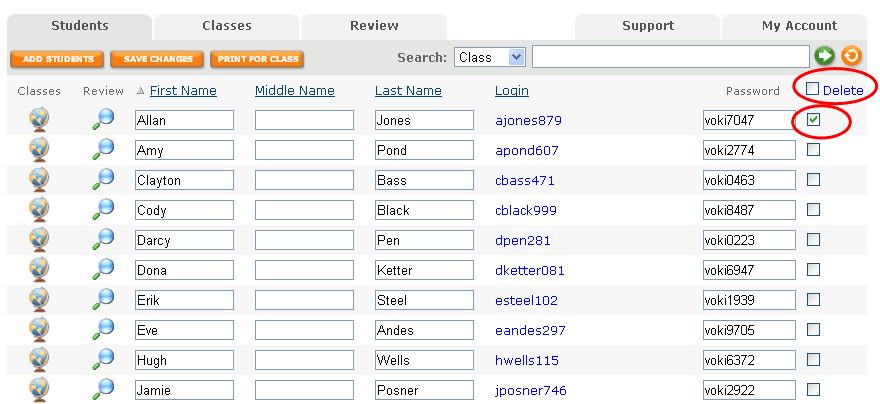
1.    Once you are logged into Voki Classroom, go to the Students Tab. Here, you have the option to delete your students’ accounts and work individually or in mass. Click the box directly adjacent to the student’s password you wish to delete. Then click the blue word Delete at the top of the column.

If you want to delete a large number of students, check the box to the right of the word Delete at the top of the column. All of your students will then be selected. You can deselect a few if needed before clicking Delete.

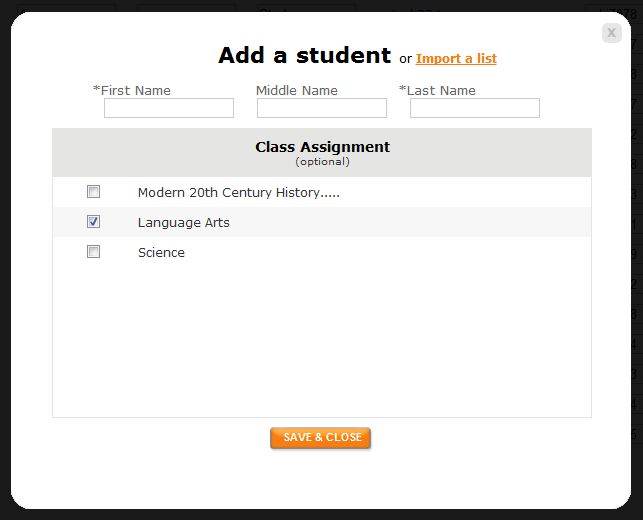
2.    You have 2 options for adding students. You may enter each student one by one or upload a spreadsheet of your students. The other options is to download the template to easily set this list up. Click Import a List. You may then select the class you will to assign your students to.

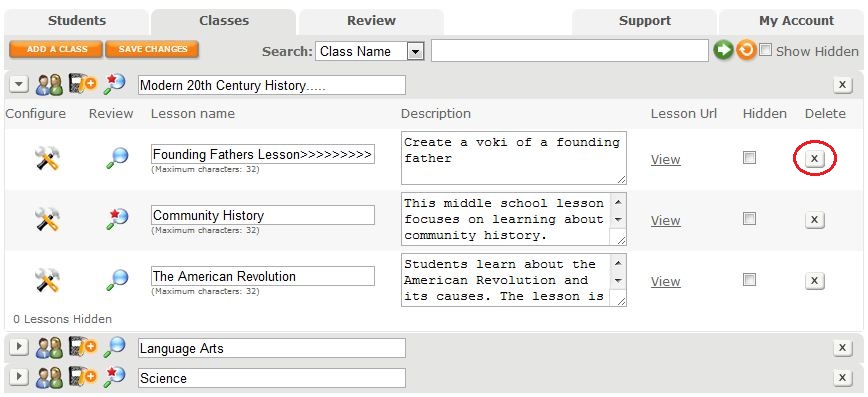
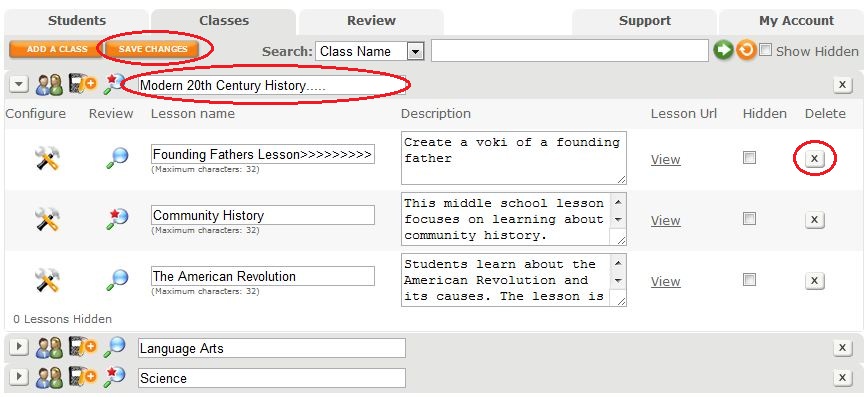
3.    If you choose to delete your classes, click on the X button next to your class. When you delete your class, all of the lessons within the class will be deleted as well as your students’ assignments and Vokis.

4.    If you want to keep your students’ past work, simply rename your old lessons. Click on the lesson or class you want to rename and type in a new name. Remember to hit the Save Changes button!

5.    To add a new class, clike the Add a Class button and give it a name.

Remember to extend your Voki Classroom subscription as you prepare for another fun and fabulous school year! Go to the My Account Tab and click Extend next to the expiration date.

Good luck this Fall!

The Voki Team

Voki Lesson Plans: A Day in Ancient Civilizations

Voki Lesson Plans: A Day in Ancient Civilizations

A date with Napoleon? A discussion with Galileo? Escaping Pompeii before the eruption of Mount Vesuvius?

It would be great if we can time travel and learn about the past. We could watch the Titanic set sail on her maiden voyage, go on a field trip to the Roman Colosseum, or even shake hands with George Washington! Wouldn’t that be exciting?

Too bad we can’t time travel, but we can still learn about the past! This month’s theme is Ancient Civilizations and we’ve prepared 3 new lessons plans your students are sure to enjoy!

The Inca Empire – In this lesson, students will learn about the Inca Empire. Students will learn about the Inca geography, government, their laws, and how the Incas travelled. Students will discuss what they would do if they were the Inca Emperor. The class will learn about Inca legends/myths and how it shaped their beliefs. Students will research and create a Voki on an Inca legend/myth.

Ancient Greece – Students will research about the different elements of ancient Greek civilization and how it influenced modern day culture. They will be separated into groups to do research and will create 3 Vokis to present their findings.

Ancient India – This lesson will teach students about the Indus Valley and where it was located. Students will learn about the daily lives of the Indus Valley people lived by doing research. They will use Voki to describe what their life would be like if they lived in the Indus Valley.

 Remember: The grade level assigned to each lesson plan is not set in stone. You can use Voki lesson plans for a higher, or lower, grade than the one you teach. Feel free to customize the lesson plans to for your needs. These Voki lesson plans can be adapted to fit your style or your students’ abilities!

Do you have a lesson plan that you want to share? Just send us an email at lessonplans@voki.com!

Until Next Time,

The Voki Team
Voki Tip of the Week: Singing Voki

Voki Tip of the Week: Singing Voki

Did you know that you can upload your own audio file? Well, that means you can upload your own audio file to make your Voki sing! It’s a great way to get people to sing along to your songs! But remember, there is a 1-minute recording time for the basic Voki editor. Students can record up to 90 seconds in Voki Classroom.

Follow these easy steps to get your singing Voki!

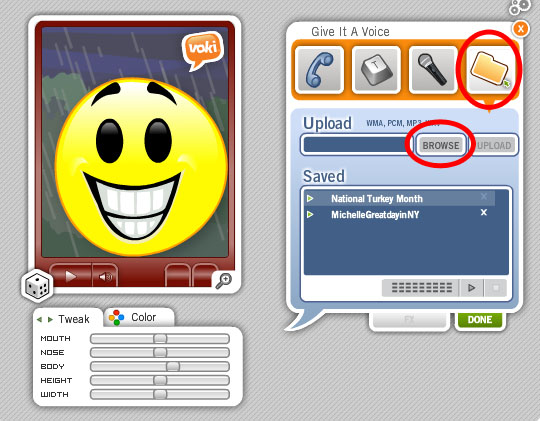
1. Go to www.Voki.com and create your Voki.

2. Click on the Folder button and Browse for your audio file.

3. Click Upload after you found your audio file.

4. Click the Publish button.

Now your Voki can sing!

Until next time,
The Voki Team

Voki Tip of the Week: Voki Postcard

Voki Tip of the Week: Voki Postcard

Going away this summer but you still want to share your adventures with your friends and family? You can simply send them a Voki postcard! It’s simple, fun, and a great way to let everyone know what you are up to! You can even share the pictures you took from your trip! Just upload them as your background!

Check out our Voki postcards below and start sending them to your friends and family today!

Have a great summer!

The Voki Team

Voki Tip of the Week: Printing out Voki

Voki Tip of the Week: Printing out Voki

We hope that everyone is having a great summer vacation so far! Whether you are swimming in the pool or resting in an air-conditioned room, it’s never too late to think about how to decorate your classroom this year! So why not show off your Voki creations by printing them out? Check out the directions below for printing your Vokis out on a PC or Mac.

  1. Go to www.Voki.com and create your Voki.
  2. Click the Publish button.
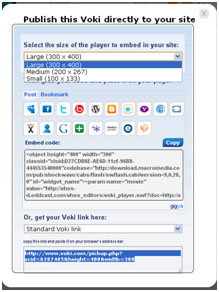
  3. Click the drop down menu and select Large. Then select, Standard Voki link to get the URL.


  1. Copy and paste the URL into the address bar. Now you have a bigger Voki on your screen!
  2. Click the Print Screen button on your keyboard.
  1. Open Paint and paste the screen shot.

Now you can crop or resize the picture.

For Mac users: You can capture the screenshot by holding down Apple key + Shift + 4A cropping tool will appear and you can select the area you would like to capture. The picture will be saved on your desktop!

Just hit Print and you can hang up your Voki! Isn’t that easy?

Can you spot my Vokis on the wall?


 Until next time,

The Voki Team

Voki Tip of the Week: Summertime Fun with Voki Classroom

Voki Tip of the Week: Summertime Fun with Voki Classroom

Summer is full of savings for Voki Classroom!

We hope that you’ll take advantage of our Voki Classroom July Special.

What’s so special about this July Special? Those who purchase a Voki Classroom subscription will get 1 extra month FREE! With this summer special, you can be prepared when the upcoming school year start.

To sign up for the Voki Classroom Summer Special, you just need purchase a 1 or 2 year Voki Classroom subscription. It’s that easy!

So what are you waiting for? Let’s sign up and get a jump start on the school year!

Until Next Time,

The Voki Team