Guest Blogger: Mandy Nelson

Guest Blogger: Mandy Nelson

Dear Educators,

I want to share a lesson that a 1st grade teacher and I did a little before Halloween last year. It worked quite well. As part of her curriculum, Mrs. Stasys gave students a binder that included poems that they would read throughout the year. They gathered together on the rug once a day and read the chosen poem aloud.  For this poem they read it to the tune of The Itsy Bitsy Spider. They read the poem together every day for one week to hone their fluency and expression skills.  Once their week of practice was up we took them to the computer lab to design their Voki character.  They could choose to represent themselves any way they wanted.  Some chose to make an exact cartoon replica of themselves, while others designed dogs, pumpkins, monsters and one student even chose a Santa Claus avatar!  Since the image has no effect on their fluency we decided to let them have free reign.  I would advise you to do the same since it helps them feel more ownership over the final product. The following day Mrs. Stasys stayed in the classroom and sent down students to the computer lab in groups of three.  Using Firefox and Voki we recorded each student saying their poem.  (If you do not have an extra adult who can assist you could always do this during reading centers.  It may take several days to get them all recorded but it can be done!)

The kids loved this lesson and we got a kick out of listening to them practice their poems over and over so they could record it just right.  By the end of the project our students were reading in a much more natural, fluent way with great expression.  Even those who usually really struggle with reading and get frustrated were motivated and showed improvement over the duration of the assignment.  Once they were recorded, we embedded their Vokis into my website and parents were given the link to listen to at home.  They were also able forward the link to grandparents and other family members.  The students loved their final products and were proud to show them off.

For our step-by-step lesson plan visit my site and click on the Voki link.  Click here for the finished student products.  To save yourself some time feel free to use these videos I made to teach students how to make their Vokis:  Video 1,  Video 2.  On an aside, another 1st grade class used Vokis for the students to report three important facts about a research topic of their choosing.  Click here for the final products.

Enjoy and let me know how it goes!

-Mandy

Mandy Nelson is a K-4 Technology Integration Specialist in River Forest, IL, near Chicago.  She is always looking for ways to partner with other teachers across the world so email her at nelsonm@district90.org if you would like to collaborate.   

Voki Podcast on TeacherCast

Voki Podcast on TeacherCast

Hey Voki users! Recently, Voki did a podcast with Jeff Bradbury at TeacherCast.

TeacherCast was created by Jeff to help teachers use technology in their classrooms. Follow @JeffBradbury and @TeacherCast on Twitter to get great updates on cool technologies to use in class! If you have any cool apps or would love to share your ideas with Jeff, feel free to reach out to him!

If you missed it on TeacherCast, listen to it here!

If you want Voki to be a guest blogger on your site or record a podcast with you, just send us an email at feedback@voki.com!


Until next time,

The Voki Team

Voki Tip of the Week: Shakespeare Activity

Voki Tip of the Week: Shakespeare Activity

Are you Team Montague or Team Capulet? Do you love to recite Hamlet’s “To be or not to be” speech? Do you like to play the bad guy from Othello? Or do you want to be a king like Macbeth?

No matter which Shakespeare play you enjoy reading, it would be great to recite parts of it in class! Get your students to recite a short passage from a Shakespeare play! It’s a fun way to help your student work on their memorization skills!

Check out the example below and tell us which famous Shakespeare play it’s from!

Until next time,
The Voki Team

Voki Character Ideas

Voki Character Ideas

We love getting feedback and comments from our Voki users. So let’s keep that feedback coming!

To celebrate the start of a new school year, Voki is planning to add some new characters to the Voki editor. And we would love it if you share actual Voki ideas with us!

If you think you have great character ideas, accessories design, or even a theme you want to see on Voki, share it with us! Send us your ideas at feedback@voki.com or share it with us on our Facebook and Twitter (@officialvoki)!

Until next time,

The Voki Team

Safari Users: Microphone Issue

Safari Users: Microphone Issue

Hey Voki users! Recently, some Safari users/Mac users were experiencing some difficulties when it came to recording with a microphone. This is because your JavaScript is not updated.

So here’s what you should do:

Solution:

  1. Go to  http://www.java.com/en/download/faq/java_mac.xml.
  2. When the page loads, you will see an option to Update plug-in.

We apologize for any inconvenience that you are having. This problem should be solved by next week! Just follow us on Facebook and Twitter for any updates on this issue!

If you are having difficulties with Voki, please send us an email at feedback@voki.com!

Voki Refer a Friend

Voki Refer a Friend

With summer vacation over and the weather starting to cool off, it’s the start of a new school year for many students and teachers. Whether you are still in school, still on vacation, or just started the new school year, there’s always a reason to celebrate!

To kick start this celebration, we are starting Voki Refer a Friend! For every friend you refer, you get 2 months of Voki Classroom! Let’s see the details below!

How this works:

  1. As an existing Voki Classroom subscriber, you can refer a friend to sign up for the 15-Day Free Trial of Voki Classroom.
  2. If the person you referred decides to keep using Voki Classroom after their 15 Day Free Trial, you should email feedback@voki.com with your Voki Classroom email and the email of the person who you referred! We will then add 2 BONUS months of Voki Classroom to your account to say “Thanks”!

Let’s take advantage of this! Voki Refer a Friend ends on Halloween (October 31, 2012)!

Good luck to everyone and here’s to a great start to the new school year!

Until next time,

The Voki Team

Voki Tip of the Week: Voki Classroom Support

Voki Tip of the Week: Voki Classroom Support

Did you know that one of the many advantages of Voki Classroom is full online support? That’s right! You can directly email our Voki Support Team with any questions or feedback. This is an exclusive feature in Voki Classroom found in the Support tab when you log in.

Also available in the Voki Classroom Support tab are a variety of resources. The Voki Classroom FAQ cover some of the most commonly asked questions. In the Teacher’s Corner, you can connect with other teachers, ask questions, and make suggestions. If you are a first time user, we recommend reviewing the Getting Started Guide. The Voki Classroom User Guide provides in depth information on every feature.

Don’t fret if you’re not a Voki Classroom user! Many of these resources can be found in the Learn tab. In addition to the Teacher’s Corner and Guides, you should check out our blog, Facebook posts, and tweets for up-to-the-moment information. Click here to learn more about the Voki Classroom 15 Day FREE Trial!

Until next time,
The Voki Team

Voki Tip of the Week: Changing Your Voki Login Emails

Voki Tip of the Week: Changing Your Voki Login Emails

So you’re a long time Voki fan and want to have a new email address associated with your Voki account. This is the scoop on how this feature works in Vok and Voki Classroom.

For Basic Voki Users:

Basic Voki users’ emails cannot be changed, but you can easily create a new account with a different email! To copy your Voki to your new account, check our blog post on How to Copy a Voki. You can also log into your old account as much as you need.

For Voki Classroom Users:

Voki Classroom users can change their emails. Here’s what you can do:

  1. Log into your Voki Classroom account.
  2. Click on the My Account tab.
  3. Under Personal Settings, click the Edit option on the Email Address line.
  4. Type in your new email and click Save. You will receive a notification informing you that your email address has been updated.

Click here to learn more about other advanced features in Voki Classroom!

Until next time,

The Voki Team

Voki Tip of the Week: Setting up Voki Classroom for the New School Year

Voki Tip of the Week: Setting up Voki Classroom for the New School Year

For advanced Voki Classroom users, you may be looking to update your account for the upcoming school year. Check out these quick-and-easy tips to revamp your Voki Classroom account with new classes, lessons, and students.

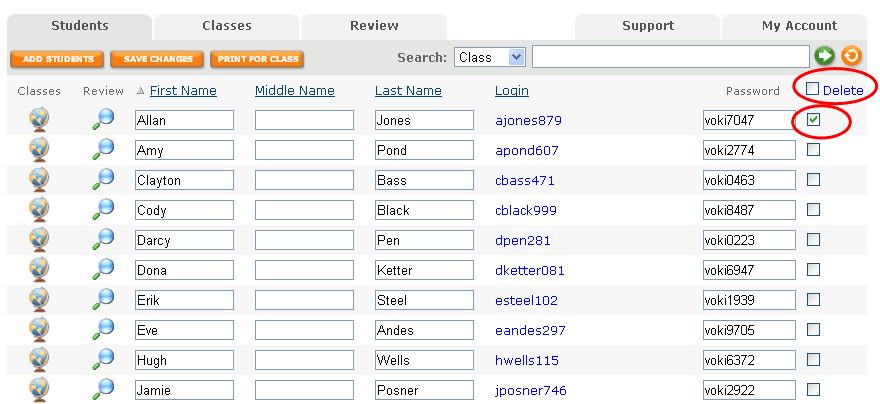
1.    Once you are logged into Voki Classroom, go to the Students Tab. Here, you have the option to delete your students’ accounts and work individually or in mass. Click the box directly adjacent to the student’s password you wish to delete. Then click the blue word Delete at the top of the column.

If you want to delete a large number of students, check the box to the right of the word Delete at the top of the column. All of your students will then be selected. You can deselect a few if needed before clicking Delete.

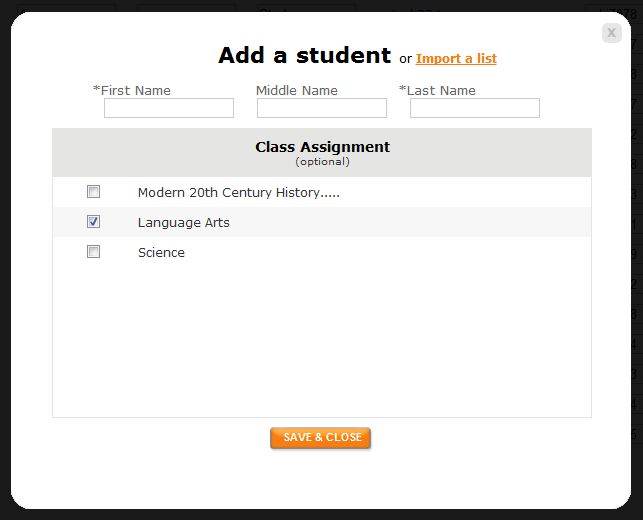
2.    You have 2 options for adding students. You may enter each student one by one or upload a spreadsheet of your students. The other options is to download the template to easily set this list up. Click Import a List. You may then select the class you will to assign your students to.

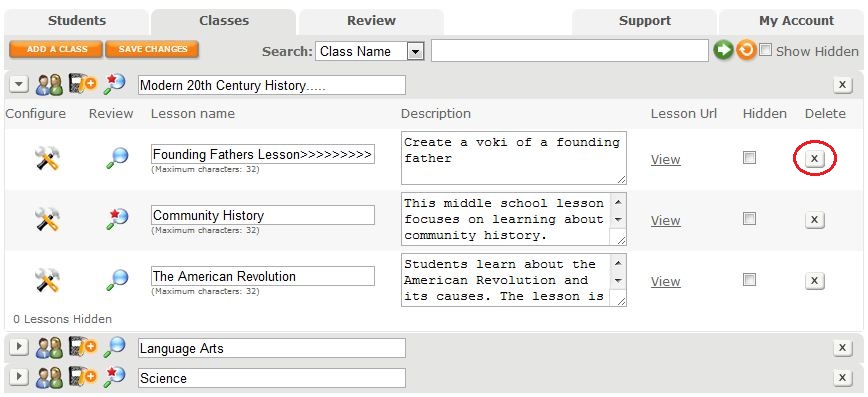
3.    If you choose to delete your classes, click on the X button next to your class. When you delete your class, all of the lessons within the class will be deleted as well as your students’ assignments and Vokis.

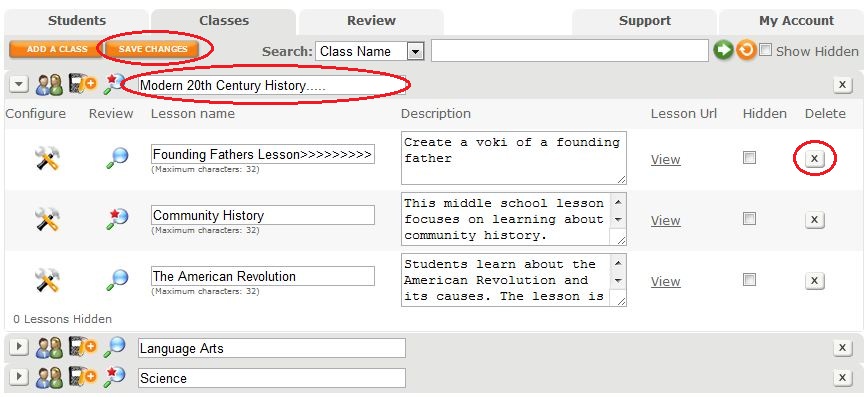
4.    If you want to keep your students’ past work, simply rename your old lessons. Click on the lesson or class you want to rename and type in a new name. Remember to hit the Save Changes button!

5.    To add a new class, clike the Add a Class button and give it a name.

Remember to extend your Voki Classroom subscription as you prepare for another fun and fabulous school year! Go to the My Account Tab and click Extend next to the expiration date.

Good luck this Fall!

The Voki Team

Voki Classroom Special: July Edition

Voki Classroom Special: July Edition

You’ve got one more month to take advantage of Voki’s Summer Special! July is your last chance to receive a FREE month with your 1 or 2 year Voki Classroom subscription. Since your time is running out, we are going to keep this post short and give you 3 good reasons of why you should check out Voki Classroom in July.

          1. You get one month FREE to explore the different Voki Classroom functions before school starts.

          2. Voki Classroom has everything you asked for in Voki to ensure student privacy and make publishing easier.

          3. Our Voki Classroom July Special goes well with hot dogs and lemonade.

To receive your free month with your Voki Classroom subscription, all you need to do is sign up! We will take care of the rest.

Enjoy your vacation and we hope to see you soon in Voki Classroom!

Until Next Time,

The Voki Team