Voki Classroom Update: 15 Day FREE Trial

Voki Classroom Update: 15 Day FREE Trial

It has been almost a year since we first introduced the revolutionary educational tool, Voki Classroom. We have worked hard to constantly make improvements based on the valuable feedback from the Voki Community. This summer, we are super excited to introduce one of the most commonly requested features: the Voki Classroom FREE Trial!

Q: How does the FREE Trial work?

A: To get started with your 15 Day FREE Trial, all you need to do is sign up for 1 or 2 year Voki Classroom subscription. Click the Get Voki Classroom button and you’re on your way!

Q: What kinds of features can I get in Voki Classroom that I can’t get with basic Voki?

A: Tons! Voki Classroom offers unlimited access to all Voki avatars, including 3D PhotoFace characters and Politicians. Teachers are given the ability to manage Classes and Assignments, control student privacy, set Assignment deadlines, leave feedback, and assign writing tasks! With Voki Classroom, teachers have unlimited email support and access to Voki Classroom Tutorials. Check out our products page to learn more.

So what are you waiting for? Take advantage of the new 15 Day FREE Trial and spread the word!

Happy Summer!

The Voki Team

Voki Classroom Special: June Edition

Voki Classroom Special: June Edition

Voki Classroom in the summertime is hot with savings! For the entire month of June, we are offering a FREE 2 month upgrade with your purchase of a 1 or 2 year Voki Classroom subscription. That means you can spend some time in the summer getting to know Voki Classroom so that when the school year comes around, using Voki Classroom with your students will be as nice and easy as a summer breeze!

          * June Special – 2 extra months


          July Special – 1 extra month


There is nothing special you need to do to receive these benefits. All you need to do is sign up for Voki Classroom and your extra months will be added onto your subscription automatically. We will be here for any questions you may have when you first get started. As a Voki Classroom subscriber, you are always entitled to unlimited e-mail support!

We hope to see you soon on Voki Classroom! We’ll save you a space on the beach blanket.

Until Next Time,

The Voki Team


Voki Classroom Summer Specials

Voki Classroom Summer Specials

Summertime is just around the corner and we’ve got an exciting Voki Classroom Summer Special to share with you! Starting in May through the end of July, you will receive FREE extra months when you buy a 1 or 2 year Voki Classroom subscription. This special is also great for teachers who are new to Voki Classroom and need some time to “play around.” With these summer savings, you can have your Voki Classroom ready for August through the entire school year.

Check out the schedule below!

          * May Special – 3 extra months

          * June Special – 2 extra months

          * July Special – 1 extra month

With all of these free months, you can enjoy a relaxing summer and feel confident with your new Voki Classroom subscription before the school year kicks in!

To take advantage of the Voki Classroom Summer Special, please visit the Voki Classroom website. Have a great vacation and we hope to see you in Voki Classroom soon!

Until Next Time,

The Voki Team

Voki Classroom Updates: Ready to Review Notifications, Multi-Delete Function and Privacy Features

Voki Classroom Updates: Ready to Review Notifications, Multi-Delete Function and Privacy Features

We’ve got more Voki Classroom updates rolling in and we think you are going to like these! As of this week, improvements have been made for reviewing Vokis as well as the multi-delete function for students. We’ve also implemented additional  student privacy settings to Voki Classroom.

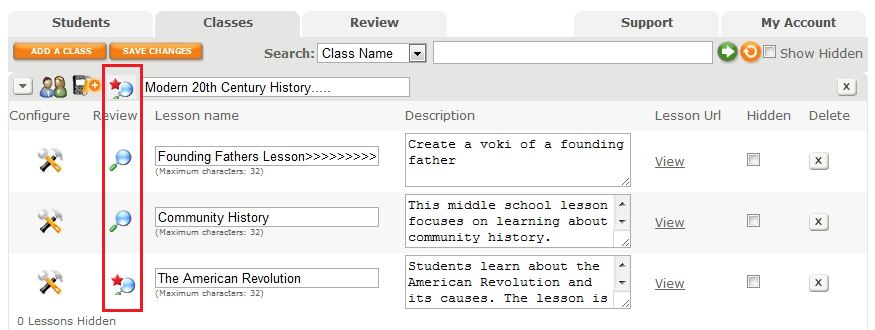
To improve your organization in Voki Classroom, we have introduced a visual that indicates that a Voki is Ready to Review. After you click the Classes Tab, you will see a list of your Classes and Assignments with the magnifying glass review icon. If there are new Vokis to review in a Class or Assignment, a red star will appear on the magnifying glass as a notification. By clicking on the notification icon, you will be taken to the Vokis that need to be reviewed.

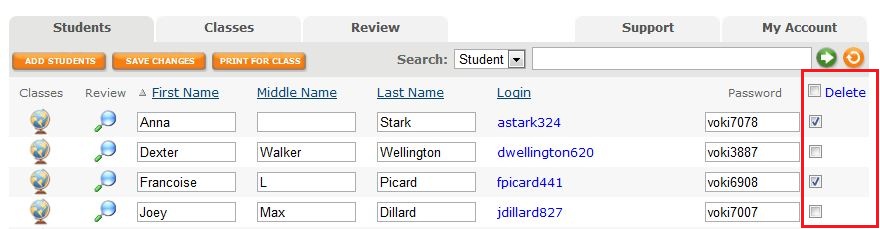
It’s now possible to delete more than one student at a time  with the new multi-delete function. Select the students you would like to delete then click on the delete button at the top of the column. Click the check box at the top of the column to select all students. You may deselect students by clicking on the check box.

Ensuring your students’ information and Vokis are private is now easier to manage with our streamlined Assignment Configuration tool. When it comes time to set up an Assignment Page, the module that pops up allows you to set your Assignment Page Security to public or private and include a password for access. You also have the option to show your students’ names or their initials only. It’s all up to you!

We hope you are enjoying Voki Classroom and always look forward to hearing your feedback! Your opinions matter. If you think of something we could do to make  your experience better, drop us a line at feedback@voki.com.

Until Next Time,

The Voki Team

New Voki Classroom Features: Add Writing Assignments, Assignment Deadlines, and More

New Voki Classroom Features: Add Writing Assignments, Assignment Deadlines, and More

Voki Classroom is constantly improving thanks to your feedback! In this update, we would like to introduce the newest Voki Classroom features. Starting this week, teachers will be able to add a writing assignment to their Voki assignments, set Assignment deadlines, show/hide student names in the Assignment Pages, and give students feedback. Status types have also been updated in both the teacher and student accounts. Read below for more information!

  • Writing Assignment – Many of the Voki Lesson Plans contain a written requirement. Now teachers will have the option to add a writing assignment to their Voki Classroom Assignments. By selecting this option, students will be able to submit a written portion of up to 500 characters with their Voki. Teachers will also have the ability to make the writing assignment visible on the Assignment Page.

Student View of New Voki Classroom Features

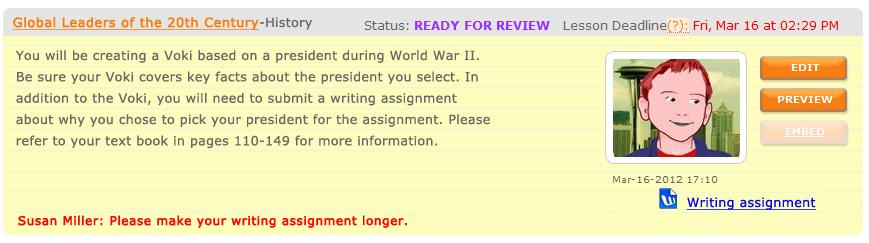
  • Assignment Deadline – Students usually have due dates for homework and classroom assignments so it only makes sense that teachers be able to set deadlines on Voki Classroom assignments! Now, teachers can assign the date and time the Voki assignment is due. If a student submits their work after the deadline, the teacher will see the date and time of assignment completion in red.
  • Show/Hide Student Names – We understand that privacy is an important factor when using online tools in the classroom. For this reason, teachers will have the option to replace the students’ full name with their initials in the Assignment Page.
  • Feedback Have you ever wanted to leave feedback on your students’ Voki assignments? Now you can! We added a feedback tool which will allow for expanded dialogue between you and your students. 
Teacher View of New Voki Classroom Features in the Review Tab
  • Statuses – Stay up-to-date with your students’ progress with our updated status types. The new categories are named and color coded as follows:
    • Get Started                                                              
    • Ready for Review
    • Try Again
    • Approved

We hope you continue to enjoy Voki Classroom and that your experience is enhanced by these improvements.. As always, we want Voki Classroom to be a tool that is useful for teachers and engaging for students.

If you have any suggestions, please feel free to click the FEEDBACK tab in Voki Classroom, or email us at feedback@voki.com. Your opinions and suggestions go a long way!

Until next time,

The Voki Team

Voki Tip of the Week: Edit Student Usernames on Voki Classroom

Voki Tip of the Week: Edit Student Usernames on Voki Classroom

If you are a Voki Classroom user, you have probably already noticed the changes we implemented  to make student logins much easier. Along with a simpler default username, Voki Classroom now allows you to edit your students’ login information as you or your school district deem most appropriate.

The new student logins are comprised of the student’s first name initial, last name, and 3 randomly generated numbers. If you do not want your students’ last names to appear or you would like to change any aspect of the username, go to your student roster and click the name in blue to edit.

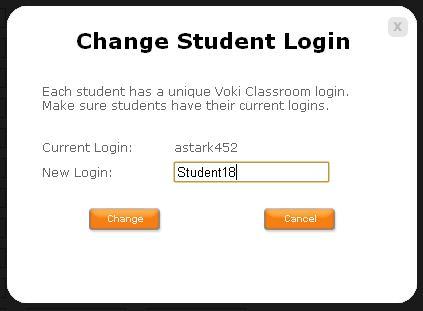
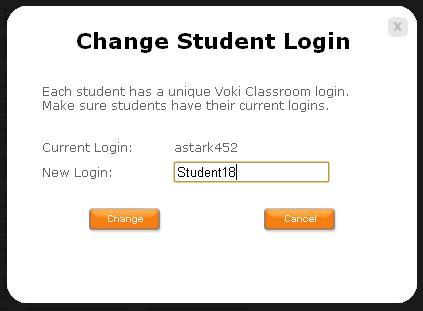
Once you click the blue username, the ‘Change Student Login’ box  will appear.

The rest is up to you! Once you enter the new login, click ‘Change’ and you are  finished!

We hope you are  pleased with this update. We are  always  eager to hear your your suggestions for Voki as we continue to improve your experience.

Should you have any questions, please leave a comment below and we will be happy to answer you, or email us at feedback@voki.com.

Until Next Time,

The Voki Team

Voki Classroom Student Logins Successfully Changed

Voki Classroom Student Logins Successfully Changed

The Voki Team is constantly working on improving your experience with Voki. We recently updated Voki Classroom Student Login names to make them shorter and easier to remember. This change was made due to the input we received from teachers like you and we have so far seen a very positive response!

You may read more about this new feature on our previous blog entry Voki Classroom Student Logins are Being Changed.

We are thrilled that everyone is pleased with the improvement and are happy to report that there was little confusion from students and teachers about this change.

Teacher feedback plays a large role in determining the direction for Voki. We greatly appreciate your suggestions. Should you have any ideas for improving Voki, please leave a comment below or email us at feedback@voki.com.

Thank you!

The Voki Team

Voki Classroom Student Logins are Being Changed

Voki Classroom Student Logins are Being Changed

We have some great news for all teachers using Voki Classroom, and (especially) their students!

As you know, we love receiving feedback and ideas from Voki users! Your feedback helps us learn what we are doing right, and how we can make Voki even more useful.

A great suggestion we have received from many teachers using Voki Classroom is to simplify the student login names. Teachers mentioned that the current student logins are rather long, and that students have a hard time remembering them. As you mentioned, students would have an easier time remembering a shorter, simplier login.

So, we have worked hard to implement a solution to this. We are simplifying student logins!

What you need to know:

Below are examples of the current student login formats.

  1. The default student logins are comprised of: First name . Middle name . Last name : Teacher email – this can lead to very long student logins. Also, many teachers don’t want their email address to be part of their students’ logins.
  2. Therefore, we implemented a minor solution called the Teacher ID. Basically, we allowed teachers to choose a unique ID that would replace their email in student logins. Student logins under teachers who had defined a Teacher ID were comprised of: First name . Middle name . Last name : Teacher ID – this led to shorter student logins, but it was not optimal.

The new and improved Student logins will be comprised of: First initial only + Last name + 3 digits – That’s all! This will make for even shorter and easier-to-remember Student logins. This is an example of the new student login format:

Much Better!

Additionally, teachers will be able to easily modify a student’s login name by simply clicking on it. Clicking on the blue login will open a small window where you may edit the student’s login. This is an example of the editing window:

Important! If you currently have a Voki Classroom account:

YOUR STUDENT LOGINS WILL BE AUTOMATICALLY UPDATED ON

SUNDAY, FEBRUARY 26TH, 2012

Everyone affected will receive an email notification, as well as another reminder the day before the change.

You will also see an alert in your Voki Classroom account, which will be dismiss-able after the change takes place. The alert looks something like this (it’s hard to miss):

What you need to do:

Technically, there’s nothing you need to do, since the change will happen automatically. However, you should provide your students with their new logins once the change occurs.

Tip: If you are unable to tell your students about the change, we’ll do it for you. When students log in using their old logins, they will see an alert. This alert will provide their new login and ask them to use it from now on.

Note: Student passwords are not affected, unless you decide to change them.

We hope that the new student logins makes logging in to Voki Classroom a much simpler process for your students!

Should you have any questions, please leave a comment below and we will be happy to answer you, or email us at feedback@voki.com.

Thanks for the great feedback – keep it coming!

The Voki Team

Get Creative with Voki – New Arts Lesson Plans!

Get Creative with Voki – New Arts Lesson Plans!

Get out your paintbrushes, glue, and construction paper! Bring out the lights, your best smile, and a script! It’s time to have fun with Voki and Visual Arts! From color studies and collages to instructional videos and personal short films, you can use Voki to help bring out the artist in every student!

Ranging from 6th to 12th grade, these lesson plans are designed to help students explore art, contextualize its meanings, produce artwork of their own, and make connections with light, shadow, color and mood to create a certain effect.

Along with lesson plans that focus on visual arts, we have also included  two lessons regarding the art of film. Your students will be in charge of writing and producing their own short films and using their knowledge of basic art composition to create entertaining and visually interesting shorts.

(We went a little crazy with the art lesson plans; but hey, what kind of renowned art isn’t a little nutty?)

Remember: The grade level we assign to each lesson plan is not a requisite – you can use most Voki lesson plans from a higher, or lower, grade than the one you teach – if you think they fit! Also, remember that you can adapt Voki lesson plans to fit your style, or your students’ abilities.

Art Interpretations (6th Grade, Arts) –  Students are assigned one photocopy of a famous work of art. They research the background and context in which the work was created. Students then create a Voki that interprets the work’s significance at the time it was created, and follow up with a brief, impromptu personal opinion of the piece.

An Artist’s History (7th Grade, Arts) –  Students discover more about notable artists and create a brief presentation that showcases an artist’s information, famous pieces, and a student analysis of the work. Students use Voki to talk about how they feel about the art and what it means to them personally. By the end of the lesson, students will have constructed an artist database to refer to before tests.

Immediate Attraction (8th Grade, Arts) –  This is a quick exercise to help students discover their art preferences and interests. Students will have 45 seconds to flip through art books and find one piece that catches their attention. After they have gone through 3 books, students will analyze each of 3 pieces of art. Students will use Voki to describe the art, how it makes them feel, think, and what kind of reactions their chosen pieces evoke.

A New Family Tree (9th Grade, Arts) –  Students use copies of family photos and magazine clips to recreate a picture of their fantasy family tree. By using various mediums, students will make collages that use real life mixed with various aspects of their imagination to create an avant-garde piece of artwork. Students will then use Voki to describe the brief history of their made-up family.

The Meaning of Color (10th Grade, Arts) – Students work together, and alone, using color to convey a story. Students will be divided into two groups of warm and cool colors. As a team, students work together cutting out colored paper and “collaging” to create a group piece of art. After the group work is done, each student will create a Voki that tells a story that represents the artwork.

The Identity Project (11th Grade, Arts) –  Students use video to create a short film that explores their identity. Students are encouraged to use whatever they would like to make their video and have all creative freedom as long as they remain on topic or can justify any deviation from the topic. Students will then create a Voki that introduces the video to the class.

A Guide to What?! (12th Grade, Arts) – Students draw three cards from a bag that contains different words. Students then create an instructional video that somehow incorporates the three words into the activity or idea being taught. Students will create a Voki that begins the video presentation by explaining what words were drawn and what the instructional video is going to teach.

As always, we would love to hear how you are using Voki in class. If you have a lesson plan that uses Voki (or that can be adapted to incorporate Voki) and you would like to share, please email us at lessonplans@voki.com.

Sincerely,

The Voki Team

Start Fresh: New Year’s Lesson Plans

Start Fresh: New Year’s Lesson Plans

It’s 2012 and school is back in session! Instead of forgetting about the happy holiday moments you and your students  experienced, extend the joy just one more day and try out one of our informative and fun New Year’s lesson plans.

With this new set of lesson plans, you and your students can talk about class resolutions and make a pact to work towards your new goals and be supportive of each other. You can also learn about different calendars used around the world and their New Year’s day celebrations.

Remember: The grade level we assign to each lesson plan is not a requisite – you can use Voki lesson plans from a higher, or lower, grade than the one you teach – if you think they fit! Also, remember that you can adapt Voki lesson plans to fit your style, or your students’ abilities.

What is your New Year’s Resolution? (Elementary, Public Speaking, Writing, Other) – A new year can bring a fresh start to your class. With this New Year’s lesson plan, you and your students can reflect on the last year in class and how this year can be better. Students will learn about resolutions and be introspective in order to bring out the best from within.

Calendars Around the World (Middle School, Social Studies, Other) – Students will learn about other calendars that exist in the world and about the cultures that observe different New Year’s days. Each student will create a Voki that teaches the class about the history of a different calendar. They will also use Voki to talk about when and how certain cultures celebrate their New Year.

Celebrating New Year’s Eve (High School, History, Geography, Social Studies, Other) – Students will discover more about the history and traditions associated with the New Year’s Eve celebrations in other parts of the world. In this interactive lesson, students gather into small groups and use Vokis to give an in depth oral presentation about the history of different culture’s New Year’s traditions. They will also do a show and tell with a visual that the students construct that represents the culture they studied. After the presentations are complete, the class can have their own New Year’s party using all of the customs and traditions they learned about.

As always, we would love to hear how you are using Voki in class. If you have a lesson plan that uses Voki (or that can be adapted to incorporate Voki) and you would like to share, please email us at lessonplans@voki.com.

Happy 2012!

Sincerely,

The Voki Team