Guest Blogger: Mandy Nelson

Guest Blogger: Mandy Nelson

Dear Educators,

I want to share a lesson that a 1st grade teacher and I did a little before Halloween last year. It worked quite well. As part of her curriculum, Mrs. Stasys gave students a binder that included poems that they would read throughout the year. They gathered together on the rug once a day and read the chosen poem aloud.  For this poem they read it to the tune of The Itsy Bitsy Spider. They read the poem together every day for one week to hone their fluency and expression skills.  Once their week of practice was up we took them to the computer lab to design their Voki character.  They could choose to represent themselves any way they wanted.  Some chose to make an exact cartoon replica of themselves, while others designed dogs, pumpkins, monsters and one student even chose a Santa Claus avatar!  Since the image has no effect on their fluency we decided to let them have free reign.  I would advise you to do the same since it helps them feel more ownership over the final product. The following day Mrs. Stasys stayed in the classroom and sent down students to the computer lab in groups of three.  Using Firefox and Voki we recorded each student saying their poem.  (If you do not have an extra adult who can assist you could always do this during reading centers.  It may take several days to get them all recorded but it can be done!)

The kids loved this lesson and we got a kick out of listening to them practice their poems over and over so they could record it just right.  By the end of the project our students were reading in a much more natural, fluent way with great expression.  Even those who usually really struggle with reading and get frustrated were motivated and showed improvement over the duration of the assignment.  Once they were recorded, we embedded their Vokis into my website and parents were given the link to listen to at home.  They were also able forward the link to grandparents and other family members.  The students loved their final products and were proud to show them off.

For our step-by-step lesson plan visit my site and click on the Voki link.  Click here for the finished student products.  To save yourself some time feel free to use these videos I made to teach students how to make their Vokis:  Video 1,  Video 2.  On an aside, another 1st grade class used Vokis for the students to report three important facts about a research topic of their choosing.  Click here for the final products.

Enjoy and let me know how it goes!

-Mandy

Mandy Nelson is a K-4 Technology Integration Specialist in River Forest, IL, near Chicago.  She is always looking for ways to partner with other teachers across the world so email her at nelsonm@district90.org if you would like to collaborate.   
Voki Lesson Plans: Lesson Plans on English-Speaking Countries

Voki Lesson Plans: Lesson Plans on English-Speaking Countries

Last month, we introduced three lesson plans on Latin America. This month we are introducing 3 new lesson plans for our English speaking countries that your students will enjoy learning about: United Kingdom, Australia, and New Zealand! So let’s dive into the past with some famous historical figures from the United Kingdom, travel and explore the great continent of Australia, and test your hidden knowledge on New Zealand!

Remember:  You can use Voki lesson plans for a higher, or lower, grade than the one you teach. Also, you can adapt Voki lesson plans to fit your style, or your students’ abilities!

Autobiography(United Kingdom) – In this lesson plan, students will learn about famous historical figures within the United Kingdom. In a 2 page autobiography, students will research about their lives and their influence on society. As an additional classroom activity, students will create Voki clues on the historical figure that they researched.


Australia Travel Brochure – Students will learn about the geography and the different territories of Australia. Students are assigned to one of the Australian territories and will be required to create a travel brochure for the territory. A Voki will be created to introduce the assigned territory with 3 interesting facts.


New Zealand Scavenger Hunt– Students will go on an internet scavenger hunt on New Zealand. They will learn to locate the islands, cities, and bodies of water located in New Zealand. You will play a Voki with scavenger hunt clues and students will research. Students will be required to create a scavenger hunt Voki to present to the class.


We would love to hear how you are using Voki in your class! If you have send it to us at lessonplans@voki.com!

Until Next Time,

The Voki Team

Talking Technology Presentation at GaETC: Voki

Talking Technology Presentation at GaETC: Voki

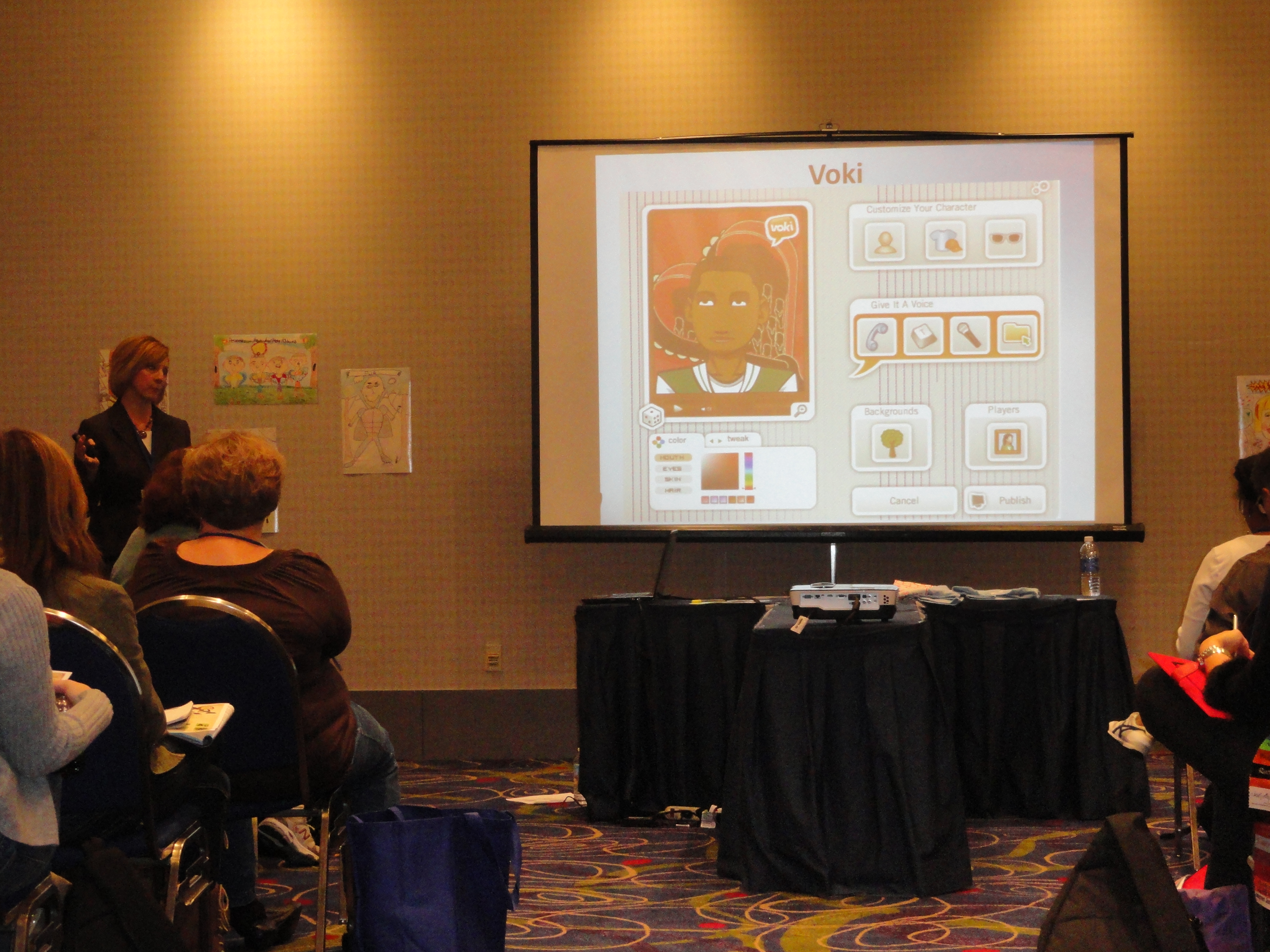
It was a huge success for the Talking Technology session lead by Lisa Collins at the Georgia Educational Technology Conference last week. The session took place on November 8, 2012 in Atlanta, Georgia. The GaETC is an annual event dedicated to helping educators understand the role of technology in classrooms.

Lisa Collins and her partner, Heidi Johnson, presented Voki to a crowd of teachers that day. They have some great giveaways that day.  Some cool Voki t-shirts were given away and two participants received Voki Classroom subscriptions!

Just take a look at how much fun they had:

If you are presenting Voki at a conference, make sure to use our Voki PowerPoint and Brochure! Remember us any pictures of the conference to feedback@voki.com!

Until next time,

The Voki Team

Guest Blogger: Lynda Hall – Engaging Today’s Students with Voki

Guest Blogger: Lynda Hall – Engaging Today’s Students with Voki

Student engagement can be an elusive entity for today’s educators.  There are many possible causes for learner apathy which range from boredom to socio-economic issues to a lack of ability.  The goal for educators is to find resources that inspire students to actively participate in their learning.  One such resource is Voki – a speaking avatar web tool.  Even the most reluctant learners embrace Voki as it gives them the opportunity to express themselves without the need of standing in front of their peers – a very terrifying experience for some.  From an educational standpoint, Voki provides all students with an equal opportunity to earn the best grade possible!

But who is really best suited to explain the educational benefits of Voki?  The students, of course!  Below are some student testimonials that will further highlight the educational benefits of Voki.

  • “I liked it because it was a unique and fun way to introduce yourself to your class and your website.  You could also customize your Voki differently than what you look like … You can have fun!” – Sydney
  • “It is good for Grade 8 introductions.  Students can find things out about their classmates without the stress of being in front of the class.” – Noah
  • “I think it’s a good tool because you can use it to present a project or a speech with it.” – Chase
  • “It’s fun to use and it could be helpful in other ways such as sending it to a family member for their birthday, etc.” – Keisha
  • “I like Voki because you get to know more about your classmates.  It’s fun, new and a good way to start the year.” – Lizzy
  • “I liked it because we can express our creativity and get to know others.” – Shaelyn
  • “It is good for auditory learners.” – Heidi
  • “If you weren’t comfortable with speaking in front of the class, you could use Voki to speak instead.” – Sarah

As you can see, Voki is a fun and engaging web tool that motivates students to creatively share their knowledge.  If you haven’t yet, I strongly encourage you to give it a try!

________________________________________________________________

Lynda Hall is a teacher and a technology coordinator.

She runs a technology blog: The De-Tech-tive 4 Teachers

Follow Lynda on Twitter: @MsLHall

Guest Blogger: Barbara Jolie – Ways to use Voki in Higher Education

Guest Blogger: Barbara Jolie – Ways to use Voki in Higher Education

Voki’s speaking avatars add a creative and personal element to any classroom, and they are especially effective in connecting participants of online courses. Vokis are also perfect for communications courses that focus on speech and language.

Connecting in the Virtual Classroom

Students of online courses may feel disconnected from professors who only communicate via chat or e-mail. Speaking avatars are being used by online instructors to introduce themselves in more personalized and engaging ways.

Similarly, students can create avatars to introduce themselves to professors and classmates in an icebreaking routine. This works well for those students who are uncomfortable with video chat, and it also allows everyone to share elements of their personalities through the fun visual elements.

Sharing Updates and Announcements

In addition to using a Voki for a preliminary introduction, professors can use these speaking avatars to make announcements or pose weekly questions. Professors can record their own voices to promote further personalized engagement.

Communications Courses

Vokis focus largely on speech, making it the perfect learning tool for speech and language classes.

  • Foreign Language Course– Professors can use Vokis to record a number of phrases. By posting them to a project management system (such as Blackboard), students would be able to access the phrases at any time. Students can also use the Voki to record their own phrases or short responses to a question posed by a Professor.
    • Lesson Idea: Play a storytelling game where the professor begins with a 60 second premise. In a predetermined sequence, each student must respond to the story of the preceding student (as told by Vokis). The end result will be a long story, full of twists and turns and all the humor of mistakes. Students should be encouraged to respond quickly and creatively. The goal is to communicate confidently and effectively in the moment – which doesn’t always require perfect grammar.


  • Communications/Speech Courses– Using a series of recordings invoking tone, inflection, pace and other elements of speech; students can develop their best speaking voices and share the results with professors and classmates.
    • Lesson Idea: Ask students to create an avatar that represents a famous celebrity or politician (historical figures are okay). Students can then use voice imitation to create a cartoon version of the figure. This will allow students to have fun while studying voice patterns.


  • Radio Broadcasting– Radio broadcasting students have the unique challenge of establishing a great speaking voice as well as an on-air persona. Broadcasting students can use Voki to create engaging representations of on-air exchanges that can be shared with classmates and professors.
    • Lesson Idea: Students will create a one-minute recording to align with his or her own radio personality. The avatar, the voice and the material will work together to create a realized character. The goal is to teach students how to purposefully meld voice and content to create a public personality.  Classmates can vote on the most successful “virtual hosts.”


Barbara Jolie is a full time freelance writer and blogger. She writes about advantages of online classes and is particularly interested in writing and language education. If you have any questions email Barbara at barbara.jolie876@gmail.com.

Voki Tip of the Week: Setting up Voki Classroom for the New School Year

Voki Tip of the Week: Setting up Voki Classroom for the New School Year

For advanced Voki Classroom users, you may be looking to update your account for the upcoming school year. Check out these quick-and-easy tips to revamp your Voki Classroom account with new classes, lessons, and students.

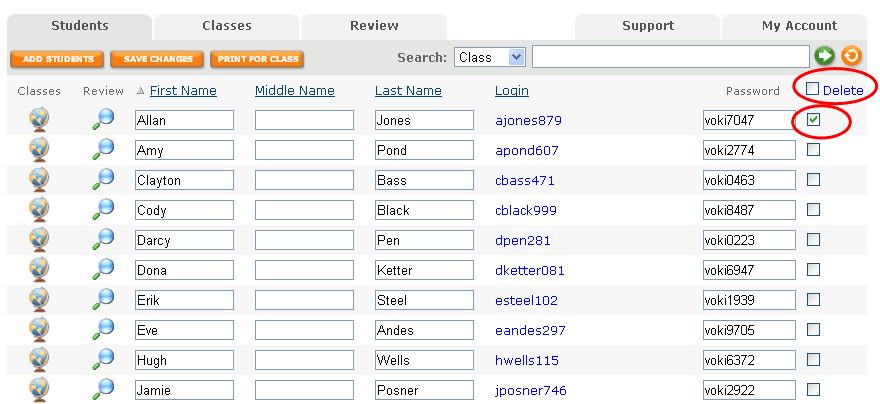
1.    Once you are logged into Voki Classroom, go to the Students Tab. Here, you have the option to delete your students’ accounts and work individually or in mass. Click the box directly adjacent to the student’s password you wish to delete. Then click the blue word Delete at the top of the column.

If you want to delete a large number of students, check the box to the right of the word Delete at the top of the column. All of your students will then be selected. You can deselect a few if needed before clicking Delete.

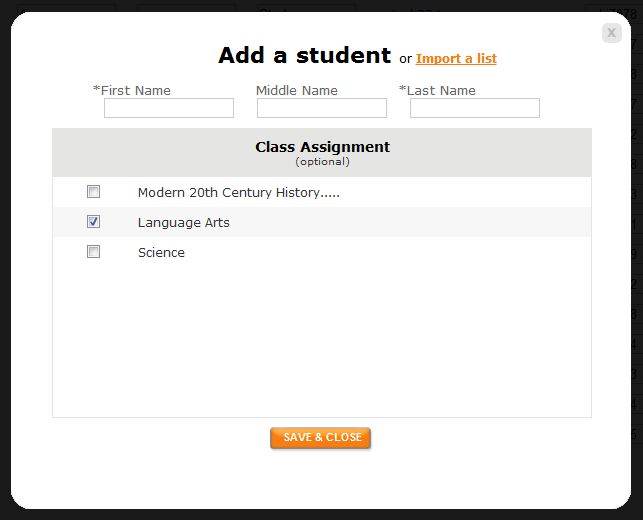
2.    You have 2 options for adding students. You may enter each student one by one or upload a spreadsheet of your students. The other options is to download the template to easily set this list up. Click Import a List. You may then select the class you will to assign your students to.

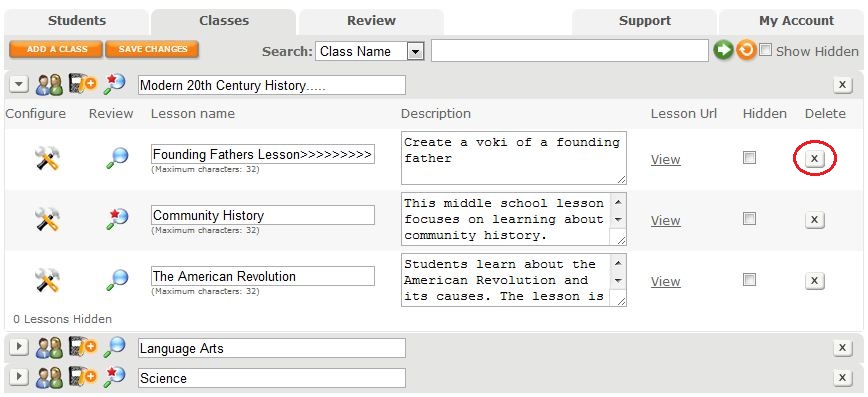
3.    If you choose to delete your classes, click on the X button next to your class. When you delete your class, all of the lessons within the class will be deleted as well as your students’ assignments and Vokis.

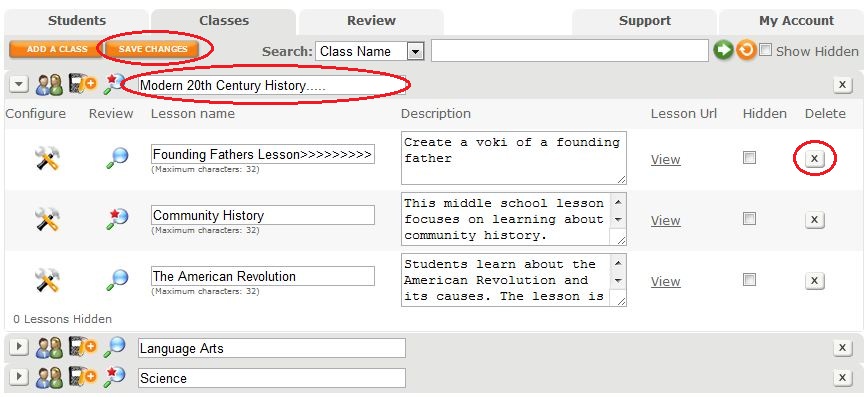
4.    If you want to keep your students’ past work, simply rename your old lessons. Click on the lesson or class you want to rename and type in a new name. Remember to hit the Save Changes button!

5.    To add a new class, clike the Add a Class button and give it a name.

Remember to extend your Voki Classroom subscription as you prepare for another fun and fabulous school year! Go to the My Account Tab and click Extend next to the expiration date.

Good luck this Fall!

The Voki Team

Interviews with Educators | Chantelle Sekerak

Interviews with Educators | Chantelle Sekerak

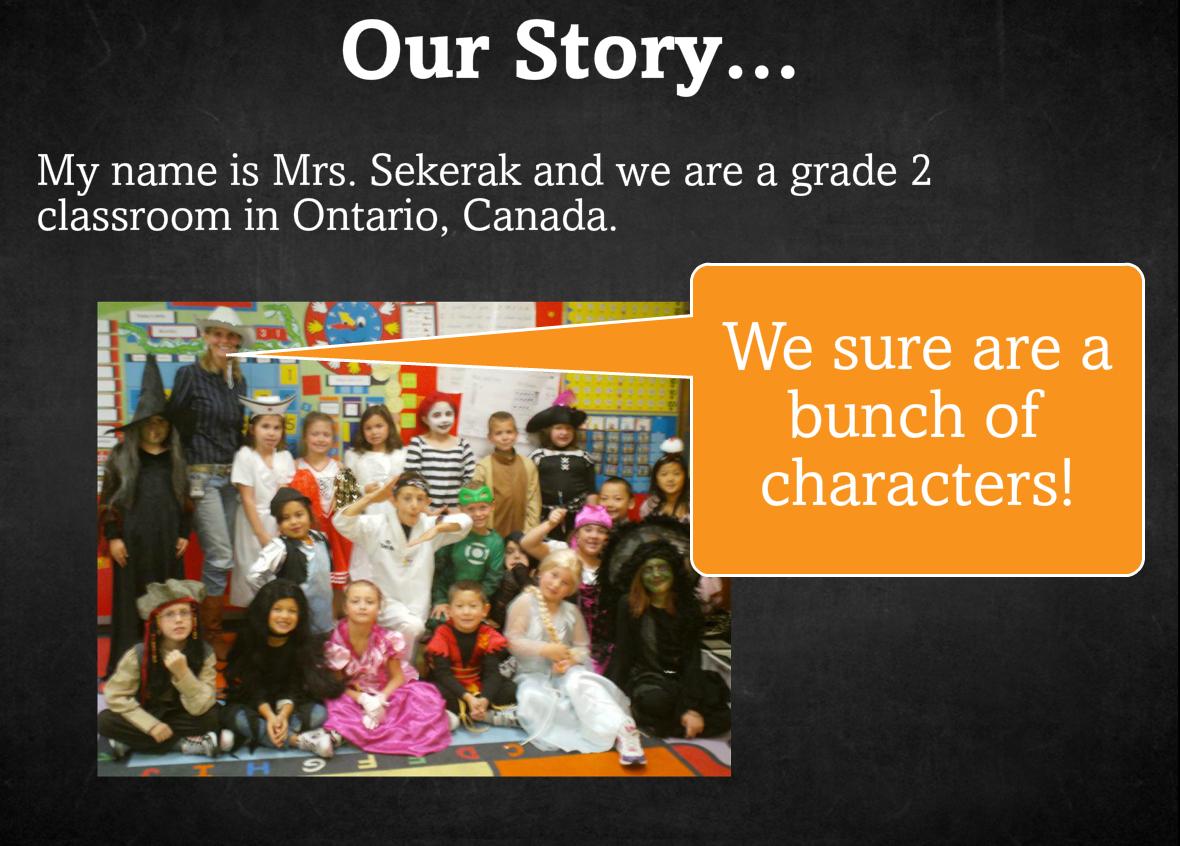
This week’s Interview with Educators features Chantelle Sekerak and her grade 2 class. Chantelle is a teacher in Ontario, Canada and first started using Voki to increase commenting activity on her classroom blog. From the looks of it, she and her class loved Voki so much that they made  it a regular part of their lessons!

As you see in her SlideRocket presentation, Voki  evolved from being a blog buddy to a lesson supplement. Now, she and her students use Voki to showcase their class activities such as math riddles and book talks!

Check out the presentationto see how Voki has been used in Chantelle’s class plus get some great tips and tricks! Be sure and click through to the end to hear her students share what they like about Voki!

Click here to view Chantelle Sekerak’s Voki SlideRocket Presentation

Financial Education Starts in the Classroom!

Financial Education Starts in the Classroom!

Economics and Personal Finance are important topics for students of all ages and should be incorporated into the   standard k-12 curriculum. Educating kids about how to responsibly manage their finances not only improves their mathematical reasoning, but also provides them with meaningful life skills.

This week, we would like to share 3 new lesson plans based on Personal Finance. By introducing lessons that draw on the importance of saving and responsible spending, students will practice basic math, learn economic principles, and gain experience managing their finances.

Remember: The grade level we assign to each lesson plan to is not a requisite – feel free to use lesson plans from different grade levels than the one you teach, if you think they fit! Also, remember that you can adapt Voki lesson plans to fit your style, goals, or your students’ abilities.

Tooth Fairy Economics (Economics, Elementary) – Students learn about the value of currency and the cost of goods and services on a small scale. In this role play activity, the teacher will act as the “Tooth Fairy” and leave different amounts of change under each student’s pillow. Students will compare the amount of money they receive from the tooth fairy to the cost of the items that are available to purchase in the classroom. Next they will have to opportunity to exchange their money for an item within their Tooth Fairy budget. Students will create a Voki that explains how much money they received and what they could and could not purchase.

A Penny Saved (Economics, Middle School and High School) – In this lesson, students will learn about saving money by reading and discussing the comic book, “A Penny Saved,” published by the New York Federal Reserve Bank.  Students will learn how the choices they make with money can determine their quality of life. At the conclusion of this lesson, students will create a Voki that explains how saving money affects the economy and the importance of personal savings..

Let’s Buy a Car! (Economics, High School) – Students will look up cars online and calculate  which one is the best investment over an extended period of time.They will pick a car, consider different interest rates, and explain the costs over a 5 or 10 year period.

As always, we would love to hear how you are using Voki in class. If you have a lesson plan that uses Voki (or that can be adapted to incorporate Voki), please email us at lessonplans@voki.com.

Sincerely,

The Voki Team

Educators in Texas Work to Improve Student Writing Skills with Voki

Educators in Texas Work to Improve Student Writing Skills with Voki

Last week, when we came across a video of students using Voki to edit their writing, we had to find out who was behind the great production, interesting lesson, and big smiles found on every student’s face. The search led us to Chase Young, a second grade teacher, and Lynda Swanner, the language arts coordinator for McKinney ISD.  Chase and Lynda are from McKinney, Texas  and have worked together to create interactive and informative environments for students to develop as confident writers. We got in touch with Chase to find out more about how he uses Voki to motivate and improve literacy and he was more than happy to share his and Lynda’s tricks of the trade. Check out the great ideas below!

Conferring with an Avatar

Teachers can use this 21st century method for proofreading when students do not read over, or are unaware of revision or editing needed in their stories. Lynda Swanner and I devised this strategy to motivate students to actively revise and edit their own writing. This strategy helps students discover what they need to revise and edit and also empowers student as writers. They become aware of their own problems in writing, and they can self-regulate the writing process. Students use this self-discovery strategy of revising and editing to privately critique their work before conferring with the teacher. Here are a few brief steps to get you started using this strategy.

1.  Students create an avatar using Voki.com. We suggest limiting the time because students and teachers could spend all day creating the perfect avatar.

2.  Students type a sentence, paragraph, or section of their stories into the Voki text box.

3.  Students listen to the speech and read along several times.

4.  Students make corrections.

Consider the following example. The student noted a lack of punctuation after conferring with an avatar.

Mr. Young:  What changes are you going to make?

Student I need more periods.

Mr. Young:  How do you know that?

Student:  …It wasn’t very good, because it went in one fast glob.

This next example shows how a student caught a spelling error from listening to the avatar.

Mr. Young:  What changes did you make?

Student:  I needed to fix some spelling errors.  I needed to spell “grabbed” correctly.

Mr. Young:  How did you know it was spelled wrong?

Student It sounded wrong.

Mr. Young:  Do you remember how the avatar said it?

Student:  “grabed” (Student uses a long a sound.)

Mr. Young:  We know that you have to do WHAT to the consonant?

Student:  Double it!

Based upon the avatar’s rendering, students were able to reflect and make changes to their work without teacher direction.

*The full chapter is currently being published by Corwin Press and will available soon in Writing Strategies for All Students in Grades 4-6: Scaffolding Independent Writing Through Differentiated Mini-Lessons.

Chase Young is a second grade teacher in McKinney, TX. He holds a MS Ed with a specialization in literacy. He is a Doctoral Candidate at the University of North Texas. He has written for the Reading Teacher and Education Review, published a book entitled Teaching Texas History through Readers Theatre, and contributed several chapters to educational books.  When he is not teaching, studying, or writing, he is wondering where his free time goes. He enjoys playing the guitar, paintball, racquetball, grilling, concerts, billiards, pools, and golf carts (not to be confused with golfing).

Lynda Swanner has been a teacher, library media specialist, and literacy staff developer. She is currently the English Language Arts and Reading Coordinator in McKinney Independent School District in McKinney, Texas.  She coordinates the curriculum, instruction, and assessments for all elementary teachers in the district.  She is also a literacy consultant for many Texas school districts.  Over the years, she has presented many workshops that integrate technology and literacy for the International Society for Technology in Education.

If you would like to share your tips and tricks on our blog, please email us at submit@voki.com. We always love to hear how Voki is being used to enhance students’ experiences in the classroom!

Healthy Living Lesson Plans with Voki

Healthy Living Lesson Plans with Voki

Being healthy is a lifestyle habit that requires guidance beginning at a young age. With some schools serving lunch options  that are highly processed and lacking in nutritional value, students may be confused as to what “good food” actually is. In addition to the difficulties of making healthy eating decisions, students have to balance their personal life with school work, which is often the source of major stress.

In an effort to help students learn how to maintain a happy and healthy life, we have created 3 lesson plans that touch on important health topics. Middle School and High School students will learn techniques on how to cope with stress,  create realistic body image expectations, and understand the potentially harmful effects of some common consumer products.

Stress, unhealthy eating habits, and a lack of regular exercise are a combination that threaten the well-being of many students. These topics deserve much more attention in school than they currently receive, so open up the discussion in your class and let your students share their ideas with Voki!

Remember: The grade level we assign to each lesson plan is not a requisite – you can use most Voki lesson plans that were written for a higher, or lower, grade than the one you teach – if you think they fit! Also, remember that you can adapt Voki lesson plans to fit your style, or your students’ abilities.

Coping with Stress (Health, High School) – Students explore the issue of stress in school and daily life, and understand that it is an issue many people have to cope with. Students make lists of things they have to do in the week and organize them in a way to try and reduce stress. The class discusses different ways to cope with stress and decrease it in daily life. The teacher will lead the students in a meditative yoga practice at the end of the lesson. Students will create a Voki that talks about how they plan to deal with stress in the future.

Body Image and its Influencers (Middle School, Health) – Students think about and discuss body image and where body image ideals come from. Students explore different body image influencers, such as the media, family, and culture, and compare and contrast these ideals with reality. Students will analyze their own perceptions and use Voki to talk about positive perceptions of their, and others’, appearance.

Voki Health PSA (Middle and High School, Health) – Students are assigned various popular consumer products and supplements to research and evaluate. After viewing examples of different health PSAs online, students will have the chance to create their own using Voki. Students will learn about how to maintain good health and the insider information on products that should be avoided or reduced. Students will think about healthier alternatives to the products they research.

As always, we would love to hear how you are using Voki in class. If you have a lesson plan that uses Voki (or that can be adapted to incorporate Voki) and you would like to share, please email us at lessonplans@voki.com.

Sincerely,

The Voki Team