Voki Lesson Plans: Lesson Plans on English-Speaking Countries

Voki Lesson Plans: Lesson Plans on English-Speaking Countries

Last month, we introduced three lesson plans on Latin America. This month we are introducing 3 new lesson plans for our English speaking countries that your students will enjoy learning about: United Kingdom, Australia, and New Zealand! So let’s dive into the past with some famous historical figures from the United Kingdom, travel and explore the great continent of Australia, and test your hidden knowledge on New Zealand!

Remember:  You can use Voki lesson plans for a higher, or lower, grade than the one you teach. Also, you can adapt Voki lesson plans to fit your style, or your students’ abilities!

Autobiography(United Kingdom) – In this lesson plan, students will learn about famous historical figures within the United Kingdom. In a 2 page autobiography, students will research about their lives and their influence on society. As an additional classroom activity, students will create Voki clues on the historical figure that they researched.


Australia Travel Brochure – Students will learn about the geography and the different territories of Australia. Students are assigned to one of the Australian territories and will be required to create a travel brochure for the territory. A Voki will be created to introduce the assigned territory with 3 interesting facts.


New Zealand Scavenger Hunt– Students will go on an internet scavenger hunt on New Zealand. They will learn to locate the islands, cities, and bodies of water located in New Zealand. You will play a Voki with scavenger hunt clues and students will research. Students will be required to create a scavenger hunt Voki to present to the class.


We would love to hear how you are using Voki in your class! If you have send it to us at lessonplans@voki.com!

Until Next Time,

The Voki Team
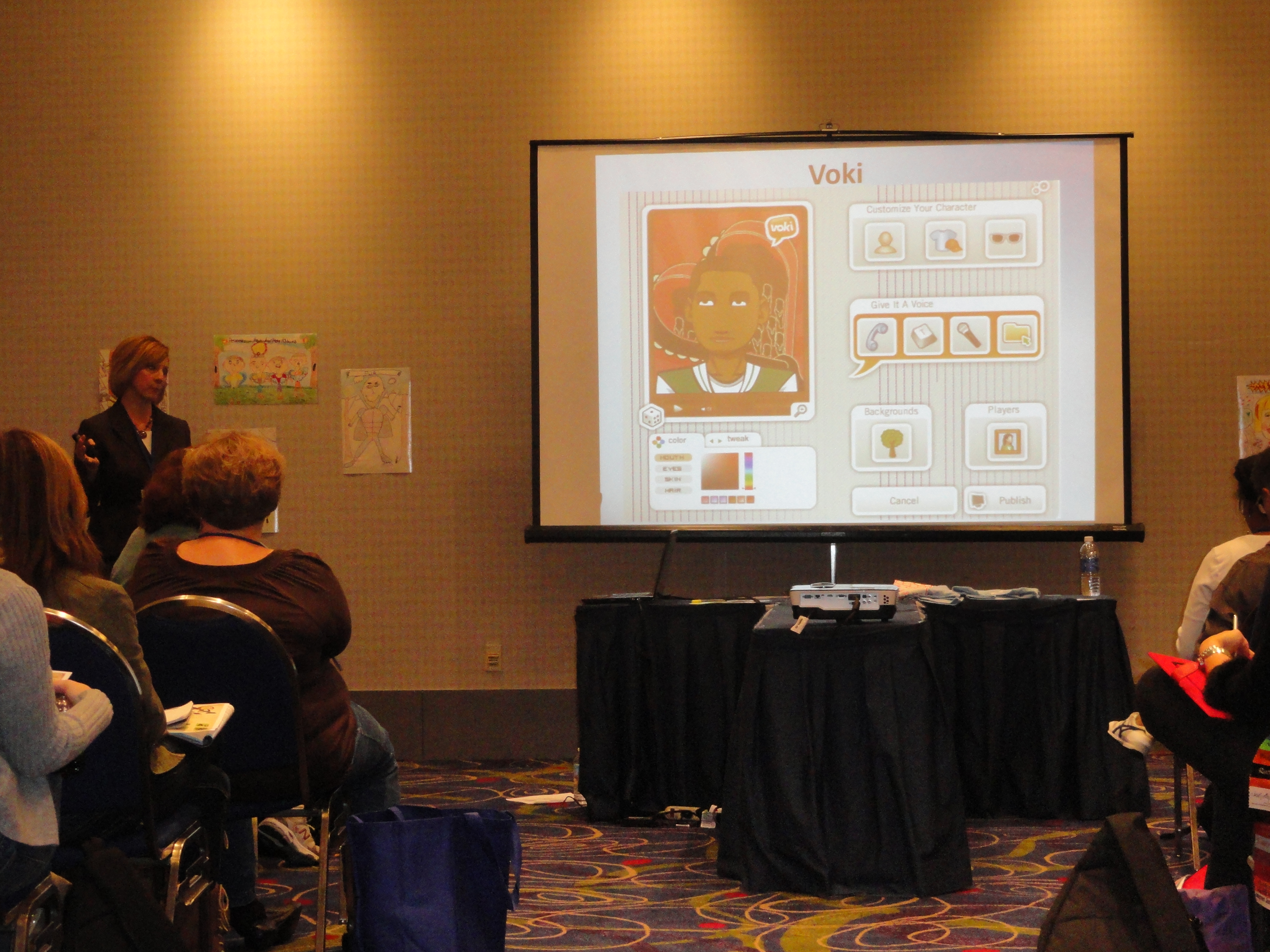
Talking Technology Presentation at GaETC: Voki

Talking Technology Presentation at GaETC: Voki

It was a huge success for the Talking Technology session lead by Lisa Collins at the Georgia Educational Technology Conference last week. The session took place on November 8, 2012 in Atlanta, Georgia. The GaETC is an annual event dedicated to helping educators understand the role of technology in classrooms.

Lisa Collins and her partner, Heidi Johnson, presented Voki to a crowd of teachers that day. They have some great giveaways that day.  Some cool Voki t-shirts were given away and two participants received Voki Classroom subscriptions!

Just take a look at how much fun they had:

If you are presenting Voki at a conference, make sure to use our Voki PowerPoint and Brochure! Remember us any pictures of the conference to feedback@voki.com!

Until next time,

The Voki Team

Tip of the Week: Embed Voki on Google Site

Tip of the Week: Embed Voki on Google Site

Are you looking for different ways to share your Voki? You can always embed your Voki collection to your Google Site! If you attempted to embed your Voki on your Google Site (and failed), continue reading to learn how!

Just follow these simple steps and you can show off your Voki collection to everyone!

  1. Go on www.voki.com
  2. Publish your Voki.
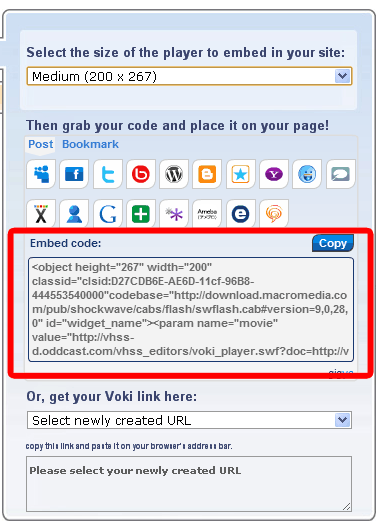
  3. Select your Voki size.
  4. Click to copy your Voki embed code.
  5. Paste your embed code onto Word.
  6. Find the hyperlink starting with src=”http://vhss-d.oddcast.com.
  7. Copy the hyperlink.Note: To make the Voki link work on Google Site, add “s” to http.
  8. Go to sites.google.com. If you do not have a Google site created, click the Create button.
  9. Name your site.
  10. Click Create again.
  11. Click on the Edit button. It looks like a pencil.
  12. Click Insert at the top of the page.
  13. Click on More Gadget.
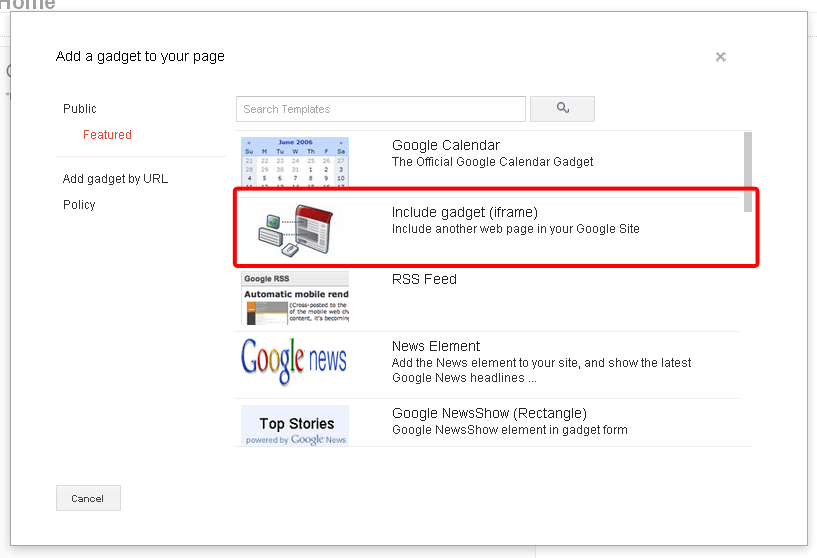
  14. Click on Include Gadget. If you cannot find it, search Include Gadget.
  15. Click on Select.
  16.  Paste the Voki hyperlink into the box and click OK
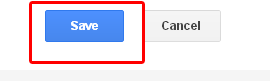
  17.  Click Save.

Now your Voki is embedded on your Google Site!

If you have any questions, comments, or suggestions for Voki, shoot us an email at feedback@voki.com!

Happy embedding!

The Voki Team

Voki Activity Ideas

Voki Activity Ideas

Looking for some great Voki activities for your students?

Well look no further! Tricia and Donna from 1001 Super Tools for Teachers made a great handout with Voki! As their Super Tool 991, they listed out some fun lesson Voki activities for different school subjects!

Reading/Language Arts

Did you just assign a great book to your students? Are you planning a poetry lesson? These fun lesson ideas would get your students to practice their reading and writing:

  • Have your students write a poem and get a Voki to recite it!
  • Create a Voki to describe the character or explain their motivation of their actions.
  • Teach your students how to identify the sequence of events in a story by creating a Voki.

Science

Teaching a science lesson does not have to be boring! Your students will have a BLAST with these Voki science activities:

  • Create a Voki that represents your lesson to explain and define important vocabulary words.
  • Are you doing an experiment in class? You can create a Voki to give directions on how to do the experiment!
  • Have your students create Voki to respond to class questions.

Social Studies

Learning about the Renaissance Era, the American Revolution, or the Meji Restoration? Having a great historical debate in class? Bring history back to life with these Voki history activities:

  • Get your students to create some famous historical figures to explain who they are and what they did.
  • Create Voki characters to have a historical debate on important subjects in history.
  • Have your students create a Voki to explain the cause and effect of some historical events.

Math

Vokis can be used in all types of subjects. Even math! These great Voki math activities will be fun part of your math lesson:

  • You can create an instructional Voki to remind your students on the correct ways to solve a problem.
  • Your students can create and share Vokis to help other solve a problem.
  • Have your students create Voki word problems and solve them in class.

Speech Therapy

Some of your students may have speech problem. These Voki activities will help them reach their language goal:

  • Create a Voki to articulate sounds.
  • If your students have dysfluency, like stuttering, have them create a Voki by recording their voice. Make sure to tell them to keep track of their progress!
  • Have your students record their voice on a Voki. Ask them to get peer feedback on how they are doing.

Foreign language

Voki offers 30 different languages! It’s a good way to start practicing your Japanese sentence structure, Spanish vocabulary, or Portuguese pronunciation!

  • Your students can create a Voki to practice their vocabulary and pronunciation.
  • Create a Voki using text-to-speech; this is a great way for students to practice their writing skills.

Thank you Tricia and Donna for creating this amazing Voki handout!

If you have some great ideas or feedback that you want us to know, send us an email at feedback@voki.com!

Until next time,

The Voki Team

Guest Blogger: Lynda Hall – Engaging Today’s Students with Voki

Guest Blogger: Lynda Hall – Engaging Today’s Students with Voki

Student engagement can be an elusive entity for today’s educators.  There are many possible causes for learner apathy which range from boredom to socio-economic issues to a lack of ability.  The goal for educators is to find resources that inspire students to actively participate in their learning.  One such resource is Voki – a speaking avatar web tool.  Even the most reluctant learners embrace Voki as it gives them the opportunity to express themselves without the need of standing in front of their peers – a very terrifying experience for some.  From an educational standpoint, Voki provides all students with an equal opportunity to earn the best grade possible!

But who is really best suited to explain the educational benefits of Voki?  The students, of course!  Below are some student testimonials that will further highlight the educational benefits of Voki.

  • “I liked it because it was a unique and fun way to introduce yourself to your class and your website.  You could also customize your Voki differently than what you look like … You can have fun!” – Sydney
  • “It is good for Grade 8 introductions.  Students can find things out about their classmates without the stress of being in front of the class.” – Noah
  • “I think it’s a good tool because you can use it to present a project or a speech with it.” – Chase
  • “It’s fun to use and it could be helpful in other ways such as sending it to a family member for their birthday, etc.” – Keisha
  • “I like Voki because you get to know more about your classmates.  It’s fun, new and a good way to start the year.” – Lizzy
  • “I liked it because we can express our creativity and get to know others.” – Shaelyn
  • “It is good for auditory learners.” – Heidi
  • “If you weren’t comfortable with speaking in front of the class, you could use Voki to speak instead.” – Sarah

As you can see, Voki is a fun and engaging web tool that motivates students to creatively share their knowledge.  If you haven’t yet, I strongly encourage you to give it a try!

________________________________________________________________

Lynda Hall is a teacher and a technology coordinator.

She runs a technology blog: The De-Tech-tive 4 Teachers

Follow Lynda on Twitter: @MsLHall

Voki Tip of the Week: Storytelling – Aesop’s Fable

Voki Tip of the Week: Storytelling – Aesop’s Fable

Storytelling is a very useful activity in the classroom. It can be used to and improve your students’ creative writing skills! Here’s an activity that you can do with your students: ask your students to tell their favorite Aesop’s Fable or write their own fable!

They can even record their own voices on the Voki! It’s also a great activity for your students to practice their public speaking!

Note: Instructions for recording with a microphone can be found on Voki Tip of the Week: Give your Voki a Human Voice with a Microphone.

Check out our example below!

Until next time,
The Voki Team

Voki Tip of the Week: Voki on SMART Notebook

Voki Tip of the Week: Voki on SMART Notebook

Many of our Voki users are using SMART Notebook in their classroom. Recently, we received questions recently about using Voki on SMART Notebook. Well, it’s really easy to embed Vokis on SMART Notebook!

Just follow these steps:

  1. Download the Voki widget from SMART Exchange. They require to you to create an account. (It’s free!) If you do not have an account with SMART Exchange, be sure to create one!
  2. Once you downloaded the Voki widget, double click on the file and SMART Notebook will open.
  3. Go to www.voki.com.
  4. Create and publish your Voki.
  5. Select the size of your Voki.
  6. Copy your embed code by clicking on it. (Mac users: To copy, press Apple key + C.)
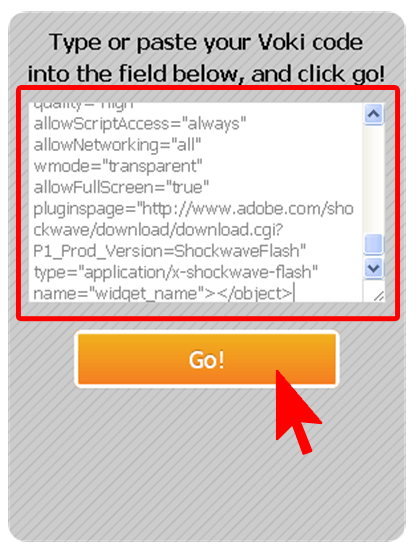
  7. Paste your embed code into the white rectangle in your Voki widget. (Mac users: To copy, press Apple key + V.) And click Go!
  8. Now you have your Voki in SMART Notebook! Just click the play button to start!

Are you having problem with Voki on SMART Notebook? Just send an email to support@voki.com and the Voki Support Team will help you out!

Until next time,

The Voki Team

Guest Blogger: Barbara Jolie – Ways to use Voki in Higher Education

Guest Blogger: Barbara Jolie – Ways to use Voki in Higher Education

Voki’s speaking avatars add a creative and personal element to any classroom, and they are especially effective in connecting participants of online courses. Vokis are also perfect for communications courses that focus on speech and language.

Connecting in the Virtual Classroom

Students of online courses may feel disconnected from professors who only communicate via chat or e-mail. Speaking avatars are being used by online instructors to introduce themselves in more personalized and engaging ways.

Similarly, students can create avatars to introduce themselves to professors and classmates in an icebreaking routine. This works well for those students who are uncomfortable with video chat, and it also allows everyone to share elements of their personalities through the fun visual elements.

Sharing Updates and Announcements

In addition to using a Voki for a preliminary introduction, professors can use these speaking avatars to make announcements or pose weekly questions. Professors can record their own voices to promote further personalized engagement.

Communications Courses

Vokis focus largely on speech, making it the perfect learning tool for speech and language classes.

  • Foreign Language Course– Professors can use Vokis to record a number of phrases. By posting them to a project management system (such as Blackboard), students would be able to access the phrases at any time. Students can also use the Voki to record their own phrases or short responses to a question posed by a Professor.
    • Lesson Idea: Play a storytelling game where the professor begins with a 60 second premise. In a predetermined sequence, each student must respond to the story of the preceding student (as told by Vokis). The end result will be a long story, full of twists and turns and all the humor of mistakes. Students should be encouraged to respond quickly and creatively. The goal is to communicate confidently and effectively in the moment – which doesn’t always require perfect grammar.


  • Communications/Speech Courses– Using a series of recordings invoking tone, inflection, pace and other elements of speech; students can develop their best speaking voices and share the results with professors and classmates.
    • Lesson Idea: Ask students to create an avatar that represents a famous celebrity or politician (historical figures are okay). Students can then use voice imitation to create a cartoon version of the figure. This will allow students to have fun while studying voice patterns.


  • Radio Broadcasting– Radio broadcasting students have the unique challenge of establishing a great speaking voice as well as an on-air persona. Broadcasting students can use Voki to create engaging representations of on-air exchanges that can be shared with classmates and professors.
    • Lesson Idea: Students will create a one-minute recording to align with his or her own radio personality. The avatar, the voice and the material will work together to create a realized character. The goal is to teach students how to purposefully meld voice and content to create a public personality.  Classmates can vote on the most successful “virtual hosts.”


Barbara Jolie is a full time freelance writer and blogger. She writes about advantages of online classes and is particularly interested in writing and language education. If you have any questions email Barbara at barbara.jolie876@gmail.com.

Voki Tip of the Week: Shakespeare Activity

Voki Tip of the Week: Shakespeare Activity

Are you Team Montague or Team Capulet? Do you love to recite Hamlet’s “To be or not to be” speech? Do you like to play the bad guy from Othello? Or do you want to be a king like Macbeth?

No matter which Shakespeare play you enjoy reading, it would be great to recite parts of it in class! Get your students to recite a short passage from a Shakespeare play! It’s a fun way to help your student work on their memorization skills!

Check out the example below and tell us which famous Shakespeare play it’s from!

Until next time,
The Voki Team

Voki Character Ideas

Voki Character Ideas

We love getting feedback and comments from our Voki users. So let’s keep that feedback coming!

To celebrate the start of a new school year, Voki is planning to add some new characters to the Voki editor. And we would love it if you share actual Voki ideas with us!

If you think you have great character ideas, accessories design, or even a theme you want to see on Voki, share it with us! Send us your ideas at feedback@voki.com or share it with us on our Facebook and Twitter (@officialvoki)!

Until next time,

The Voki Team