Upcoming Events

Upcoming Events

Yes! Voki have some upcoming events that you may want to join! We will be hosting our very first Voki Demo on August 28th, 2014.

The Voki Demo would be great for new Voki users to learn more about Voki Classroom and Voki Presenter. Also, you’ll have a chance to talk to the Voki Team and ask questions!

To view all the upcoming events, check out our calendar below:

calendar


We have more events scheduled in the future! So don’t forget to check back!

If you have any questions, feel free to reach out to us at feedback@voki.com!

Until next time,

The Voki Team

Ways to use Twitter in Class

Ways to use Twitter in Class

2a1c1d8If you use Twitter in class, raise your hand! Last week, we have a post on the ways to engage students with technology and one of the ways is to use Twitter in class. So today, we will be expanding this topic a little more!

As you know, many educators found innovative ways to use Twitter with their students. For those you use it, it is a very useful (and powerful) tool. If you don’t use it, here are some ways that you can use Twitter in class.

 Twitter discussions after class.

Do you ever feel like there’s not enough hours in a day to teach a lesson? The lesson doesn’t have to end just because class is over. You can hold Twitter discussions online with your students. Tweet out discussions questions and encourage your students to participate!

Class announcements on Twitter.

Quiz next Monday? Class trip to the local art museum is cancelled? Or to remind them that school is closed on Wednesday? Twitter is the perfect place to make these announcements. It keeps students up-to-date with the latest classroom news. If you’re using Twitter with younger students, it can also keep parents informed about upcoming classroom events!

Share useful information.

Don’t limit your students’ knowledge with just the readings assigned for homework. If you find a relevant article or an interesting video, tweet it out to them. Or, if you find some materials that can help them clarify some topics or questions, tweet it out too! It can be articles, videos, pictures, anything!

 Practice writing skills on Twitter.

Even though Twitter offers a 140-character limit, this doesn’t mean students can’t practice their writing skills. What’s even better is that you can encourage students to write creatively while staying within the character limit. TeachThought offers some writing activities that you can use with students, which includes vocabulary building and grammar review.

We are interested in learning how you use Twitter in class! Tweet it to us @officialvoki!

Until next time,

Eva D.

The Voki Team

1560505_10152516453053764_8553617582835278394_nBio: Eva is the Community Manager for Voki and is part of the Marketing Team at Oddcast. She enjoys playing the piano and knitting on her free time. (She’s also a Rubik’s cube master!) She loves to hear your feedback and comments for Voki!

Qualities of a Great Teacher

Qualities of a Great Teacher

Did you have that one teacher who inspired you to go above and beyond? That one teacher who took their time and made sure all his/her students are on the right track? And that one class that you can’t wait to attend? I am sure we can all relate to that.  Teachers carry a huge responsibility in their classroom. They are placed in a position that will shape and mold the future generations and contribute to their students’ successes. Being a teacher isn’t just about spoon-feeding facts and data into student’s brain but about the attitude toward your students and your dedication to your job.

So, we put together a short list of qualities that a great teacher should have. (Keep in mind that this is not all the qualities that are important to being a great teacher.)

Being Organized.

Being organized and prepared is very important. Great teachers are always organized and prepared for class. Their lessons are clearly structured so that students can easily follow it. An organized teacher can quickly find their teaching materials so that there are minimal distractions in class. Besides, what would your students think when you tell them you misplaced all their homework last night? (Maybe “the dog ate your homework” excuse might work!)

 Have Patience.

Patience is a virtue. The most important quality that a teacher should have is patience. A great teacher is very patient with their students and their parents to deal with the same questions and problems over and over again.  You never give up on your students and would try out new ways to help them succeed in school.

Sets High Expectations. 

A great teacher should have set high expectations and work to raise the bar for their students. You should realize that the expectations that you set can greatly affect your students’ achievements. Setting high expectations can help challenge your students to work harder and prepare them for the future. It’s not easy (and they might hate you for it). It is up to you to inspire and encourage them to do their best!

 Cares about Students.

To us, a great teacher should also care about their students. This teacher is the one who students can go to when they have problems/issues or maybe just to share a funny story with! Great teachers are also great listeners and will make time to listen to their students. I’m sure that we all have this one teacher who you talk to after class and you are STILL in contact with him/her today! (Or am I the only one?)

Loves Teaching.

According to Robert John Meehan, “teachers who love teaching, teach children to love learning.” We believe that this is the most important quality that all teachers should have. Teachers should be passionate and love teaching. A teacher who does not enjoy and love their job cannot be effective at all. Also, you can’t expect your students to enjoy the class if you’re not enjoying the class!

We know that there are more qualities that make up a great teacher. What other qualities do you think a great teacher should have? Let us know!

Until next time,

Eva D.

The Voki Team

1560505_10152516453053764_8553617582835278394_nBio: Eva is the Community Manager for Voki and is part of the Marketing Team at Oddcast. She enjoys playing the piano and knitting on her free time. (She’s also a Rubik’s cube master!) She loves to hear your feedback and comments for Voki!


Voki Presenter Update: New Sharing Options

Voki Presenter Update: New Sharing Options

We made these special updates thanks to your suggestion! This minor change will make a big difference and help make your Voki Presenter experience more valuable.

Our newest update includes the new sharing options for Voki Presentations. You can now share it via the following:

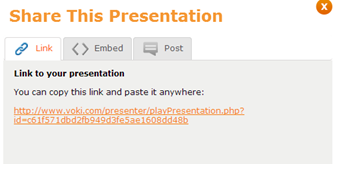
Posting a direct link

Voki Presenter users can grab the direct link and paste it anywhere to share it.

1

Embedding it on a website

Or, Voki Presenter users can grab the embed code and paste it into your webpage or class site by selecting a Presentation size.

2

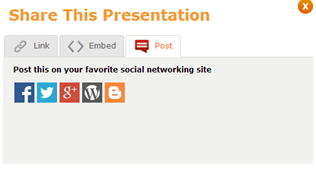
Posting it on a social media site

We are also giving users the option to post it on their favorite social media website.

3

We love to hear what you think about this new update! Let us know by sending an email to feedback@voki.com!

Until next time,

The Voki Team

Ways to Engage Students with Technology

Ways to Engage Students with Technology

It is important to have a class structured around student involvement and helping them focus on what’s important. Technology is a great way to engage your students in class and many educators are beginning to adopt different type of technology within their classes. Let’s see how you can engage your students with technology:

Tweet it! (Using Twitter)

Many students and their parents are using Twitter on their free time. Because of this, a lot of educators have taken advantage of Twitter. What do they use Twitter for? They use it to keep their students well-informed and engaged. It also allowed educators to communicate important information with parents. Since Twitter only allows messages up to 140 characters, students will have to find creative ways to get their messages across!

Some great examples of educators using Twitter is Mrs. Kilgo’s Class, who tweet out news and important announcements, and Room Eleven, which allows students to take charge of the Twitter account and tweet!

Samantha Miller, from TeachHub, came up with 50 different ways for educators to use Twitter in their classroom. Let us know which one you are planning to use!

There’s an app for that! (Using apps)

Yes, there’s definitely an app for this. There are many educational apps within the App Store and GooglePlay that you can use in class. And we definitely know the pain of trying to find the right one. So we will save you some times and have the list for you, right here:

If you’re an Apple lover, here’s 55 Education Apps to use with your students (free, of course).

If you’re an Android geek, here’s 50 Education Apps for you to use!

If you have a favorite app that you love to use in class, just share it with us!

Hey, look at me! (Using visual aids)

If you have more visual learners in your class, it might be useful for you to use videos in class. After all, approximately 65% of the population is visual learners. Visual learners are those who learn materials by seeing them with visuals like graphs, videos, diagrams, etc. So using sites, such as YouTube or PowerPoint, can help you effectively explain certain concepts and ideas to the class. (Also, it’ll keep easily-bored students entertained!)

Until next time,

Eva D.

The Voki Team

1560505_10152516453053764_8553617582835278394_nBio: Eva is the Community Manager for Voki and is part of the Marketing Team at Oddcast. She enjoys playing the piano and knitting on her free time. (She’s also a Rubik’s cube master!) She loves to hear your feedback and comments for Voki!


Guest Blogger: Jennifer Bouffard

Guest Blogger: Jennifer Bouffard

JB2Our school district decided to use Project Based Learning (PBL) as the main delivery system for gifted education this year. The gifted teachers, along with myself, worked on writing PBL units for 3rd, 4th, and 5th grade students.  The premise of PBL is that students are engaged through a driving question; an authentic problem or question that they need to answer through in-depth inquiry. Ultimately, the students present their final products and findings to an authentic audience. This is where Voki came in to play.

I was looking for a way to engage my students, and Voki became my ultimate tool as it provided a way to improve reading/writing skills, and it provided an authentic audience. My 3rd grade students were researching endangered Ohio animals. They had to find out about the physical appearance of their animal, its habitat, its diet, how it survives and thrives, and finally, what we can do to help protect these animals. The students chose the bobcat, the Little Brown Bat, the Peregrine Falcon, and Shovelnose Sturgeon, and the Eastern Massasauga rattlesnake. After researching and writing facts on notecards, I wanted the kids to write a speech that would teach others about their findings.

As most of us, most kids do not like to write, especially when it is a school assignment. They want to find other ways to present their information. Voki was the perfect way to motivate my students. I created a Voki speech that I showed the kids. It told them exactly what they needed to do for the project. Once I showed them my Voki and avatar, they were instantly sold. They created their Voki speeches first by writing them, doing a peer edit, and finally me editing them for a final revision. Once they were revised, I let them create their avatar, and type their speech into the Voki website.

JB1The kids really liked having their own login and password. Most of them memorized it instantly, but I still made sure they had it taped inside of their PBL folder. They could not wait to get started on their Voki speeches. It was interesting to watch them choose their avatars, colors, style of voice, backgrounds, etc. It gave them a voice and choice, another important part of PBL. I think the fact that they could make the speech their own, through Voki, really resonated with my students. I watched the students type their speech, listen to their speech, and rewrite their speech. The writing process naturally flowed, because the students really, really listened to what they wrote.

As a teacher, I was able to listen to my students’ speeches and provide feedback for them. I wish there was a way to see the text that the students had typed in while I was watching/listening to the speech. Sometimes, I could not tell what the student has written, and I wanted to provide better feedback for them.

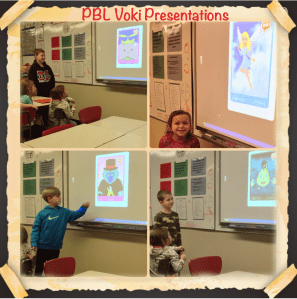
Students need to be able to communicate their ideas and findings in order to be college and career ready.  For those students that are not totally comfortable speaking in front of a group, Voki was a great option. The students still stood up at the Smart Board while they were giving their Voki speech. They had to give their own introduction before the avatar spoke; however, it gave them peace of mind that they were not in the spotlight the entire time. One student even wrote on a reflection sheet, “Voki gave me a voice when I was afraid to use mine.” Pretty powerful.

JB3I used Voki with 3rd, 4th, and 5th grade students. I have to say that all the grade levels were totally engaged while using Voki. The 5th graders needed longer than the speech time allotted, so I added extra parts in for them. For example, they had Part I and Part II of their speeches so all of their information could fit. Ultimately, I liked that Voki provided an authentic audience, because the students’ work could be shared on various websites. The parents of my students enjoyed watching the Voki’s their child had created. They offered feedback to their children as well.

After having the students reflect on using Voki, the vast majority of them really enjoyed using the program. They offered these suggestions: More choices for avatars, especially animals and more choices for USA voices. Voice and choice is very important to them. Overall, it was a great experience for my students. I plan on using Voki again with my gifted PBL students next year.

________________________________________________________________________

Follow Jennifer on Twitter: @BellflowerBouf

Overcoming Technology Obstacles in Classrooms

Overcoming Technology Obstacles in Classrooms

Welcome to the digital era, where students are no longer bound to the books and desks in their classroom.  Instead, they now have new technologies that give them the opportunity to explore the world. Clearly, technology is transforming the way students learn. Educators are now faced with a big challenge: how to keep their students engaged and stimulated in the classroom.

There are many barriers that educators face every day in seeking to integrate technology in to their classes, such as lack of support, lack of computers, and no motivation.

Overcome Your Fear of Implementing Technology

We are all accustomed to the traditional ways of teaching and learning: a lecture, face-to-face questions, and tests. We can definitely agree that implementing new technologies in class can be very frightening and it is still considered the main obstacle for technology integration in schools. Educators who are unfamiliar with technology are afraid of the learning curve. Some are skeptical that technology can help improve their teachings while some are concerned about digital footprint, privacy, and cyber-bullying.

You don’t have to jump straight into using SMART boards or expect all your students to have a tablet. Start off by using something you already know! Which take us to our next point…

Keep it Simple

Like we said before, you don’t need to start off with some high-techie lesson! Comfortable with using PowerPoint? Using Google Docs with other teachers?  We are sure that you are already using some form of technology in class (like Voki)! Just start off with something that you are familiar (and comfortable) with and explore different technologies on your free time!

Use the Tools You Already Have

Have only five computers in class? Need to sign up for the computer lab? Some schools have a limited access to computers. But don’t worry, there are ways to overcome this issue. Have a BYOD (Bring Your Own Device) day in class! Or place them in group to help them learn about teamwork.

As an extra point:

Tip: Always Be Prepared!

There will ALWAYS be something wrong with the lesson that day. The school internet doesn’t work. Another class took the computer lab. The software “decided” to not function properly that day. Or maybe a major power outage in the area. (You might never know! It’s always a possibility!) So it’s up to you to always be prepared for anything that might happen during that lesson and always have a backup plan!

Until next time,

Eva D.

The Voki Team

1560505_10152516453053764_8553617582835278394_nBio: Eva is the Community Manager for Voki and is part of the Marketing Team at Oddcast. She enjoys playing the piano and knitting on her free time. (She’s also a Rubik’s cube master!) She loves to hear your feedback and comments for Voki!


What is a Flipped Classroom?

What is a Flipped Classroom?

imagesMore and more educators are experimenting with flipped classroom. In a traditional classroom setting, the teacher gives a lecture and assigns reading materials and homework questions. Students are required to take notes and they follow instructions given by teachers.

But within a flipped classroom, the lectures and assignments are reversed. This means that lectures/class materials are viewed by students at home before the class and the class-time is devoted to different exercise, hands-on projects and/or discussions. Students can learn at their own pace and receive support from peers and teacher. With a flipped classroom, teachers can be more involved with student learning and provide support to students who need extra practice.

What happens if you’re a first time flipper? The Journal has some very nice tips that you should pay attention to when starting your first flipped class. Some tips for first time flippers are to have a set plan/strategy and start small. If you want to read the entire article, click here.

It might be difficult to try and change your class into a flipped class. Here at Voki, we suggest that you start off small. We are sure that you are already using some form of technology in class (like Voki)! So start off with a technology that you are familiar with and explore different technologies on your free time!

Remember, this is a learning process for you and your students. So just sit back, learn and enjoy it! Have you tried out a flipped classroom, and how is it working out for you? Let us know in the comments below.

Until next time,

Eva D.

The Voki Team

1560505_10152516453053764_8553617582835278394_nBio: Eva is the Community Manager for Voki and is part of the Marketing Team at Oddcast. She enjoys playing the piano and knitting on her free time. (She’s also a Rubik’s cube master!) She loves to hear your feedback and comments for Voki!

Ways to Challenge Yourself as a Teacher

Ways to Challenge Yourself as a Teacher

We should always challenge ourselves to learn more. As a teacher in the new technology era, you have to constantly adapt to the ever-changing technological environment and continuously challenge yourself (and your students) in the classroom. TeachThought came up with 50 different ways to challenge you as a teacher and here’s out top 3 favorite ones:

#14. Present at a state or national conference by yourself.

Your students are presenting in front of their peers, so why can’t you? Lead by example! Attending conferences (local, state, or national) is a great way for you to learn and network. If you’re presenting at the conference, even better! By presenting, you can share your experience with other educators and help others by providing valuable ideas and suggestions.

#25. Smile at every student, every day.

We all have that one rough day: forgetting to set the alarm the night before, missing the first train, spilling coffee on your new shirt, losing all your hard work because your computer decided to crash. It may be hard to smile all the time but it’s worth a try! After all it takes fewer muscles to smile than frown! Smiling is a very powerful tool. It is a subtle message that shows that you are kind and polite. Also, smiling puts nervous students at ease because it tells them that everything is going to be ok!

#47. Videotape yourself teaching and share it with the world.

Have some good materials to share? Want feedback on your teaching style or lesson? Have a great class that you wanted the entire world to see? Record it and share it with everyone! You can share it on YouTube, your personal blog, or any social media sites. Not only that this is a good way to get feedback, it’s a great way to pinpoint what you can do better next time. (Don’t forget to share the video with us if you’re using Voki in class!)

Which ways are you planning to challenge yourself this upcoming school year? Let us know below! If you have other ways that other teachers can challenge themselves in class, share it with us here!

Until next time,

Eva D.

The Voki Team

1560505_10152516453053764_8553617582835278394_nBio: Eva is the Community Manager for Voki and is part of the Marketing Team at Oddcast. She enjoys playing the piano and knitting on her free time. (She’s also a Rubik’s cube master!) She loves to hear your feedback and comments for Voki!

I Am a Tech-Savvy Teacher!

I Am a Tech-Savvy Teacher!

It’s not easy being a teacher. But what about a tech-savvy teacher? There are tons of applications, tools, and sites out there that teachers are beginning to use in class: Google Maps, EduBlogs, BrainPop, Wikispaces, etc. (Now, let’s not forget about Voki!)

We spotted a checklist from DailyGenius this week that lists out the 10 signs that you are a tech-savvy teacher. It includes having students read your blog, preparing for twitter chats, attending conferences and keepings up to date with the newest tech! Let’s go ahead take a look at them here: http://dailygenius.com/tech-savvy-teacher/

But we’re adding 2 more signs of a tech-savvy teacher; let us know if you agree:

  1. You embrace gaming inside your classroom. Gaming not limited to just OUTSIDE the classroom. You constantly use games, such as Angry Bird and Minecraft, to teach math, teamwork, science, etc. You understand that students are now growing up in an era where they spend most of their time on videogames and computers. You use it to help student explore and be curious about the world around them.
  2. You have A LOT of class trips without leaving the classroom. You and your class visits the most exotic places on Earth: The Great Wall of China, Pyramid of Giza, Taj Mahal. You use applications like Google Maps/Google Earth with your students to explore different parts of the world and learn!

But being a tech-savvy teacher also means that you need certain skills. There are some skills that you can acquire before your next project! Some of the skills include always looking for new learning opportunities, the importance of real world applications in eLearning, and committing to the best learning experience EVER! Check out this article here to see if you have those skills needed: http://elearningindustry.com/top-10-elearning-skills-elearning-professionals

Here at Voki, we think that the most important skill is communicating and keeping up with new tools and applications. It is important to receive good (and bad) feedback. These feedbacks allow learners (and us!) to change and try to get the most out of the user experience. All tech-savvy teachers should keep up with new tools and applications. You will have in depth knowledge of how these new tools and be combined with others and how it can fit into your lessons and your students’ learning process!

So… Are you a tech-savvy teacher? Do you have what it takes to be one? Let us know in the comments below!

Until next time,

Eva D.

The Voki Team

1560505_10152516453053764_8553617582835278394_nBio: Eva is the Community Manager for Voki and is part of the Marketing Team at Oddcast. She enjoys playing the piano and knitting on her free time. (She’s also a Rubik’s cube master!) She loves to hear your feedback and comments for Voki!