Voki Character Ideas

Voki Character Ideas

We love getting feedback and comments from our Voki users. So let’s keep that feedback coming!

To celebrate the start of a new school year, Voki is planning to add some new characters to the Voki editor. And we would love it if you share actual Voki ideas with us!

If you think you have great character ideas, accessories design, or even a theme you want to see on Voki, share it with us! Send us your ideas at feedback@voki.com or share it with us on our Facebook and Twitter (@officialvoki)!

Until next time,

The Voki Team

Safari Users: Microphone Issue

Safari Users: Microphone Issue

Hey Voki users! Recently, some Safari users/Mac users were experiencing some difficulties when it came to recording with a microphone. This is because your JavaScript is not updated.

So here’s what you should do:

Solution:

  1. Go to  http://www.java.com/en/download/faq/java_mac.xml.
  2. When the page loads, you will see an option to Update plug-in.

We apologize for any inconvenience that you are having. This problem should be solved by next week! Just follow us on Facebook and Twitter for any updates on this issue!

If you are having difficulties with Voki, please send us an email at feedback@voki.com!

Voki Tip of the Week: Voki Classroom Support

Voki Tip of the Week: Voki Classroom Support

Did you know that one of the many advantages of Voki Classroom is full online support? That’s right! You can directly email our Voki Support Team with any questions or feedback. This is an exclusive feature in Voki Classroom found in the Support tab when you log in.

Also available in the Voki Classroom Support tab are a variety of resources. The Voki Classroom FAQ cover some of the most commonly asked questions. In the Teacher’s Corner, you can connect with other teachers, ask questions, and make suggestions. If you are a first time user, we recommend reviewing the Getting Started Guide. The Voki Classroom User Guide provides in depth information on every feature.

Don’t fret if you’re not a Voki Classroom user! Many of these resources can be found in the Learn tab. In addition to the Teacher’s Corner and Guides, you should check out our blog, Facebook posts, and tweets for up-to-the-moment information. Click here to learn more about the Voki Classroom 15 Day FREE Trial!

Until next time,
The Voki Team

Voki Tip of the Week: Changing Your Voki Login Emails

Voki Tip of the Week: Changing Your Voki Login Emails

So you’re a long time Voki fan and want to have a new email address associated with your Voki account. This is the scoop on how this feature works in Vok and Voki Classroom.

For Basic Voki Users:

Basic Voki users’ emails cannot be changed, but you can easily create a new account with a different email! To copy your Voki to your new account, check our blog post on How to Copy a Voki. You can also log into your old account as much as you need.

For Voki Classroom Users:

Voki Classroom users can change their emails. Here’s what you can do:

  1. Log into your Voki Classroom account.
  2. Click on the My Account tab.
  3. Under Personal Settings, click the Edit option on the Email Address line.
  4. Type in your new email and click Save. You will receive a notification informing you that your email address has been updated.

Click here to learn more about other advanced features in Voki Classroom!

Until next time,

The Voki Team

Voki Classroom Summer Specials

Voki Classroom Summer Specials

Summertime is just around the corner and we’ve got an exciting Voki Classroom Summer Special to share with you! Starting in May through the end of July, you will receive FREE extra months when you buy a 1 or 2 year Voki Classroom subscription. This special is also great for teachers who are new to Voki Classroom and need some time to “play around.” With these summer savings, you can have your Voki Classroom ready for August through the entire school year.

Check out the schedule below!

          * May Special – 3 extra months

          * June Special – 2 extra months

          * July Special – 1 extra month

With all of these free months, you can enjoy a relaxing summer and feel confident with your new Voki Classroom subscription before the school year kicks in!

To take advantage of the Voki Classroom Summer Special, please visit the Voki Classroom website. Have a great vacation and we hope to see you in Voki Classroom soon!

Until Next Time,

The Voki Team

Voki Classroom Updates: Ready to Review Notifications, Multi-Delete Function and Privacy Features

Voki Classroom Updates: Ready to Review Notifications, Multi-Delete Function and Privacy Features

We’ve got more Voki Classroom updates rolling in and we think you are going to like these! As of this week, improvements have been made for reviewing Vokis as well as the multi-delete function for students. We’ve also implemented additional  student privacy settings to Voki Classroom.

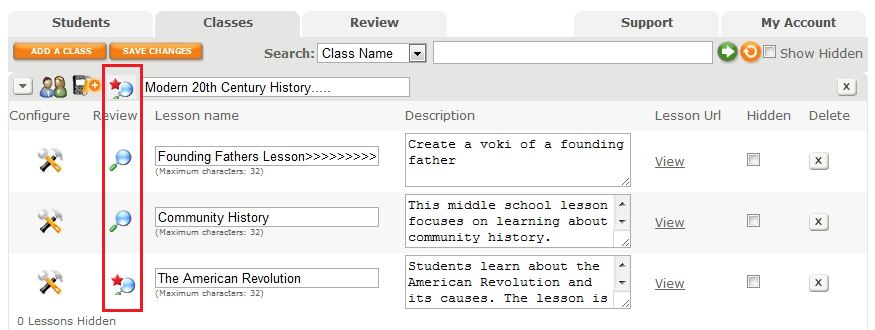
To improve your organization in Voki Classroom, we have introduced a visual that indicates that a Voki is Ready to Review. After you click the Classes Tab, you will see a list of your Classes and Assignments with the magnifying glass review icon. If there are new Vokis to review in a Class or Assignment, a red star will appear on the magnifying glass as a notification. By clicking on the notification icon, you will be taken to the Vokis that need to be reviewed.

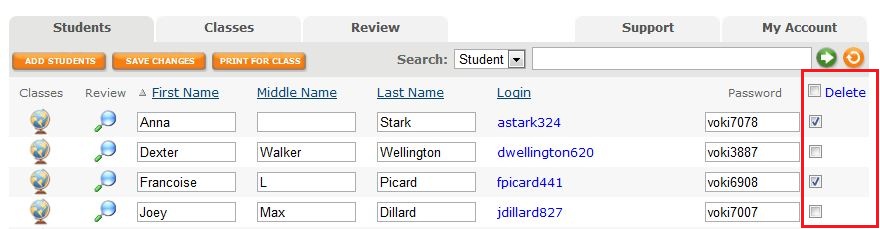
It’s now possible to delete more than one student at a time  with the new multi-delete function. Select the students you would like to delete then click on the delete button at the top of the column. Click the check box at the top of the column to select all students. You may deselect students by clicking on the check box.

Ensuring your students’ information and Vokis are private is now easier to manage with our streamlined Assignment Configuration tool. When it comes time to set up an Assignment Page, the module that pops up allows you to set your Assignment Page Security to public or private and include a password for access. You also have the option to show your students’ names or their initials only. It’s all up to you!

We hope you are enjoying Voki Classroom and always look forward to hearing your feedback! Your opinions matter. If you think of something we could do to make  your experience better, drop us a line at feedback@voki.com.

Until Next Time,

The Voki Team

New Voki Classroom Features: Add Writing Assignments, Assignment Deadlines, and More

New Voki Classroom Features: Add Writing Assignments, Assignment Deadlines, and More

Voki Classroom is constantly improving thanks to your feedback! In this update, we would like to introduce the newest Voki Classroom features. Starting this week, teachers will be able to add a writing assignment to their Voki assignments, set Assignment deadlines, show/hide student names in the Assignment Pages, and give students feedback. Status types have also been updated in both the teacher and student accounts. Read below for more information!

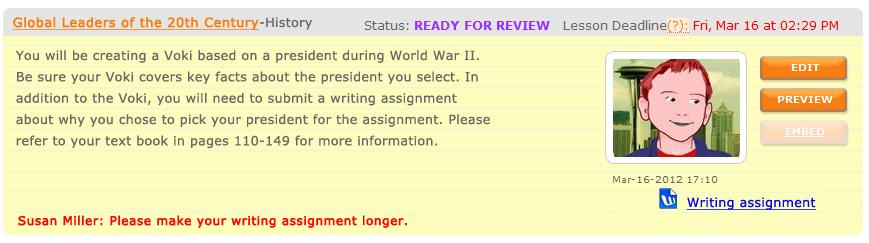
  • Writing Assignment – Many of the Voki Lesson Plans contain a written requirement. Now teachers will have the option to add a writing assignment to their Voki Classroom Assignments. By selecting this option, students will be able to submit a written portion of up to 500 characters with their Voki. Teachers will also have the ability to make the writing assignment visible on the Assignment Page.

Student View of New Voki Classroom Features

  • Assignment Deadline – Students usually have due dates for homework and classroom assignments so it only makes sense that teachers be able to set deadlines on Voki Classroom assignments! Now, teachers can assign the date and time the Voki assignment is due. If a student submits their work after the deadline, the teacher will see the date and time of assignment completion in red.
  • Show/Hide Student Names – We understand that privacy is an important factor when using online tools in the classroom. For this reason, teachers will have the option to replace the students’ full name with their initials in the Assignment Page.
  • Feedback Have you ever wanted to leave feedback on your students’ Voki assignments? Now you can! We added a feedback tool which will allow for expanded dialogue between you and your students. 
Teacher View of New Voki Classroom Features in the Review Tab
  • Statuses – Stay up-to-date with your students’ progress with our updated status types. The new categories are named and color coded as follows:
    • Get Started                                                              
    • Ready for Review
    • Try Again
    • Approved

We hope you continue to enjoy Voki Classroom and that your experience is enhanced by these improvements.. As always, we want Voki Classroom to be a tool that is useful for teachers and engaging for students.

If you have any suggestions, please feel free to click the FEEDBACK tab in Voki Classroom, or email us at feedback@voki.com. Your opinions and suggestions go a long way!

Until next time,

The Voki Team

Voki Tip of the Week: Edit Student Usernames on Voki Classroom

Voki Tip of the Week: Edit Student Usernames on Voki Classroom

If you are a Voki Classroom user, you have probably already noticed the changes we implemented  to make student logins much easier. Along with a simpler default username, Voki Classroom now allows you to edit your students’ login information as you or your school district deem most appropriate.

The new student logins are comprised of the student’s first name initial, last name, and 3 randomly generated numbers. If you do not want your students’ last names to appear or you would like to change any aspect of the username, go to your student roster and click the name in blue to edit.

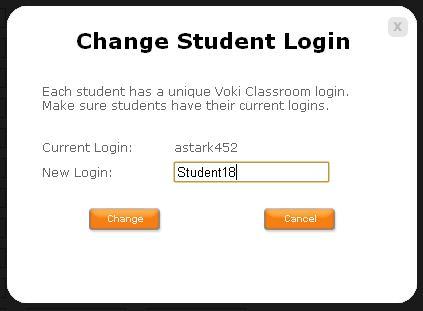
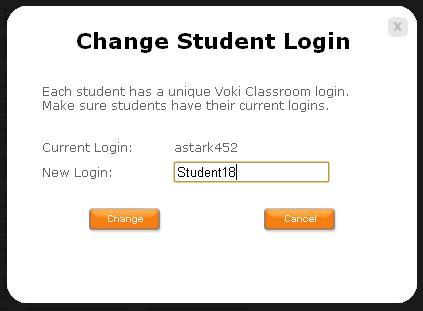
Once you click the blue username, the ‘Change Student Login’ box  will appear.

The rest is up to you! Once you enter the new login, click ‘Change’ and you are  finished!

We hope you are  pleased with this update. We are  always  eager to hear your your suggestions for Voki as we continue to improve your experience.

Should you have any questions, please leave a comment below and we will be happy to answer you, or email us at feedback@voki.com.

Until Next Time,

The Voki Team

Voki Classroom Student Logins Successfully Changed

Voki Classroom Student Logins Successfully Changed

The Voki Team is constantly working on improving your experience with Voki. We recently updated Voki Classroom Student Login names to make them shorter and easier to remember. This change was made due to the input we received from teachers like you and we have so far seen a very positive response!

You may read more about this new feature on our previous blog entry Voki Classroom Student Logins are Being Changed.

We are thrilled that everyone is pleased with the improvement and are happy to report that there was little confusion from students and teachers about this change.

Teacher feedback plays a large role in determining the direction for Voki. We greatly appreciate your suggestions. Should you have any ideas for improving Voki, please leave a comment below or email us at feedback@voki.com.

Thank you!

The Voki Team

Voki Classroom Student Logins are Being Changed

Voki Classroom Student Logins are Being Changed

We have some great news for all teachers using Voki Classroom, and (especially) their students!

As you know, we love receiving feedback and ideas from Voki users! Your feedback helps us learn what we are doing right, and how we can make Voki even more useful.

A great suggestion we have received from many teachers using Voki Classroom is to simplify the student login names. Teachers mentioned that the current student logins are rather long, and that students have a hard time remembering them. As you mentioned, students would have an easier time remembering a shorter, simplier login.

So, we have worked hard to implement a solution to this. We are simplifying student logins!

What you need to know:

Below are examples of the current student login formats.

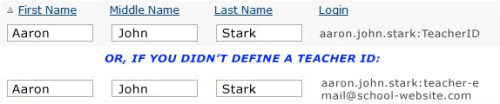
  1. The default student logins are comprised of: First name . Middle name . Last name : Teacher email – this can lead to very long student logins. Also, many teachers don’t want their email address to be part of their students’ logins.
  2. Therefore, we implemented a minor solution called the Teacher ID. Basically, we allowed teachers to choose a unique ID that would replace their email in student logins. Student logins under teachers who had defined a Teacher ID were comprised of: First name . Middle name . Last name : Teacher ID – this led to shorter student logins, but it was not optimal.
The new and improved Student logins will be comprised of: First initial only + Last name + 3 digits – That’s all! This will make for even shorter and easier-to-remember Student logins. This is an example of the new student login format:

Much Better!

Additionally, teachers will be able to easily modify a student’s login name by simply clicking on it. Clicking on the blue login will open a small window where you may edit the student’s login. This is an example of the editing window:

Important! If you currently have a Voki Classroom account:

YOUR STUDENT LOGINS WILL BE AUTOMATICALLY UPDATED ON

SUNDAY, FEBRUARY 26TH, 2012

Everyone affected will receive an email notification, as well as another reminder the day before the change.

You will also see an alert in your Voki Classroom account, which will be dismiss-able after the change takes place. The alert looks something like this (it’s hard to miss):

What you need to do:

Technically, there’s nothing you need to do, since the change will happen automatically. However, you should provide your students with their new logins once the change occurs.

Tip: If you are unable to tell your students about the change, we’ll do it for you. When students log in using their old logins, they will see an alert. This alert will provide their new login and ask them to use it from now on.

Note: Student passwords are not affected, unless you decide to change them.

We hope that the new student logins makes logging in to Voki Classroom a much simpler process for your students!

Should you have any questions, please leave a comment below and we will be happy to answer you, or email us at feedback@voki.com.

Thanks for the great feedback – keep it coming!

The Voki Team