Guest Blogger: Carmen Brettel – How to Use Voki in the Classroom

Guest Blogger: Carmen Brettel – How to Use Voki in the Classroom

Voki speaking avatars are great tools for the classroom. Teachers and students alike can create avatars and use them in a number of ways to make learning fun and more accessible. Not sure how Voki can help you or your students? Here are a few fun ideas for how you can incorporate Voki speaking avatars in your classroom and lesson plans:

Use Your Avatar as a “Substitute”

Students can start to zone out in the middle of lectures, and the teacher’s voice can start to sound like the “mwah mwah mwah” in a Charlie Brown cartoon. Introducing an avatar for some lessons can get students’ attention and make it a little more fun.

Choose a quirky and interesting avatar — not just one that looks like you. Use it for particularly dry discussions and incorporate it into an interactive presentation. Students will feel like they’re watching a show — and they’ll be learning at the same time.

Get Students to Create Interactive Avatars

Every teacher knows that encouraging student participation can be a bit like pulling teeth at times. Encouraging students to create their own interactive avatars may help them to participate more, both by offering them a fun outlet for it, and by offering shy students a way to participate that doesn’t require being so “exposed.”

You can create a virtual interactive classroom if you have access to a computer lab, or you can use the avatars in online discussions through a classroom blog or website. Explore which options work best for you based on your resources.

Assign a Virtual Presentation

Old-fashioned book reports and project presentations can be dull for both the presenter and the audience. Students standing next to a tri-fold project board and reading off note cards are not likely to have a good time, and neither are their peers who have to listen to it.

You can make it a little more fun for all students by asking them to create virtual presentations that are created with a Voki speaking avatar and a powerpoint or other presentation. The avatar can guide the presentation, which students will have fun creating (with a little more creative latitude) and their peers will have fun listening to, helping both to learn more.

Create Avatars Based on Lessons

Help bring historical and literary figures to life by asking students to create a speaking avatar for them. Not only will students have to create an avatar in that person’s likeness — and may have to imagine it based on cues for literary figures — but they can also create dialogue for the characters for a presentation or report.

Such an assignment will help students better understand the figures they are studying in class, and it will help them to have more fun while they’re doing it.

There are many more ways you can use Voki speaking avatars in your classroom to help promote learning and greater interaction. You are only limited by your creativity.

How have you used Voki speaking avatars in your classroom? Share your tips in the comments!

Carmen Brettel is a writer and manager for Studentgrants.org. In her spare time, Carmen enjoys gardening and volunteering at animal shelters.

Voki Tip of the Week: Voki on Glogster

Voki Tip of the Week: Voki on Glogster

Is there a way to embed a Voki on Glogster? 
This is a very common question that we get from teachers! Unfortunately, the answer is no, you can’t embed a Voki on Glogster. But, we found a different way that you can put a Voki on your Glog! Just continue reading to learn how!

Insert as video file

1. Go to www.voki.com.

2. Create and publish your Voki.

3. Save your Voki as a video file. Check out this Tip of the Week on how to turn your Voki into a video file. If you want your Voki video to be bigger, you can view the Voki in full screen.

4. Go to www.glogster.com and sign into your Glogster account.Glog0

5. Create a Glog.Glog1
6. Click upload and find your Voki video file. Find your uploaded Voki video under Video.

Glog2
7. Click on the Voki video and click Use It. Your Voki will be inserted into your Glog.

Glog3
8. To preview your Glog, select preview. To save, click save or publish.Glog4

Insert as picture

1. Go to www.voki.com.

2. Create and publish your Voki.

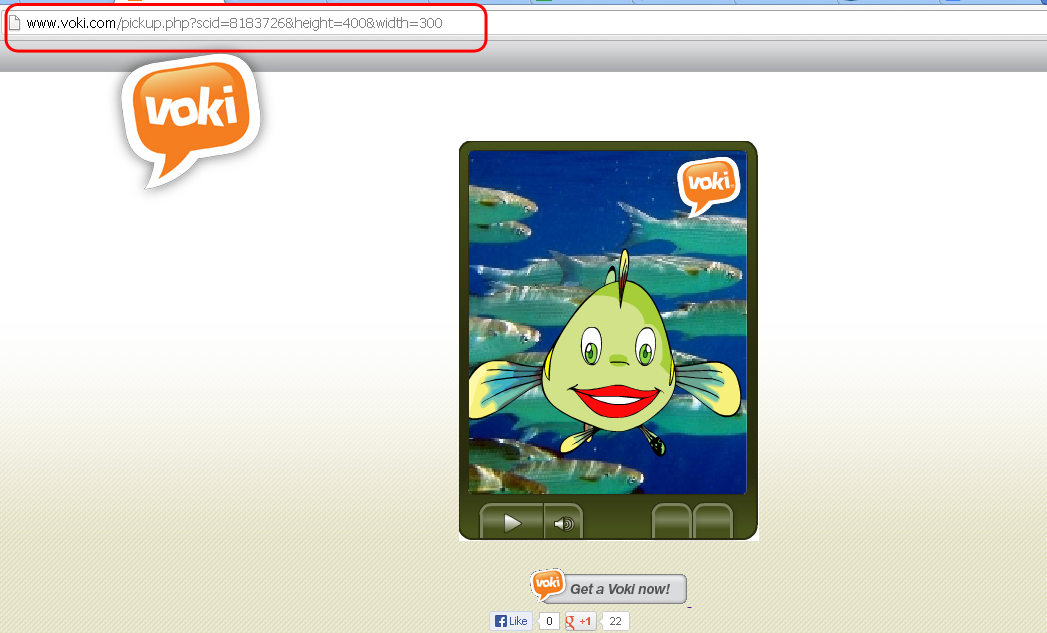
3. Click the drop down menu and select Large. Then select, Standard Voki link to get the URL.

4. Copy and paste the URL into the address bar. Now you have a bigger Voki on your screen!Glog5
5. Click the Print Screen button on your keyboard.

6. Open Paint and paste the screenshot.

7. Crop the Voki image.Glog6
8. Go to www.glogster.com and sign into your Glogster account.

Glog0
9. Create a Glog.Glog1
10. Click upload and find your Voki picture. Find your uploaded Voki image under Image.Glog2
11. Return to your Voki page and copy the direct link.

Glog8
12. Return to your Glogster page and click on the Voki image. Then click Edit.Glog9
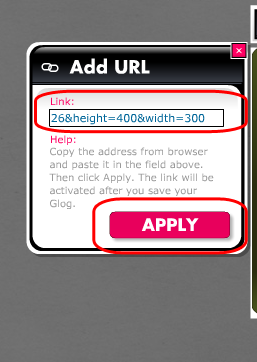
13. Click on Add link.Glog10
14. Paste the Voki link and click apply.Glog11
15. To preview your Glog, select preview. To save, click save or publish.Glog4

If you have any feedback, comments, or suggestion for Voki, send us an email at feedback@voki.com!
Until next time,
The Voki Team

Voki Classroom July Special 2013

Voki Classroom July Special 2013

Just one more month until Voki Classroom Summer Special is over! This month is the last chance to take advantage of Voki Classroom Summer Special. For the entire month of July, you will receive an extra month of Voki Classroom added to your 1 or 2 year subscription!

summer-special6 Just sign up for Voki Classroom and your extra month will be added onto your subscription automatically.

If you have any questions or feedbacks, send us an email at feedback@voki.com!

Enjoy the rest of your summer vacation!

Until Next Time,
The Voki Team

Voki Lesson Plans: Eating Healthy Lesson Plans

Voki Lesson Plans: Eating Healthy Lesson Plans

Did you know that June is National Fresh Fruit and Vegetable Month? Fruits and vegetables are healthy and good for our bodies. In addition to exercising, eating healthy foods help us stay… well, HEALTHY! Developing a healthy eating habit should start from a young age. So, for the month of June, we have prepared 3 new healthy lesson plans to teach your students how to eat healthy.

Remember: The grade level assigned to each lesson plan is not set in stone. You can use Voki lesson plans for a higher, or lower, grade than the one you teach. Feel free to customize the lesson plans to fit your needs. These Voki lesson plans can be adapted to fit your style or your students’ abilities!

Fruits and Vegetables – In this lesson, students will learn about the health benefits of fruits and vegetables. They will understand the type of nutrients that fruits and vegetable provide and how it can help their body stay healthy. They will have a fruits and vegetable tasting test.

Food Pyramid – Students will learn about the food pyramid and the different food groups. They will identify the foods that belong in each part of the food pyramid. Students will learn how to place what they ate into the correct food groups. They will analyze and figure out which food groups they should eat more and which food groups they should eat less.

Healthy Snacks – This lesson will teach students how to identify what kind of snacks are healthy and unhealthy. They will learn that snacks are small portion of food that is eaten between regular meals. Students will record what kind of snacks they eat for 1 week and create a Voki to present it to their class.

We would love to know how you are using Voki in class! If you have a lesson plan that you want to share with us, send it to lessonplans@voki.com!

Until next time,
The Voki Team

Interview with Educators | Craig Badura

Interview with Educators | Craig Badura

1.   Tell us a little about yourself.

My name is Craig Badura.  I am the K-12 Integration Specialist for Aurora Public Schools in Aurora, Nebraska.  I have been an avid Voki user and integrator since 2010.


2.   What are your goals using Voki?

I like use a tool that will integrate seamlessly into the classroom.  Voki creates this opportunity.  Whether it be creating a Voki character of a famous person, book character or having a Voki character summarizing what students learned. Voki is so easy to integrate into any activity you may be doing in your classroom.


3.     How do you use Voki?

  • Famous Persons Project (Create Voki character that speaks script that students wrote)
  • Book Reviews (students create a Voki character of themselves discussing the book)
  • Book Trailers (students create Voki character based on a character in the book)
  • Summarizing (Kindergarteners created Voki characters summarizing their learning of a certain animal)

I have used Voki in a variety of ways and with almost every grade level.  It is so easy to use!

4. What are your 3 favorite things about Voki? 

  • Easy to use!
  • Embeds well.
  • Myriad of integration possibilities!

5. What would you add to the Voki product?

I wouldn’t change a thing! I do notice that some of the characters require a paid account, but there are still plenty of characters for students to choose from.

6. Do you have any Voki tricks up your sleeve?

I didn’t know that Voki’s could speak different languages.  I had an ELL student in my class that actually taught ME that you could change the language.  I bet she couldn’t speak more than a dozen words in English, yet she figured out how to change her Voki character to her native tongue!  So easy to use and what a great tool for the ELL classroom!

_____________________________

Want to be interviewed for the Voki blog? Send us an email at submit@voki.com!

Until next time,

The Voki Team

Guest Blogger: Give Kids a Voice with Voki by Susan Stephenson

Guest Blogger: Give Kids a Voice with Voki by Susan Stephenson

SusanI love what Voki offers kids! Often in the classroom or in home school we focus on the key skills of reading and writing to such an extent that we neglect other communication skills. Speaking confidently and competently is a skill that helps not just in school, but in real life. Give an employer a choice between someone who mumbles and rambles, and another person who speaks clearly and concisely. I think we can guess which candidate they will choose.

Voki gives children an engaging format for speaking. The range of cute avatars available is motivating for kids, allowing them to choose one to suit their purpose. Voki also gives kids a voice. Whether they are creating a short speech to introduce themselves on a class blog, or giving an opinion about their favourite video game, kids are involved in creative and critical thinking as they choose the best words and delivery style for their purpose.

We want older kids to develop real writing skills. Part of that with narrative writing is to develop strong characters for a story. The Voki avatars can suggest a character, and students can speak like that character, trying to think their way into the character and look at life from its perspective.

In a literature lesson, students can use Voki to give a book report, or brief opinion of a book they’ve read. By listening to others’ Vokis, kids are not only experiencing different ways of delivering a presentation, but also perhaps learning about new and exciting books to read.

For children in younger grades, Voki gives them a way to practise reading fluency and writing. By adopting “voices” for the different avatars, and reading aloud scripts they’ve written earlier, kids have a purpose for both reading and writing that is truly engaging.

There are many ways to create avatars. Voki offers more than the usual avatar because children can record themselves and speak through the character they choose. Adding the dimension of audio to an  avatar makes it a talking character, opening up lots of learning possibilities for children at home and at school. Voki really does give children a voice!

Find many more ideas from teachers currently using Voki on the Voki blog.

BIO: Susan Stephenson is an Australian writer, teacher and book reviewer. She blogs at The Book Chook (www.thebookchook.com). Teachers and parents from all over the world visit The Book Chook to find tips on encouraging kids to read, write and communicate, and ideas for incorporating children’s literature and learning into everyday life. Susan also offers free PDF booklets of learning activities at her personal website, www.susanstephenson.com.au

Voki Tip of the Week: Embed Voki on Prezi

Voki Tip of the Week: Embed Voki on Prezi

We have a lot of teachers who uses Prezi for class and Prezi does not have an option to insert an embed code. Don’t worry; we have a solution for showing off your Voki on Prezi. Just follow these simple steps!

  1. Go to www.voki.com.
  2. Create and publish your Voki.
  3. Save your Voki as a video file. (Note: For instructions on how to save your Voki as a video, please read this Tip of the Week.)
  4. Go to www.prezi.com.
  5. Log into your Prezi account.
  6. Click on New Prezi.Prezi1
  7.  Select a template.Prezi2
  8. Click on Insert.
  9. Select From File (PDF, video)…Prezi3
  10. Find your Voki video file and wait for the video to process.Prezi4
  11. Save your Prezi.Prezi5
  12. To save and close your Prezi, click Exit.Prezi6

If you have any feedback, comments, or questions, send an email to feedback@voki.com!

Until next time,

The Voki Team

Voki Classroom June Special 2013

Voki Classroom June Special 2013

Get your beach towels and sunglasses ready for some summer fun!

For the entire month of June, you can get 2 free months when you subscribe to a 1 or 2 year Voki Classroom subscription! With these extra months, you can enjoy your summer vacation and feel confident with your new Voki Classroom subscription before the new school year!

summer-special6


  • June Special – 2 extra months
  • July Special – 1 extra month


How to take advantage of Voki Summer Special? Just visit our Products page!

Enjoy your fun in the sun! (Don’t forget to bring sunblock!)

Until Next Time,

The Voki Team

Voki Lesson Plans: End of the School Year Lesson Plans

Voki Lesson Plans: End of the School Year Lesson Plans

Another school year is nearly complete. It can be hard to keep your students focused until the last day of school. But don’t worry! We have developed new lesson plans to keep your students focused and looking forward to summer and the new school year!

Remember:  You can use Voki lesson plans for a higher, or lower, grade than the one you teach. These Voki lesson plans can be adapted and customized to fit your unique style or your students’ abilities!

Summer Short Stories –   In this lesson, students will write a short story that will take place during the summer. They will learn about the elements of a short story and pick a story topic to write about. Students will learn to edit and revise their stories. They will create a Voki to present their final story.


Letter to Your Next Teacher – Students will learn about the parts of a letter and how to write a letter. They will write a letter to their teacher for the following year. Students will introduce themselves and talk about their favorite hobbies, books, and subjects. They will be required to create and send a Voki to themselves and to their parents.


Summer Book Talk – In this lesson, students will pick a book of their choice. They will be required to do a book talk. In the book talk, students will be giving an overview of the book, explain their favorite part, and read a short passage from the book. They will be required to create a Voki to read a short passage from the book.

Have a lesson plan that you want to share with us? Send it to lessonplans@voki.com!

Until next time,

The Voki Team

Interviews with Educators | Lindsey Griesse

Interviews with Educators | Lindsey Griesse

This month, we have a great interview with Ms. Lindsey Griesse from Asbell Emenetary in Fayetteville, AK. She worked used Voki with her first grade class. If you missed her video, check it out here:

LidVid

Now… on with the interview!

Who am I?
My name is Lindsey Griesse. I work at Asbell Elementary in Fayetteville, Arkansas. This is my third year of teaching. I have been a Voki user since February of this year.

Why do I use Voki?
I have several goals when I use Voki. One is that my students will be excited to create something that they can actually see. Being able to hear their own writing with a character they create puts more ownership and accountability for my students. I also want them to be able to edit their writing. They want their Voki to be correct, so they are more willing to go back and make sure all spelling, punctuation and word usage is correct. I use Voki with any type of writing project. I can check their understanding with any subject. I have used it to check comprehension on books we have read, new science concepts, as well as writing projects. Instead of just writing a response on a piece of paper, I send them to a computer to create a Voki for their response.

Kudos to Voki
One of my favorite things about Voki is that students can have their own opinion on what their Voki will look like. It encourages creativity and originality in my students. The second is that it is so easy for my students to use and navigate. The page is easy to understand and it does not take too much practice to get the hang of using it. I can have my students get to a computer and do a Voki with ease. The third thing I like about Voki is that as a teacher I can review all the assignments using my own account. This makes grading quick and stress-free for me. I do not have to deal with a million different logins and passwords. I have enough of those already! If I could add anything to Voki I would make the text box for the typing bigger and easier to see. Sometimes it is hard for my students to see the text they are typing within that little box. But I love this program and encourage educators with any age group to try it with their own class!

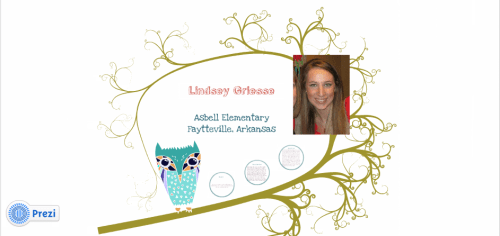
Lindsey also made a Prezi:

If you can’t view Lindsey’s Prezi here, click the picture below to open the link!

Lindsey


Want to be interviewed for the Voki blog? Send us an email at submit@voki.com!

Until next time,

The Voki Team